## Screenshot: Virtual Environment Task Instructions
### Overview
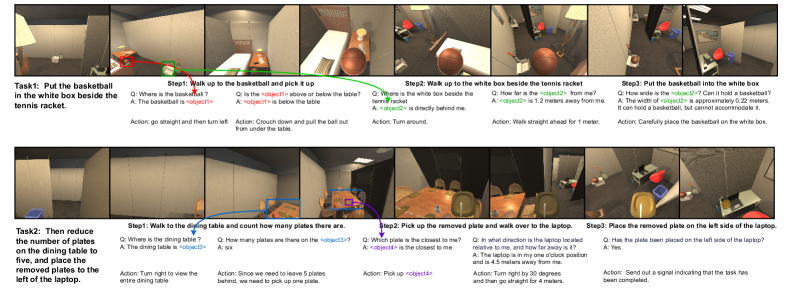
The image depicts a simulated environment interface with two distinct tasks (Task1 and Task2) presented in a step-by-step format. Each task includes visual snapshots of the environment, textual instructions, questions, answers, and corresponding actions. The layout uses color-coded annotations (red, green, blue) to highlight object interactions and spatial relationships.
### Components/Axes
- **Task1**:
- **Objective**: "Put the basketball in the white box beside the tennis racket."
- **Steps**:
1. Walk to the basketball, pick it up.
2. Walk to the white box beside the tennis racket.
3. Place the basketball in the white box.
- **Annotations**:
- Red arrows indicate object locations (e.g., basketball, white box).
- Green arrows show movement paths.
- Blue text boxes contain questions/answers (e.g., "Where is the basketball?").
- **Task2**:
- **Objective**: "Reduce the number of plates on the dining table to five, and place the removed plates to the left of the laptop."
- **Steps**:
1. Walk to the dining table, count plates.
2. Pick up a removed plate.
3. Walk to the laptop, place the plate on its left.
- **Annotations**:
- Blue arrows highlight the dining table and laptop.
- Purple text boxes contain questions/answers (e.g., "How many plates are there?").
### Detailed Analysis
#### Task1
- **Step1**:
- **Question**: "Where is the basketball?"
- **Answer**: "The basketball is <object1>."
- **Action**: "Go straight and then turn left. Crouch down and pull the ball out from under the table."
- **Step2**:
- **Question**: "Where is the white box beside the tennis racket?"
- **Answer**: "The white box is directly behind me."
- **Action**: "Turn around."
- **Step3**:
- **Question**: "How wide is the white box?"
- **Answer**: "Approximately 0.22 meters. It cannot accommodate the basketball."
- **Action**: "Carefully place the basketball on the white box."
#### Task2
- **Step1**:
- **Question**: "How many plates are on the dining table?"
- **Answer**: "Six."
- **Action**: "Turn right to view the entire dining table."
- **Step2**:
- **Question**: "Which plate is closest to me?"
- **Answer**: "<object4> is closest."
- **Action**: "Pick up <object4>."
- **Step3**:
- **Question**: "Where is the laptop?"
- **Answer**: "The laptop is 4.5 meters away, one o’clock position relative to me."
- **Action**: "Turn right by 30 degrees, then go straight for 4 meters. Place the plate on the left side of the laptop."
### Key Observations
1. **Spatial Reasoning**: Instructions rely on relative positioning (e.g., "one o’clock position," "left of the laptop").
2. **Object Interaction**: Color-coded arrows (red/green/blue) visually guide object manipulation and movement.
3. **Dynamic Adjustments**: Task2 requires removing plates to meet a target count (5), implying conditional logic.
4. **Measurement Precision**: Distances (e.g., 1.2 meters, 4.5 meters) are provided with approximate values.
### Interpretation
This interface simulates a multi-step reasoning process for an AI or robot, combining spatial navigation, object counting, and conditional actions. The integration of questions/answers suggests a feedback loop where the system verifies object locations and quantities before executing actions. The use of color-coded annotations enhances clarity in complex environments, while approximate measurements highlight real-world constraints (e.g., object size limitations). The tasks emphasize procedural logic, requiring the system to adapt to dynamic environments (e.g., reducing plate counts).