## Diagram: Multi-View Human Pose Estimation and Keypoint Correspondence
### Overview
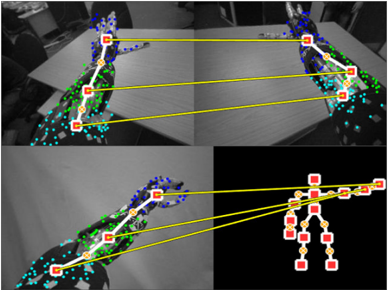
The image is a composite of four panels demonstrating a computer vision process for human pose estimation across multiple camera views. It visualizes the detection of body keypoints (joints) in 2D images and their correspondence to a unified 3D skeletal model. The primary visual elements are human figures overlaid with colored dots (keypoints) and yellow lines connecting specific points across different panels to illustrate matching.
### Components/Axes
The image contains no traditional chart axes, legends, or text labels. The informational components are entirely visual:
* **Panels:** Four distinct image panels arranged in a 2x2 grid.
* **Keypoints:** Small colored dots placed on anatomical locations of a human figure (e.g., shoulders, elbows, wrists, hips, knees, ankles).
* **Color Coding:** Keypoints are colored, likely representing different body parts or confidence levels. The dominant colors are blue, green, cyan, and red/yellow.
* **Correspondence Lines:** Solid yellow lines connect specific keypoints between panels, indicating that the system has identified them as the same physical point viewed from different angles.
* **Skeletal Model:** The bottom-right panel displays a simplified, abstract stick-figure representation of the human skeleton, derived from the keypoints.
### Detailed Analysis
**Panel-by-Panel Breakdown:**
1. **Top-Left Panel:**
* **Content:** A grayscale image of a person standing, viewed from a side angle. The person's right arm is extended forward.
* **Keypoints:** A dense cluster of blue dots covers the head and upper torso. Green dots are distributed along the spine, arms, and legs. Cyan dots appear on the lower legs and feet.
* **Connections:** Three yellow lines originate from keypoints in this panel. They connect to:
* A point on the head/neck area (blue cluster) in the Top-Right panel.
* A point on the right hip (green) in the Top-Right panel.
* A point on the right ankle (cyan) in the Top-Right panel.
2. **Top-Right Panel:**
* **Content:** A grayscale image of the same person from a different, more frontal camera angle.
* **Keypoints:** Similar distribution of blue (head/shoulders), green (torso/limbs), and cyan (lower legs/feet) dots.
* **Connections:** Receives the three yellow lines from the Top-Left panel. It also has three yellow lines originating from it, connecting to the Bottom-Left panel.
3. **Bottom-Left Panel:**
* **Content:** Another grayscale view of the person, similar to the top-left but possibly from a slightly different time or camera.
* **Keypoints:** Same color scheme (blue, green, cyan).
* **Connections:** Receives three yellow lines from the Top-Right panel. It also has three yellow lines originating from it, connecting to the skeletal model in the Bottom-Right panel.
4. **Bottom-Right Panel:**
* **Content:** A black background with a stylized, abstract human skeleton model.
* **Keypoints:** The joints are represented by larger red squares with yellow centers. The bones are thick yellow lines.
* **Connections:** Receives three yellow lines from the Bottom-Left panel, linking specific 2D image keypoints to their corresponding joints on the 3D model. The connected joints appear to be the right shoulder, right hip, and right ankle.
**Correspondence Flow:**
The yellow lines create a clear visual chain: **Top-Left Image → Top-Right Image → Bottom-Left Image → 3D Skeleton Model**. This demonstrates the process of matching the same anatomical point across multiple 2D views and finally mapping it to a canonical 3D pose representation.
### Key Observations
* **Multi-View Consistency:** The system successfully identifies and links the same body parts (head, hip, ankle) across three significantly different camera perspectives.
* **Keypoint Density:** The raw detection (blue/green/cyan dots) is very dense and noisy, covering large areas of the body. This suggests an initial, high-recall detection phase.
* **Model Abstraction:** The final skeletal model (bottom-right) is a clean, low-noise abstraction, indicating a processing step that filters and consolidates the noisy 2D detections into a coherent 3D structure.
* **Occlusion Handling:** The person's right arm is extended in the top views, which could cause self-occlusion. The consistent matching of the hip and ankle points suggests the system is robust to such challenges.
### Interpretation
This diagram illustrates a core pipeline in **3D human pose estimation from multi-view cameras**. The data suggests the following process:
1. **2D Keypoint Detection:** Each camera view independently detects a large set of candidate keypoints (the colored dots) on the human figure. The high density implies a model designed for high sensitivity, possibly at the cost of precision.
2. **Cross-View Correspondence:** The system then solves the correspondence problem, identifying which noisy 2D point in View A represents the same physical joint as a point in View B. The yellow lines are the visual proof of this matching.
3. **3D Lifting/Reconstruction:** Finally, the matched 2D points from all views are used to "lift" or reconstruct the pose into a unified 3D skeletal model. The clean skeleton in the bottom-right is the output—a simplified, actionable representation of the person's pose in space.
The **notable anomaly** is the stark contrast between the noisy, dense 2D detections and the clean, sparse 3D model. This highlights the critical role of the multi-view matching and 3D reconstruction algorithms in filtering noise and resolving ambiguity that is inherent in single-view 2D pose estimation. The diagram effectively argues for the power of multi-view systems to achieve robust and accurate 3D understanding.