# Technical Document Extraction: Desktop Environment Analysis
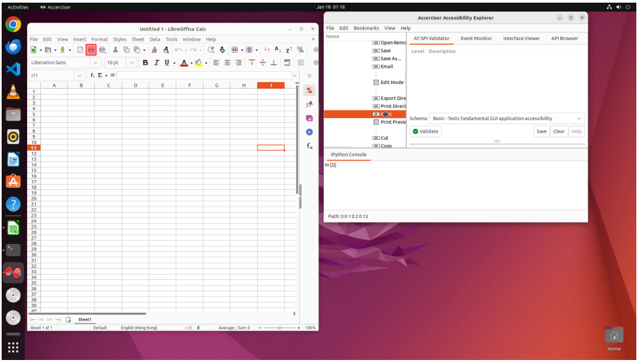
This document provides a detailed technical extraction of the provided image, which depicts a Linux-based desktop environment (GNOME) running two primary applications: **LibreOffice Calc** and **Accerciser Accessibility Explorer**.
---
### 1. System Environment (Global UI)
* **Operating System Interface:** GNOME Desktop Environment.
* **Top Bar (Header):**
* **Left:** "Activities" menu and "Accerciser" application indicator.
* **Center:** Date/Time display: `Jan 18 01:18`.
* **Right:** System status icons (Network, Volume, Power/Battery).
* **Dock/Launcher (Left Sidebar):** Contains icons for Google Chrome, Files, Visual Studio Code, VLC Media Player, GNOME Software, LibreOffice Calc, Accerciser, and a "Show Applications" button.
* **Desktop Background:** Red/Purple geometric abstract wallpaper.
* **Bottom Right:** "Home" folder icon.
---
### 2. Application 1: LibreOffice Calc (Spreadsheet)
**Window Title:** `Untitled 1 - LibreOffice Calc`
#### A. Menu and Toolbar
* **Menu Bar:** `File`, `Edit`, `View`, `Insert`, `Format`, `Styles`, `Sheet`, `Data`, `Tools`, `Window`, `Help`.
* **Formatting Bar:**
* Font: `Liberation Sans`
* Size: `10 pt`
* Styles: Bold (B), Italic (I), Underline (U), Font Color (Red icon), Background Color (Yellow icon).
* **Formula Bar:**
* Cell Reference: `I11`
* Function Input: `f(x) Σ =`
#### B. Spreadsheet Grid Data
* **Columns:** Labeled `A` through `I` (visible).
* **Rows:** Labeled `1` through `40` (visible).
* **Active Selection:** Cell `I11` is highlighted with a red border.
* **Row Header Highlight:** Row `11` is highlighted in orange on the vertical axis.
* **Column Header Highlight:** Column `I` is highlighted in orange on the horizontal axis.
* **Content:** The spreadsheet cells appear empty of numerical or text data.
#### C. Status Bar (Footer)
* **Sheet Tab:** `Sheet1`
* **Metadata:** `Sheet 1 of 1`, `Default`, `English (Hong Kong)`.
* **Calculations:** `Average: ; Sum: 0`.
* **Zoom Level:** `100%` with a slider.
---
### 3. Application 2: Accerciser Accessibility Explorer
**Window Title:** `Accerciser Accessibility Explorer`
#### A. Interface Components
* **Menu Bar:** `File`, `Edit`, `Bookmarks`, `View`, `Help`.
* **Left Pane (Tree View):** Displays a hierarchical list of UI elements.
* Visible items include: `Open Remote`, `Save`, `Save As...`, `Email`, `Edit Mode`, `Export Direct`, `Print Direct`, `Print...` (Highlighted in orange), `Print Preview`, `Cut`, `Copy`.
* **Right Pane (Tabs):**
* Active Tab: `AT-SPI Validator`
* Inactive Tabs: `Event Monitor`, `Interface Viewer`, `API Browser`.
* **AT-SPI Validator Content:**
* Table Headers: `Level`, `Description`.
* Schema Dropdown: `Basic - Tests fundamental GUI application accessibility`.
* Controls: `Validate` button (with a green checkmark icon), `Save`, `Clear`, `Help`.
* Status: `Idle`.
#### B. Console and Path
* **IPython Console (Bottom Section):**
* Input Prompt: `In [1]:`
* **Status Footer:**
* Path: `0:0:1:0:2:0:1:3`
---
### 4. Component Isolation & Spatial Grounding
* **Region: Left Window [x:0, y:50 to x:500, y:950]** - LibreOffice Calc. Focus is on cell `I11`.
* **Region: Right Window [x:510, y:50 to x:950, y:600]** - Accerciser. Focus is on the "Print" element within the accessibility tree, indicated by the orange selection bar.
* **Region: System Dock [x:0, y:0 to x:50, y:1000]** - Vertical launcher containing 10 visible application shortcuts.
### 5. Language Declaration
* **Primary Language:** English.
* **Regional Setting:** English (Hong Kong) as specified in the LibreOffice status bar.
* **No other languages detected.**