## Bar Chart: Accuracy Comparison by Row Count
### Overview
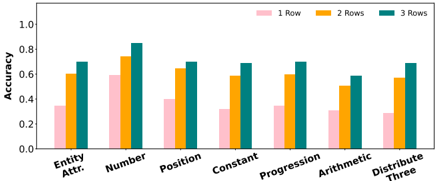
The image is a bar chart comparing the accuracy of a model across different categories ("Entity Attr.", "Number", "Position", "Constant", "Progression", "Arithmetic", "Distribute Three") based on the number of rows used (1 Row, 2 Rows, 3 Rows). The y-axis represents accuracy, ranging from 0.0 to 1.0.
### Components/Axes
* **X-axis:** Categories: "Entity Attr.", "Number", "Position", "Constant", "Progression", "Arithmetic", "Distribute Three".
* **Y-axis:** Accuracy, ranging from 0.0 to 1.0 in increments of 0.2.
* **Legend:** Located at the top of the chart.
* Pink: 1 Row
* Orange: 2 Rows
* Teal: 3 Rows
### Detailed Analysis
Here's a breakdown of the accuracy for each category and row count:
* **Entity Attr.:**
* 1 Row: ~0.35
* 2 Rows: ~0.60
* 3 Rows: ~0.70
* **Number:**
* 1 Row: ~0.60
* 2 Rows: ~0.75
* 3 Rows: ~0.85
* **Position:**
* 1 Row: ~0.40
* 2 Rows: ~0.65
* 3 Rows: ~0.70
* **Constant:**
* 1 Row: ~0.32
* 2 Rows: ~0.60
* 3 Rows: ~0.65
* **Progression:**
* 1 Row: ~0.35
* 2 Rows: ~0.60
* 3 Rows: ~0.70
* **Arithmetic:**
* 1 Row: ~0.30
* 2 Rows: ~0.50
* 3 Rows: ~0.60
* **Distribute Three:**
* 1 Row: ~0.28
* 2 Rows: ~0.58
* 3 Rows: ~0.68
### Key Observations
* For all categories, the accuracy generally increases as the number of rows increases from 1 to 3.
* The "Number" category has the highest accuracy overall, especially with 3 rows.
* The "Distribute Three" category has the lowest accuracy across all row counts.
* The difference in accuracy between 2 rows and 3 rows is smaller than the difference between 1 row and 2 rows, suggesting diminishing returns with increasing row count.
### Interpretation
The chart demonstrates that increasing the number of rows generally improves the accuracy of the model across different categories. However, the extent of improvement varies depending on the category. The "Number" category seems to benefit the most from increased row count, while "Distribute Three" remains relatively low in accuracy even with 3 rows. This suggests that the model's performance is influenced by both the number of rows and the specific characteristics of each category. The diminishing returns observed between 2 and 3 rows might indicate a point of saturation, where further increasing the row count yields less significant improvements in accuracy.