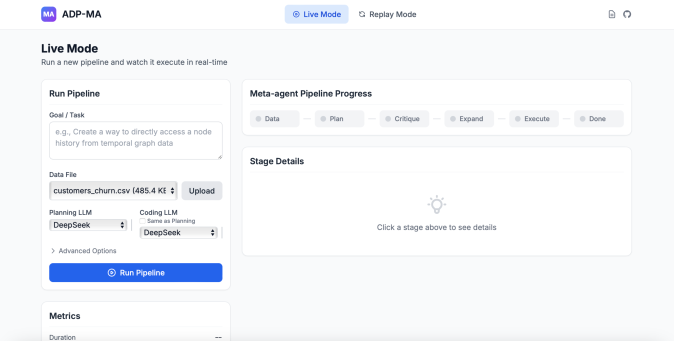
# Technical Document Extraction: Pipeline Management UI
## Header Section
- **Logo/Label**:
- Purple square icon with "MA"
- Text: `ADP-MA`
- **Mode Selection**:
- `Live Mode` (highlighted, blue background)
- `Replay Mode` (default, white background)
- **Icons**:
- Download icon (paperclip)
- Refresh icon (circular arrow)
---
## Main Content
### Left Panel: Pipeline Configuration
#### Section 1: Run Pipeline
- **Title**: `Run Pipeline`
- **Goal/Task**:
- Example text:
`e.g., Create a way to directly access a node history from temporal graph data`
- **Data File**:
- Filename: `customers_churn.csv`
- Size: `485.4 KB`
- Buttons:
- `Upload` (gray)
- **Planning LLM**:
- Dropdown: `DeepSeek`
- **Coding LLM**:
- Dropdown: `DeepSeek`
- Note: "Same as Planning"
- **Advanced Options**:
- Link: `Advanced Options`
- **Action Button**:
- `Run Pipeline` (blue, with play icon)
#### Section 2: Metrics (Partial View)
- **Title**: `Metrics`
- **Visible Field**:
- `Duration` (no value shown)
---
### Right Panel: Pipeline Progress
#### Section 1: Meta-agent Pipeline Progress
- **Title**: `Meta-agent Pipeline Progress`
- **Stages**:
- `Data` (gray button)
- `Plan` (gray button)
- `Critique` (gray button)
- `Expand` (gray button)
- `Execute` (gray button)
- `Done` (gray button)
#### Section 2: Stage Details
- **Title**: `Stage Details`
- **Icon**: Lightbulb
- **Instruction**:
- `Click a stage above to see details`
---
## Footer
- **Copyright**:
- `© 2023 ADP-MA. All rights reserved.`
---
## Notes
- **Language**: All text is in English.
- **No Charts/Diagrams**: The image contains UI elements only; no numerical data or visual trends to extract.
- **Spatial Grounding**:
- Header: Top-left (logo) and top-center (mode buttons).
- Left Panel: Vertical layout for pipeline configuration.
- Right Panel: Horizontal stage progression and stage details.
- Footer: Bottom of the UI.
This extraction captures all textual elements, UI components, and structural details from the image.