# Technical Document Extraction: ADP-MA Interface
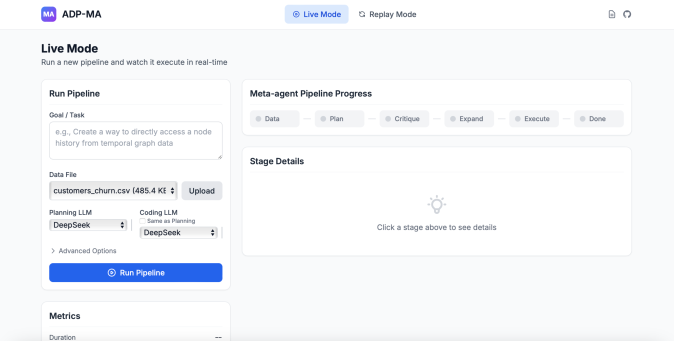
This document provides a comprehensive extraction of the textual and structural information from the provided image of the **ADP-MA** (Agentic Data Pipeline - Meta Agent) web interface.
---
## 1. Header Region
* **Logo/Title:** `MA ADP-MA` (Located top-left).
* **Mode Toggle:**
* `Live Mode` (Selected/Active, indicated by blue background and target icon).
* `Replay Mode` (Inactive, indicated by circular arrow icon).
* **Utility Icons:** Document icon and GitHub logo (Located top-right).
---
## 2. Main Content Area: Header & Description
* **Section Title:** `Live Mode`
* **Sub-text:** `Run a new pipeline and watch it execute in real-time`
---
## 3. Left Sidebar: Run Pipeline Configuration
This region contains the input parameters for initiating a data processing task.
### Run Pipeline Form
* **Goal / Task (Text Area):**
* Placeholder text: `e.g., Create a way to directly access a node history from temporal graph data`
* **Data File (Upload Field):**
* Current File: `customers_churn.csv (485.4 KB)`
* Action Button: `Upload`
* **Planning LLM (Dropdown):**
* Selected Value: `DeepSeek`
* **Coding LLM (Dropdown):**
* Checkbox: `Same as Planning` (Unchecked)
* Selected Value: `DeepSeek`
* **Advanced Options:** Expandable menu (currently collapsed).
* **Primary Action Button:** `Run Pipeline` (Blue button with target icon).
### Metrics (Footer of Sidebar)
* **Section Title:** `Metrics`
* **Field:** `Duration`
* **Value:** `--` (Indicates no active process is currently running).
---
## 4. Main Dashboard: Pipeline Progress & Details
This region visualizes the workflow and provides granular feedback on the execution stages.
### Meta-agent Pipeline Progress
This is a horizontal flow diagram representing the sequential stages of the agentic workflow. Each stage is represented by a pill-shaped node connected by lines.
| Stage Order | Label | Status Indicator |
| :--- | :--- | :--- |
| 1 | `Data` | Grey Circle (Inactive/Pending) |
| 2 | `Plan` | Grey Circle (Inactive/Pending) |
| 3 | `Critique` | Grey Circle (Inactive/Pending) |
| 4 | `Expand` | Grey Circle (Inactive/Pending) |
| 5 | `Execute` | Grey Circle (Inactive/Pending) |
| 6 | `Done` | Grey Circle (Inactive/Pending) |
### Stage Details
This is a large container intended to display logs or specific outputs for the selected stage.
* **Section Title:** `Stage Details`
* **Empty State Content:**
* Icon: Lightbulb
* Instructional Text: `Click a stage above to see details`
---
## 5. Summary of Technical Components
* **Application Name:** ADP-MA.
* **Primary Function:** Real-time execution and monitoring of an agentic data pipeline.
* **Workflow Logic:** The system follows a 6-step linear progression: Data ingestion -> Planning -> Critique -> Expansion -> Execution -> Completion.
* **Technology Stack Indicators:** The interface allows for the selection of Large Language Models (LLMs), specifically identifying `DeepSeek` as a compatible model for both planning and coding tasks.