## Diagram: OSWorld Environment Workflow
### Overview
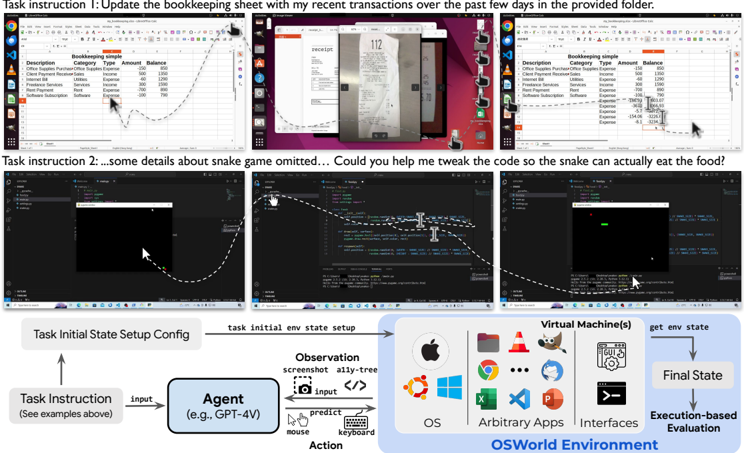
The image depicts a technical workflow diagram for an OSWorld Environment system, illustrating how task instructions are processed through an agent (GPT-4V) to interact with virtual machines and achieve final states. The diagram includes two task examples at the top (bookkeeping and snake game code modification) and a structured flowchart below showing system components and execution flow.
### Components/Axes
#### Header Section
- **Task Instructions**:
1. "Update the bookkeeping sheet with my recent transactions over the past few days in the provided folder."
2. "Some details about snake game omitted... Could you help me tweak the code so the snake can actually eat the food?"
- **Screenshots**:
- Three Excel spreadsheet snapshots showing bookkeeping data with columns: Description, Category, Type, Amount, Balance.
- Two code editor snapshots (Python/JavaScript) with syntax highlighting and debugging tools.
#### Main Flowchart
1. **Task Initial State Setup Config** → **Agent (GPT-4V)** → **Observation** (screenshot, ally-tree) → **Action** (mouse, keyboard) → **Virtual Machine(s)** → **Final State**
2. **Execution-based Evaluation** component with OS logos (Apple, Chrome, Windows, etc.) and arbitrary apps/interfaces.
#### Footer Section
- **OSWorld Environment** label with icons for:
- Operating Systems (OS)
- Arbitrary Applications
- Interfaces
- **Final State** box with downward arrow indicating evaluation completion.
### Detailed Analysis
#### Task Instructions
- Bookkeeping task involves updating financial records with transaction data from a folder.
- Snake game task requires code modification for functionality (food consumption logic).
#### Flowchart Components
- **Agent (GPT-4V)**: Central processing unit using GPT-4 Vision capabilities.
- **Observation**: Input modalities include screenshots and ally-tree structures (likely hierarchical data representations).
- **Action**: Output modalities include mouse/keyboard interactions.
- **Virtual Machines**: Environment simulation layer with OS, apps, and interfaces.
- **Final State**: Evaluation outcome after execution.
#### OSWorld Environment
- Visual representation of supported platforms through OS logos (Apple, Chrome, Windows, etc.).
- Indicates cross-platform compatibility and application diversity.
### Key Observations
1. **Modality Integration**: Combines visual (screenshots), textual (code), and interactive (mouse/keyboard) inputs.
2. **Hierarchical Processing**: Task instructions flow through agent reasoning to environmental interaction.
3. **Execution Evaluation**: Final state determination through environment-based assessment rather than purely algorithmic outputs.
4. **Platform Agnosticism**: OS logos suggest multi-platform support.
### Interpretation
This diagram represents an AI-driven task automation system where:
1. **Agent Reasoning**: GPT-4V processes natural language instructions and environmental observations.
2. **Environment Interaction**: The system bridges AI capabilities with OS-level operations through virtual machine simulation.
3. **Task Execution**: Combines code modification (snake game) and data processing (bookkeeping) as example use cases.
4. **Evaluation Framework**: Final states are determined through execution-based assessment.
The workflow emphasizes multimodal interaction between AI agents and operating systems, suggesting applications in automated software development, data management, and system administration. The inclusion of both financial and gaming tasks demonstrates the system's versatility across different domains.