## Diagram: Image Processing Workflow
### Overview
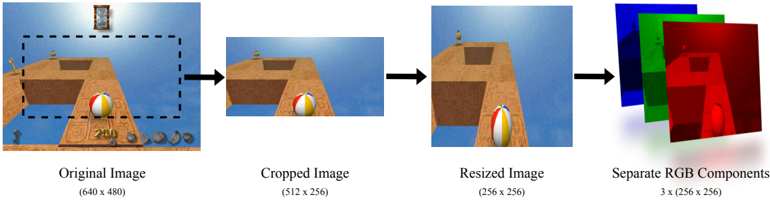
The image depicts a sequential workflow of image processing steps, starting with an original image and progressing through cropping, resizing, and RGB component separation. Each stage is visually represented with labeled outputs and dimensional annotations.
### Components/Axes
1. **Original Image**
- Label: "Original Image"
- Dimensions: (640 x 480)
- Visual: A rectangular image with a beach scene, including a beach ball, wooden structure, and horizon.
2. **Cropped Image**
- Label: "Cropped Image"
- Dimensions: (512 x 256)
- Visual: A zoomed-in portion of the original image, focusing on the beach ball and wooden structure.
3. **Resized Image**
- Label: "Resized Image"
- Dimensions: (256 x 256)
- Visual: A square image derived from the cropped image, maintaining the same content but scaled down.
4. **Separate RGB Components**
- Label: "Separate RGB Components"
- Dimensions: 3 x (256 x 256)
- Visual: Three overlapping squares representing red, green, and blue channels, each with a distinct color overlay.
### Detailed Analysis
- **Original Image**: The starting point with dimensions 640x480. Contains a beach scene with a beach ball, wooden structure, and horizon.
- **Cropped Image**: Reduced dimensions (512x256) by removing peripheral elements (e.g., horizon, distant objects). Focuses on the central subject (beach ball).
- **Resized Image**: Further reduced to 256x256, maintaining aspect ratio. Content remains identical to the cropped image but scaled.
- **RGB Components**: Three identical-sized (256x256) channels (red, green, blue) extracted from the resized image. Each channel isolates a single color component.
### Key Observations
- **Dimensional Reduction**: Each step reduces image size: 640x480 → 512x256 → 256x256.
- **Aspect Ratio Change**: Original (4:3) → Cropped (2:1) → Resized (1:1).
- **Channel Separation**: RGB components are visually distinct (red, green, blue overlays) but share the same spatial dimensions.
### Interpretation
This workflow illustrates standard image preprocessing steps:
1. **Cropping** isolates a region of interest (e.g., the beach ball).
2. **Resizing** standardizes dimensions for downstream tasks (e.g., neural network input).
3. **RGB Separation** enables color channel analysis (e.g., edge detection, color correction).
The process emphasizes spatial and color data manipulation, critical for computer vision applications. No numerical trends or outliers are present, as the image focuses on procedural steps rather than quantitative data.