## Image Analysis: Robot Simulation Examples
### Overview
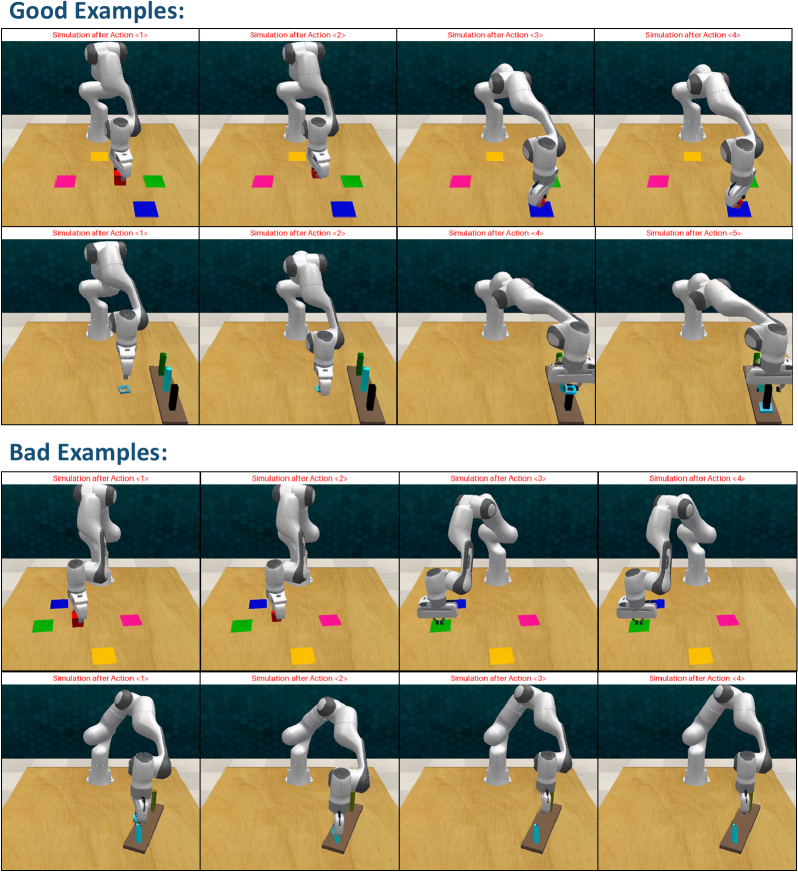
The image presents a series of simulated robotic arm actions, categorized as "Good Examples" and "Bad Examples." Each example shows the robotic arm at different stages of an action sequence, labeled as "Simulation after Action <N>," where N is a number indicating the sequence step. The simulations involve the robot interacting with colored squares and rectangular objects on a wooden surface.
### Components/Axes
* **Title:** "Good Examples:" and "Bad Examples:"
* **Subtitles:** "Simulation after Action <1>", "Simulation after Action <2>", "Simulation after Action <3>", "Simulation after Action <4>", "Simulation after Action <5>"
* **Objects:** Robotic arm (white), colored squares (red, green, yellow, pink), colored rectangular objects (blue, black, brown).
* **Environment:** Wooden surface, background with a gradient from light to dark.
### Detailed Analysis
**Good Examples:**
* **Row 1:**
* Simulation after Action <1>: The robotic arm is positioned above a red square.
* Simulation after Action <2>: The robotic arm is positioned above a red square.
* Simulation after Action <3>: The robotic arm is positioned above a yellow square.
* Simulation after Action <4>: The robotic arm is positioned above a yellow square.
* **Row 2:**
* Simulation after Action <1>: The robotic arm is positioned above a blue rectangular object.
* Simulation after Action <2>: The robotic arm is positioned above a blue rectangular object.
* Simulation after Action <4>: The robotic arm is positioned above a blue rectangular object.
* Simulation after Action <5>: The robotic arm is positioned above a blue rectangular object.
**Bad Examples:**
* **Row 1:**
* Simulation after Action <1>: The robotic arm is positioned above a red square.
* Simulation after Action <2>: The robotic arm is positioned above a pink square.
* Simulation after Action <3>: The robotic arm is positioned above a green square.
* Simulation after Action <4>: The robotic arm is positioned above a green square.
* **Row 2:**
* Simulation after Action <1>: The robotic arm is positioned above a brown rectangular object.
* Simulation after Action <2>: The robotic arm is positioned above a brown rectangular object.
* Simulation after Action <3>: The robotic arm is positioned above a brown rectangular object.
* Simulation after Action <4>: The robotic arm is positioned above a brown rectangular object.
### Key Observations
* The "Good Examples" appear to show the robot consistently interacting with the same colored object across multiple actions, or with a set of similar objects.
* The "Bad Examples" show the robot interacting with different colored objects in sequence.
* The number of actions varies between the examples. The first row of "Good Examples" has 4 actions, while the second row has 5. The "Bad Examples" both have 4 actions.
### Interpretation
The image likely illustrates a reinforcement learning or robotic control scenario where the robot is being trained to perform specific tasks. The "Good Examples" likely represent successful execution of a task, such as consistently picking up or interacting with a specific object. The "Bad Examples" likely represent failures, such as picking up the wrong object or deviating from the intended sequence of actions. The simulation actions are snapshots of the robot's state at different time steps during the task execution. The image suggests that the robot's performance is being evaluated based on its ability to consistently interact with the correct objects.