# Technical Document: Data Processing Pipeline for DPO Training
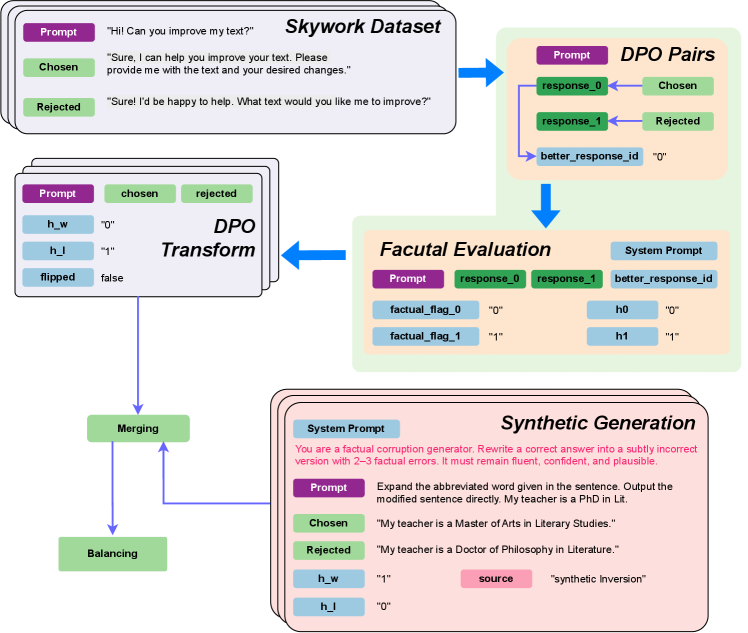
This document describes a technical flowchart illustrating the data preparation pipeline for Direct Preference Optimization (DPO), specifically focusing on the transformation of the "Skywork Dataset" and the integration of "Synthetic Generation" for factual evaluation.
## 1. Component Isolation and Flow Overview
The diagram consists of five primary processing blocks connected by directional arrows, indicating a sequential and iterative data flow:
1. **Skywork Dataset (Top Left):** The initial input source.
2. **DPO Pairs (Top Right):** Structuring the raw data into preference pairs.
3. **Factual Evaluation (Center Right):** Assessing the factual accuracy of the pairs.
4. **DPO Transform (Center Left):** Finalizing the data structure for training.
5. **Synthetic Generation (Bottom Right):** A parallel process for creating corrupted factual data, which feeds back into the main pipeline via **Merging** and **Balancing**.
---
## 2. Detailed Component Analysis
### 2.1 Skywork Dataset (Input)
This block represents a stack of data entries.
* **Prompt (Purple Label):** "Hi! Can you improve my text?"
* **Chosen (Green Label):** "Sure, I can help you improve your text. Please provide me with the text and your desired changes."
* **Rejected (Green Label):** "Sure! I'd be happy to help. What text would you like me to improve?"
### 2.2 DPO Pairs
The Skywork Dataset flows into this block to be structured into a comparison format.
* **Prompt (Purple Label):** Header for the entry.
* **Structure:**
* `response_0` (Dark Green) is mapped from the **Chosen** label.
* `response_1` (Dark Green) is mapped from the **Rejected** label.
* `better_response_id` (Light Blue): Value is `"0"`.
### 2.3 Factual Evaluation
The DPO Pairs flow downward into this evaluation stage.
* **Labels:** Prompt (Purple), response_0 (Green), response_1 (Green), better_response_id (Light Blue).
* **System Prompt (Blue Label):** (Text not explicitly provided in this specific block, but serves as a placeholder for evaluation logic).
* **Data Fields:**
| Field | Value |
| :--- | :--- |
| `factual_flag_0` | `"0"` |
| `factual_flag_1` | `"1"` |
| `h0` | `"0"` |
| `h1` | `"1"` |
### 2.4 Synthetic Generation (Bottom Right)
This block describes the creation of "Synthetic Inversion" data to improve factual robustness.
* **System Prompt (Blue Label):** "You are a factual corruption generator. Rewrite a correct answer into a subtly incorrect version with 2-3 factual errors. It must remain fluent, confident, and plausible." (Text color: Red/Pink).
* **Prompt (Purple Label):** "Expand the abbreviated word given in the sentence. Output the modified sentence directly. My teacher is a PhD in Lit."
* **Chosen (Green Label):** "My teacher is a Master of Arts in Literary Studies."
* **Rejected (Green Label):** "My teacher is a Doctor of Philosophy in Literature."
* **Metadata:**
| Field | Value |
| :--- | :--- |
| `h_w` | `"1"` |
| `h_l` | `"0"` |
| `source` (Pink Label) | `"synthetic Inversion"` |
### 2.5 DPO Transform (Center Left)
This block receives data from the Factual Evaluation and prepares it for the final output.
* **Labels:** Prompt (Purple), chosen (Green), rejected (Green).
* **Data Fields:**
| Field | Value |
| :--- | :--- |
| `h_w` | `"0"` |
| `h_l` | `"1"` |
| `flipped` | `false` |
---
## 3. Final Processing: Merging and Balancing
The data from **DPO Transform** and **Synthetic Generation** converge at the bottom left of the diagram:
1. **Merging (Green Box):** Combines the transformed Skywork data with the synthetically generated factual corruption data.
2. **Balancing (Green Box):** The final step in the pipeline, ensuring the dataset has an appropriate distribution of "Chosen" and "Rejected" responses across different categories (e.g., helpfulness vs. factuality) before training.
## 4. Language Declaration
The primary language of this document and the source image is **English**. No other languages were detected.