## Diagram: Tool-Environment-Agent (TEA) Architecture
### Overview
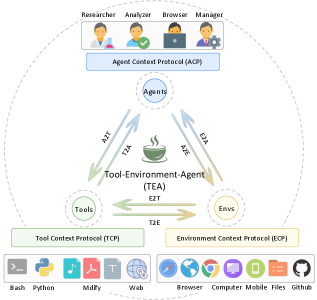
The image is a diagram illustrating the architecture of a Tool-Environment-Agent (TEA) system. It depicts the relationships and interactions between different components, including Researchers, Analyzers, Browsers, Managers, Agents, Tools, and Environments. The diagram uses arrows to indicate the flow of information and protocols for communication.
### Components/Axes
* **Header (Top):**
* Roles: Researcher, Analyzer, Browser, Manager (represented by icons of people performing tasks)
* Protocol: Agent Context Protocol (ACP) - a blue box below the roles.
* **Main Diagram (Center):**
* Central Node: Tool-Environment-Agent (TEA) - represented by a steaming cup icon.
* Nodes surrounding TEA:
* Agents (top)
* Tools (left)
* Envs (right)
* Communication Arrows:
* A2T: Agents to TEA (upward arrow)
* T2A: TEA to Agents (downward arrow)
* A2E: Agents to Envs (upward arrow)
* E2A: Envs to Agents (downward arrow)
* E2T: Envs to TEA (leftward arrow)
* T2E: TEA to Envs (rightward arrow)
* Protocols:
* Tool Context Protocol (TCP) - below the "Tools" node.
* Environment Context Protocol (ECP) - below the "Envs" node.
* **Footer (Bottom):**
* Tools: Bash, Python, Mdify, Web (represented by icons)
* Envs: Browser, Computer, Mobile, Files, Github (represented by icons)
### Detailed Analysis or Content Details
* **Roles:** The diagram starts with user roles at the top: Researcher, Analyzer, Browser, and Manager. These roles likely represent different types of users interacting with the system.
* **Agent Context Protocol (ACP):** This protocol governs the interaction between the user roles and the Agents.
* **Agents:** Agents are central to the system, communicating with both the TEA and the Envs.
* **Tool-Environment-Agent (TEA):** This is the core component, facilitating interaction between Tools and Environments. It is represented by a steaming cup icon.
* **Tools:** Represented by Bash, Python, Mdify, and Web, these are the tools that the system utilizes.
* **Envs:** Represented by Browser, Computer, Mobile, Files, and Github, these are the environments in which the system operates.
* **Tool Context Protocol (TCP):** This protocol governs the interaction between the TEA and the Tools.
* **Environment Context Protocol (ECP):** This protocol governs the interaction between the TEA and the Envs.
* **Communication Arrows:** The arrows indicate the flow of information between the components. For example, A2T represents communication from Agents to TEA.
### Key Observations
* The TEA acts as a central hub, mediating interactions between Tools, Environments, and Agents.
* Protocols (ACP, TCP, ECP) are used to standardize communication between different components.
* The diagram provides a high-level overview of the system architecture, highlighting the key components and their relationships.
### Interpretation
The diagram illustrates a modular architecture where the Tool-Environment-Agent (TEA) acts as an intermediary, enabling communication and interaction between various tools, environments, and agents. The use of context protocols (ACP, TCP, ECP) suggests a standardized approach to managing interactions, ensuring that each component understands the context of the communication. This architecture likely aims to provide a flexible and extensible system that can adapt to different tools, environments, and user roles. The presence of Github as an environment suggests version control and collaboration are important aspects of the system. The steaming cup icon for TEA could symbolize the "brewing" or processing of information between the tools and environments.