##Flowchart: CoT-Editing Consistency Process with Gemini
### Overview
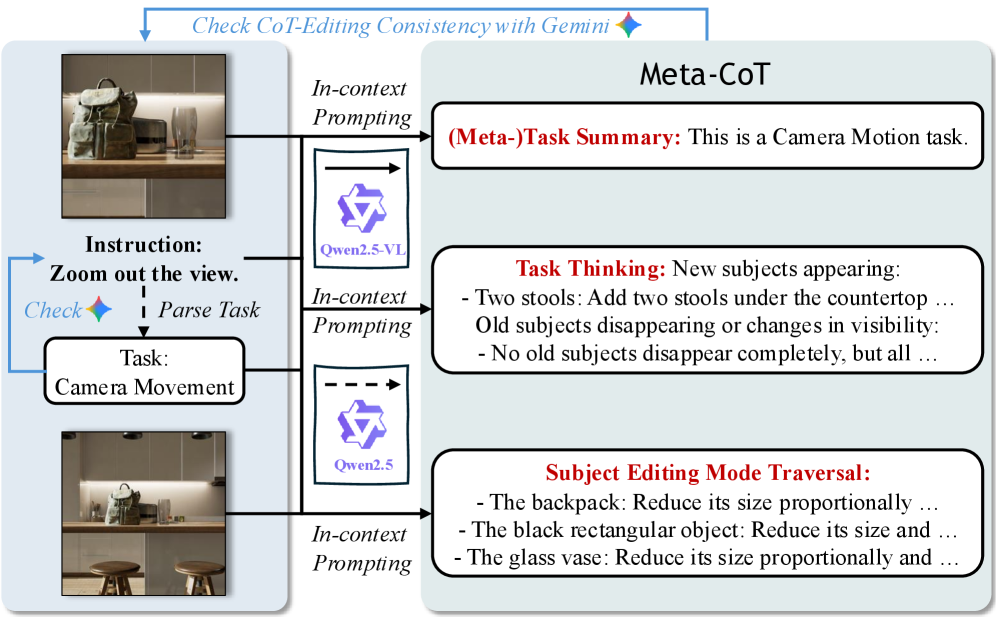
This flowchart illustrates a technical workflow for analyzing and editing camera motion tasks using Gemini and Qwen2.5 models. It demonstrates how visual changes (e.g., object additions/removals) are parsed, contextualized, and summarized through iterative prompting and consistency checks.
### Components/Axes
1. **Left Panel (Input/Instruction)**:
- Two sequential images:
- *Top Image*: Kitchen counter with backpack and glass
- *Bottom Image*: Same scene with two added stools
- Instructions:
- "Zoom out the view"
- "Check CoT-Editing Consistency with Gemini"
- Task labels:
- "Task: Camera Movement"
2. **Middle Panel (Processing Flow)**:
- Three interconnected boxes:
- *Top Box*: "In-context Prompting" (Qwen2.5-VL logo)
- *Middle Box*: "In-context Prompting" (Qwen2.5 logo)
- *Bottom Box*: "In-context Prompting" (Qwen2.5 logo)
- Arrows indicate sequential processing flow
3. **Right Panel (Output/Analysis)**:
- *Meta-CoT Section*:
- **(Meta-)Task Summary**: "This is a Camera Motion task"
- **Task Thinking**:
- New subjects: "Two stools: Add two stools under the countertop..."
- Old subjects: "No old subjects disappear completely, but all..."
- **Subject Editing Mode Traversal**:
- Backpack: "Reduce its size proportionally..."
- Black rectangular object: "Reduce its size and..."
- Glass vase: "Reduce its size proportionally and..."
### Detailed Analysis
1. **Input Sequence**:
- Initial state: Backpack and glass on countertop
- Modified state: Two stools added under countertop
- Both states labeled as "Camera Movement" tasks
2. **Processing Flow**:
- Visual changes trigger Qwen2.5 model prompting
- Three-stage prompting process:
1. Initial context establishment (Qwen2.5-VL)
2. Intermediate analysis (Qwen2.5)
3. Final contextualization (Qwen2.5)
3. **Output Analysis**:
- Task classification: Camera motion task
- Subject changes:
- Addition: Two stools (new subjects)
- Persistence: Original objects remain visible
- Editing constraints:
- Proportional size reduction for all objects
- Spatial relationships maintained
### Key Observations
1. **Consistency Framework**:
- Gemini checks ensure CoT-Editing alignment
- Qwen2.5 handles incremental contextual updates
2. **Object Relationships**:
- New objects (stools) don't fully occlude original subjects
- All objects undergo proportional size reduction
3. **Temporal Dynamics**:
- Two distinct states processed sequentially
- Editing mode traversal maintains object hierarchy
### Interpretation
This workflow demonstrates a hybrid approach combining Gemini's consistency verification with Qwen2.5's contextual prompting for dynamic scene editing. The process maintains spatial relationships while handling object additions/removals through proportional scaling. The dual-image comparison suggests a focus on relative motion analysis rather than absolute positioning. The "Subject Editing Mode Traversal" indicates a prioritization of object hierarchy preservation during edits, with the backpack (likely foreground object) receiving explicit size reduction instructions. The persistent visibility of original objects despite new additions implies a transparency-aware editing paradigm.