# Technical Document: LogSage CI/CD Error Analysis and Resolution Interface
This document provides a comprehensive extraction of the data and workflow presented in the provided screenshot of a CI/CD log analysis tool (LogSage). The interface is primarily in **English** and **Simplified Chinese**.
---
## 1. Component Isolation & Workflow
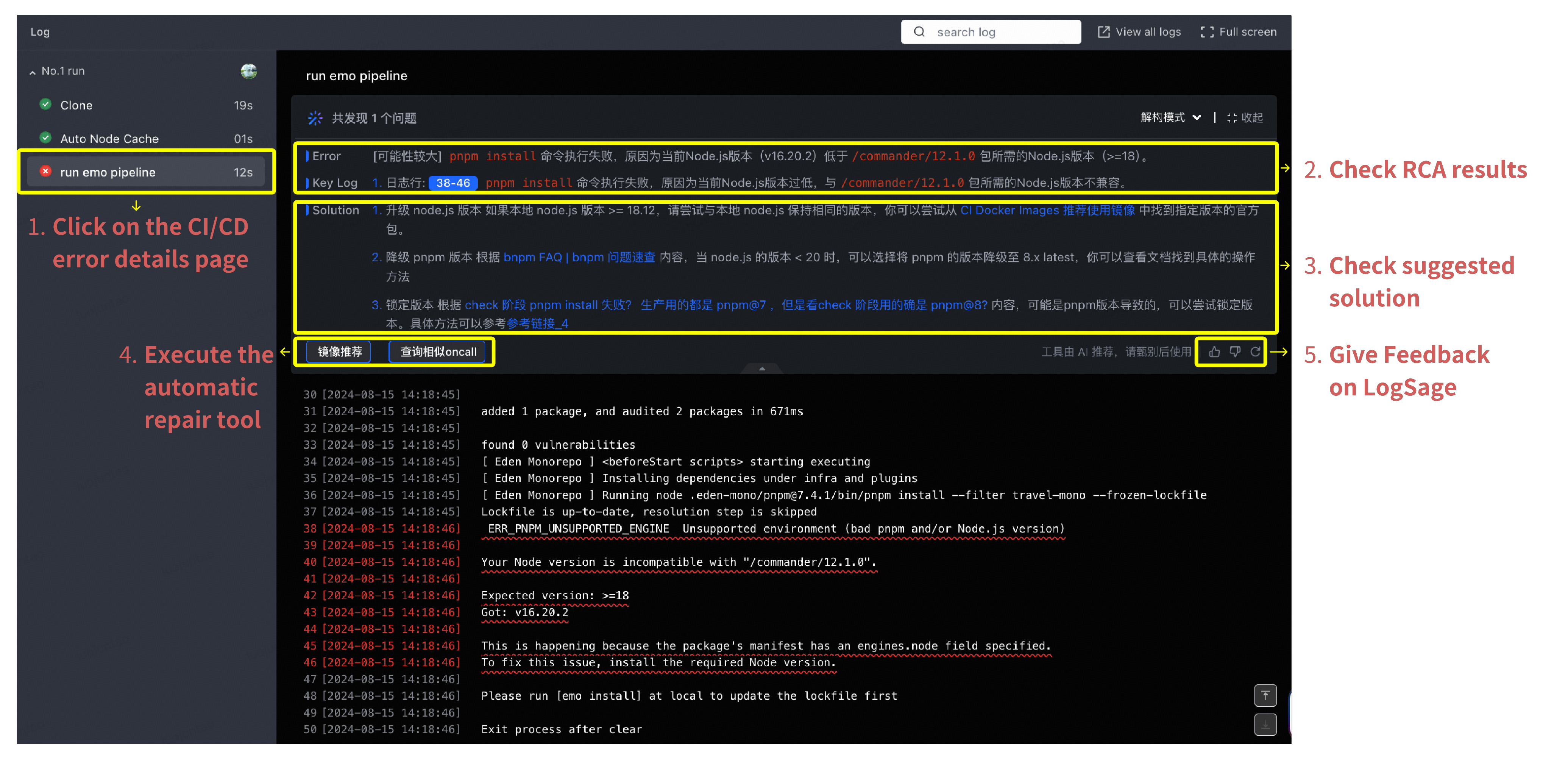
The image is a technical dashboard divided into a sidebar (navigation), a main analysis panel (Root Cause Analysis), and a raw log viewer. Red instructional text and yellow boxes have been overlaid to explain the user journey.
### User Journey Steps (Overlaid Text)
1. **Step 1:** "Click on the CI/CD error details page" (Points to the sidebar).
2. **Step 2:** "Check RCA results" (Points to the Error/Key Log section).
3. **Step 3:** "Check suggested solution" (Points to the Solution section).
4. **Step 4:** "Execute the automatic repair tool" (Points to action buttons).
5. **Step 5:** "Give Feedback on LogSage" (Points to the feedback icons).
---
## 2. Sidebar (Navigation)
* **Header:** Log
* **Run ID:** No.1 run
* **Task List:**
* **Clone:** Completed (Green checkmark), 19s
* **Auto Node Cache:** Completed (Green checkmark), 01s
* **run emo pipeline:** Failed (Red 'x' icon), 12s. *This item is highlighted with a yellow box.*
---
## 3. Main Analysis Panel (Header & RCA)
* **Title:** run emo pipeline
* **Status Summary:** 共发现 1 个问题 (Translation: A total of 1 problem was found).
* **Controls:** 解构模式 (Deconstruction Mode), 收起 (Collapse).
### Section: Error & Key Log (Yellow Box 2)
* **Error:** [可能性较大] pnpm install 命令执行失败,原因为当前Node.js版本 (v16.20.2) 低于 /commander/12.1.0 包所需的Node.js版本 (>=18)。
* *Translation:* [High Probability] The `pnpm install` command failed because the current Node.js version (v16.20.2) is lower than the Node.js version (>=18) required by the `/commander/12.1.0` package.
* **Key Log:** 1. 日志行: 38-46 pnpm install 命令执行失败,原因为当前Node.js版本过低,与 /commander/12.1.0 包所需的Node.js版本不兼容。
* *Translation:* 1. Log lines: 38-46. The `pnpm install` command failed because the current Node.js version is too low and incompatible with the Node.js version required by the `/commander/12.1.0` package.
### Section: Solution (Yellow Box 3)
1. **Option 1:** 升级 node.js 版本 如果本地 node.js 版本 >= 18.12,请尝试与本地 node.js 保持相同的版本,你可以尝试从 CI Docker Images 推荐使用镜像 中找到指定版本的官方包。
* *Translation:* Upgrade Node.js version. If the local Node.js version is >= 18.12, please try to maintain the same version as the local Node.js. You can try to find the official package of the specified version from the "Recommended CI Docker Images".
2. **Option 2:** 降级 pnpm 版本 根据 bnpm FAQ | bnpm 问题速查 内容,当 node.js 的版本 < 20 时,可以选择将 pnpm 的版本降级至 8.x latest,你可以查看文档找到具体的操作方法。
* *Translation:* Downgrade pnpm version. According to bnpm FAQ | bnpm Quick Search, when the Node.js version is < 20, you can choose to downgrade the pnpm version to 8.x latest. You can check the documentation for specific operation methods.
3. **Option 3:** 锁定版本 根据 check 阶段 pnpm install 失败?生产用的都是 pnpm@7,但是看check 阶段的确是 pnpm@8? 内容,可能是pnpm版本导致的,可以尝试锁定版本。具体方法可以参考参考链接_4。
* *Translation:* Lock version. Based on "pnpm install failed during check stage? Production uses pnpm@7, but the check stage is indeed pnpm@8?", it might be caused by the pnpm version. You can try locking the version. Refer to Reference Link 4 for specific methods.
### Action Buttons (Yellow Box 4)
* **镜像推荐** (Recommended Images)
* **查询相似oncall** (Search similar on-call tickets)
### Feedback (Yellow Box 5)
* **Text:** 工具由 AI 推荐,请甄别后使用 (Tool recommended by AI, please use after verification).
* **Icons:** Thumbs Up, Thumbs Down, Refresh.
---
## 4. Raw Log Viewer (Main Chart Area)
The log displays timestamps in the format `[YYYY-MM-DD HH:MM:SS]`. Lines 38-46 are highlighted in red text to indicate the error source.
| Line | Timestamp | Content |
| :--- | :--- | :--- |
| 30 | 2024-08-15 14:18:45 | [Log entry start] |
| 31 | 2024-08-15 14:18:45 | added 1 package, and audited 2 packages in 671ms |
| 33 | 2024-08-15 14:18:45 | found 0 vulnerabilities |
| 34 | 2024-08-15 14:18:45 | [ Eden Monorepo ] <beforeStart scripts> starting executing |
| 35 | 2024-08-15 14:18:45 | [ Eden Monorepo ] Installing dependencies under infra and plugins |
| 36 | 2024-08-15 14:18:45 | [ Eden Monorepo ] Running node .eden-mono/pnpm@7.4.1/bin/pnpm install --filter travel-mono --frozen-lockfile |
| 37 | 2024-08-15 14:18:45 | Lockfile is up-to-date, resolution step is skipped |
| **38** | **2024-08-15 14:18:46** | **ERR_PNPM_UNSUPPORTED_ENGINE Unsupported environment (bad pnpm and/or Node.js version)** |
| **39** | **2024-08-15 14:18:46** | **--------------------------------------------------------------------------------** |
| **40** | **2024-08-15 14:18:46** | **Your Node version is incompatible with "/commander/12.1.0".** |
| **41** | **2024-08-15 14:18:46** | **--------------------------------------------------------------------------------** |
| **42** | **2024-08-15 14:18:46** | **Expected version: >=18** |
| **43** | **2024-08-15 14:18:46** | **Got: v16.20.2** |
| **44** | **2024-08-15 14:18:46** | **--------------------------------------------------------------------------------** |
| **45** | **2024-08-15 14:18:46** | **This is happening because the package's manifest has an engines.node field specified.** |
| **46** | **2024-08-15 14:18:46** | **To fix this issue, install the required Node version.** |
| 48 | 2024-08-15 14:18:46 | Please run [emo install] at local to update the lockfile first |
| 50 | 2024-08-15 14:18:46 | Exit process after clear |
---
## 5. Top Navigation Bar
* **Search:** "search log" input field.
* **Actions:** View all logs, Full screen.