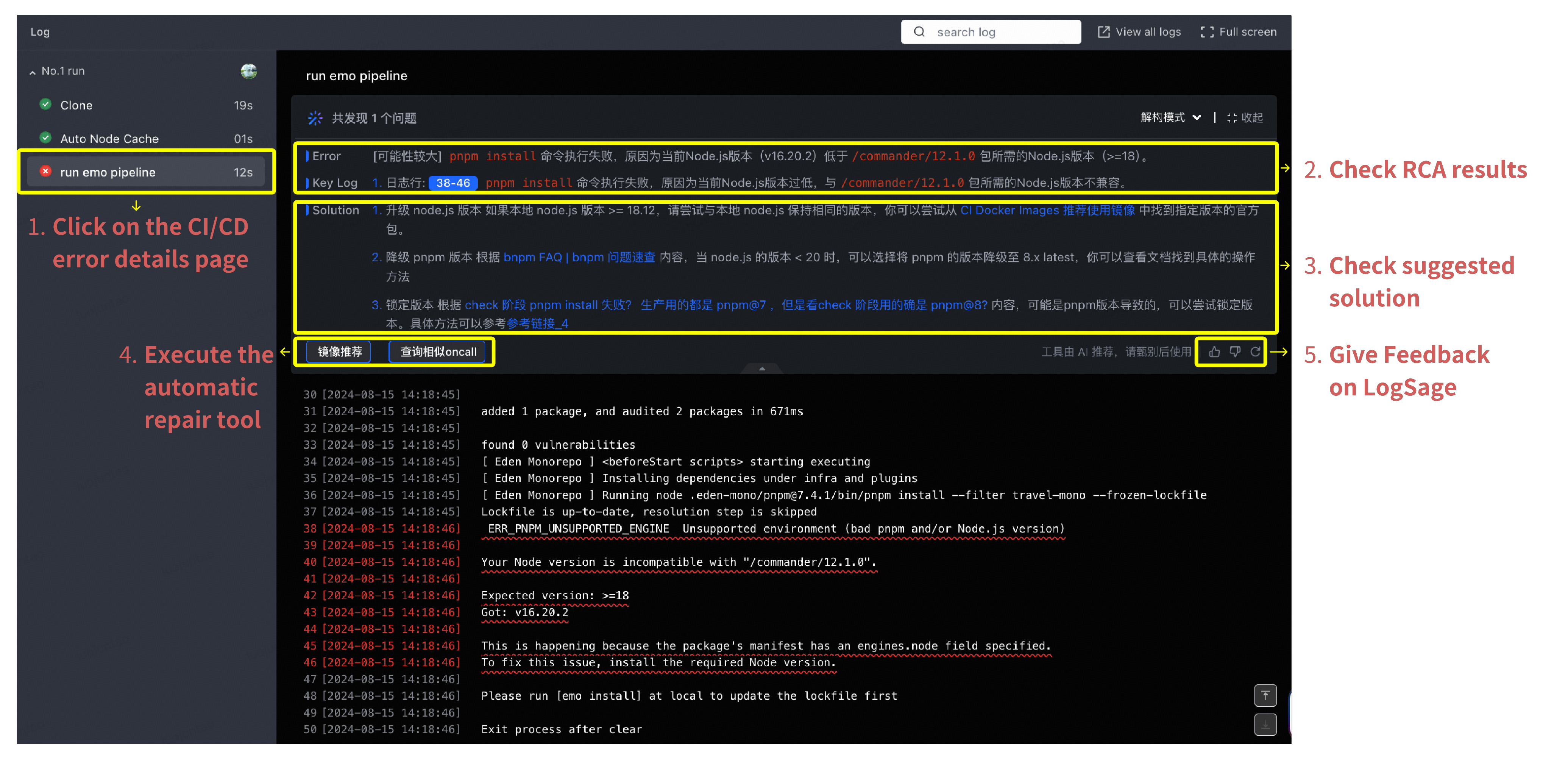
# Technical Document Extraction: LogSage Pipeline Error Analysis
## Left Panel: Log Entry Overview
- **Log Header**: `Log` (top-left corner)
- **Pipeline Run Entry**:
- **Label**: `No.1 run`
- **Status Indicators**:
- ✅ `Clone` (19s duration)
- ✅ `Auto Node Cache` (01s duration)
- ❌ `run emo pipeline` (12s duration, highlighted with yellow box)
- **Error Marker**: Red circle with "X" icon
## Main Panel: Error Details
### Error Section 1
- **Error Title**: `Error [可能性较大] npm install 命令执行失败`
- **Error Message**:
- 原因: 当前Node.js版本 (v16.20.2) 低于 `/commander/12.1.0` 所需的Node.js版本 (>=18)
- 解决方案:
1. 升级 node.js 版本 如果本地 node.js 版本 >= 18.12,请尝试与本地 node.js 保持相同的版本
2. 降级 npm 版本 根据 `npm FAQ` 降级至 8.x 最新版本
3. 使用特定版本 `npm@7` 或检查 `npm@8` 内容
- **Highlighted Text**:
- `38-46` (blue box)
- `npm install` (red text)
- `commander/12.1.0` (red text)
### Error Section 2
- **Error Title**: `Error [锁定推荐]`
- **Error Message**:
- 原因: 包 manifest 中指定了 `engines.node` 字段要求 Node.js 18,但当前环境为 v16.20.2
- 解决方案:
1. 升级 Node.js 到 v18 版本
2. 降级 npm 到 8.x 版本
3. 使用特定版本 `npm@7` 或检查 `npm@8` 内容
- **Highlighted Text**:
- `engines.node` (red text)
- `v16.20.2` (red text)
## Right Panel: Action Steps
1. **Check RCA Results** (Step 2)
2. **Check Suggested Solution** (Step 3)
3. **Give Feedback on LogSage** (Step 5)
- **Feedback Buttons**:
- 👍 Thumbs up
- 💬 Comment
- 🔄 Refresh (highlighted with yellow box)
## Error Details Section
- **Error Code**: `ERR_PNPM_UNSUPPORTED_ENGINE`
- **Error Message**:
- `Unsupported environment (bad pnpm and/or Node.js version)`
- `Your Node version is incompatible with "/commander/12.1.0"`
- **Version Information**:
- Expected: `>=18`
- Actual: `v16.20.2`
- **Resolution Guidance**:
- `Please run [emo install] at local to update the lockfile first`
- `Exit process after clear`
## Chinese Text Translation
| Chinese Text | English Translation |
|--------------|---------------------|
| 共发现1个问题 | Found 1 issue |
| 错误 | Error |
| 解决方案 | Solution |
| 保持相同的版本 | Maintain same version |
| CI Docker Images | CI Docker Images |
| 降级速度 | Downgrade speed |
| 当前版本 | Current version |
| 兼容性 | Compatibility |
| 错误详情 | Error details |
| 反馈 | Feedback |
| 执行自动修复工具 | Execute automatic repair tool |
## Temporal Data
- **Log Timestamps**:
- 2024-08-15 14:18:45 (multiple entries)
- 2024-08-15 14:18:46 (multiple entries)
- **Duration Metrics**:
- Clone: 19s
- Auto Node Cache: 01s
- run emo pipeline: 12s
## Interface Elements
- **Search Bar**: `search log` (top-right)
- **View Options**:
- `View all logs`
- `Full screen`
- **Action Buttons**:
- `镜像推荐` (Image Recommendation)
- `查询相似|oncall` (Query Similar|Oncall)
## Error Resolution Flow
1. Identify incompatible Node.js version (v16.20.2 vs required >=18)
2. Check package manifest for engines.node requirements
3. Execute suggested npm install with correct version
4. Update lockfile using [emo install]
5. Provide feedback through LogSage interface