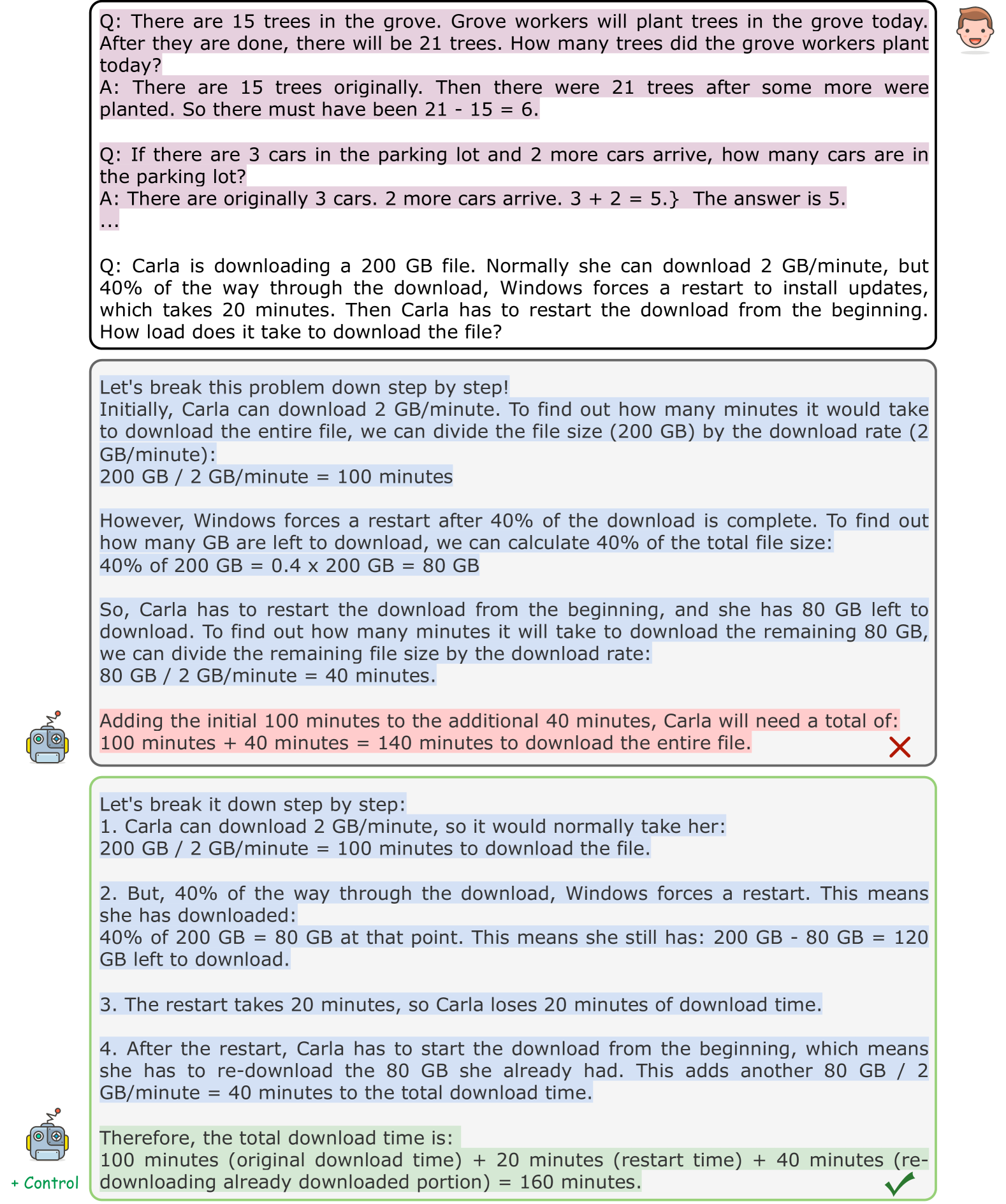
## Screenshot: Math Problem-Solving Process with Step-by-Step Explanations
### Overview
The image shows a structured problem-solving process for three math problems, each presented with a question (Q:), answer (A:), and detailed step-by-step explanations. The content includes arithmetic, rate-time-distance calculations, and error correction. Highlighted sections (pink/green) emphasize key steps, while symbols (✗/✓) indicate correctness.
---
### Components/Axes
1. **Problem Structure**:
- **Question Boxes**: Black-bordered rectangles with "Q:" prefixes.
- **Answer Boxes**: Black-bordered rectangles with "A:" prefixes.
- **Highlighted Sections**:
- Pink: Emphasizes critical calculations (e.g., `21 - 15 = 6`, `3 + 2 = 5`).
- Green: Highlights final answer verification.
- **Symbols**:
- ✗ (red): Marks incorrect final answer in one problem.
- ✓ (green): Confirms correct final answer in another.
2. **UI Elements**:
- Robot icon with "+ Control" label (bottom-left).
- Cartoon face icon (top-right).
---
### Detailed Analysis
#### Problem 1: Grove Trees
- **Q**: "There are 15 trees in the grove. Grove workers will plant trees today. After they are done, there will be 21 trees. How many trees did the grove workers plant today?"
- **A**: "There are 15 trees originally. Then there were 21 trees after some more were planted. So there must have been 21 - 15 = 6."
- **Highlight**: Pink box around `21 - 15 = 6`.
#### Problem 2: Parking Lot Cars
- **Q**: "If there are 3 cars in the parking lot and 2 more cars arrive, how many cars are in the parking lot?"
- **A**: "There are originally 3 cars. 2 more cars arrive. 3 + 2 = 5. The answer is 5."
- **Highlight**: Pink box around `3 + 2 = 5`.
#### Problem 3: File Download
- **Q**: "Carla is downloading a 200 GB file. Normally she can download 2 GB/minute, but 40% of the way through the download, Windows forces a restart to install updates, which takes 20 minutes. How long does it take to download the file?"
- **A**: Step-by-step breakdown:
1. Normal download time: `200 GB / 2 GB/minute = 100 minutes`.
2. 40% downloaded: `0.4 × 200 GB = 80 GB` (80 GB remaining).
3. Restart adds 20 minutes.
4. Re-download remaining 80 GB: `80 GB / 2