## YAML Configuration File: Prompt Templates Structure
### Overview
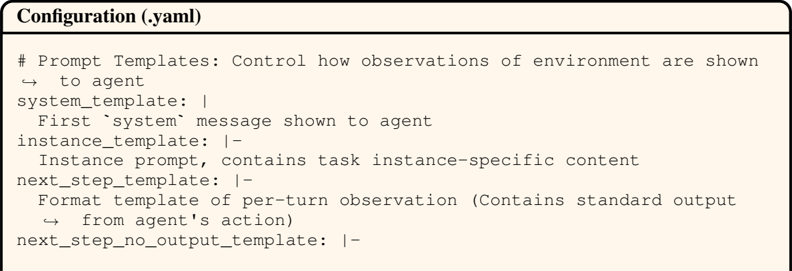
This image shows a YAML configuration file defining prompt templates for an agent-environment interaction system. The file specifies how observations and task instances are formatted for the agent.
### Components/Axes
- **Header**: "Configuration (.yaml)" with a horizontal rule
- **Comment Line**: `# Prompt Templates: Control how observations of environment are shown to agent`
- **Key-Value Pairs**:
1. `system_template`: Contains the first system message shown to the agent
2. `instance_template`: Contains task instance-specific content (denoted with `|-` for multi-line strings)
3. `next_step_template`: Formats per-turn observations with standard output from the agent's action
4. `next_step_no_output_template`: Placeholder for observations without agent output
### Detailed Analysis
- **system_template**:
- Purpose: Initial system message
- Format: Single-line string
- **instance_template**:
- Purpose: Task-specific context
- Format: Multi-line string (indicated by `|-`)
- **next_step_template**:
- Purpose: Standard observation formatting
- Contains: Agent action output
- **next_step_no_output_template**:
- Purpose: Observation formatting without agent output
- Status: Placeholder (empty value)
### Key Observations
1. The configuration uses YAML's pipe (`|`) and hyphen (`-`) syntax for multi-line strings
2. All template definitions follow a consistent structure: `key: description`
3. The system template is the only single-line entry among multi-line templates
4. The `next_step_no_output_template` appears to be intentionally left blank
### Interpretation
This configuration file establishes a structured communication protocol between an agent and its environment. The templates define:
1. **Initial Context**: Through `system_template`
2. **Task Specificity**: Via `instance_template` for customized prompts
3. **Interaction Flow**: Using `next_step_template` for standard observations with agent output, and `next_step_no_output_template` for observations without agent responses
The empty `next_step_no_output_template` suggests either incomplete implementation or intentional omission of this particular template type. The use of YAML's multi-line string syntax indicates that some templates may contain complex, formatted text requiring preservation of line breaks and structure.