# Technical Document Extraction: SWE-agent Architecture Diagram
## 1. Overview
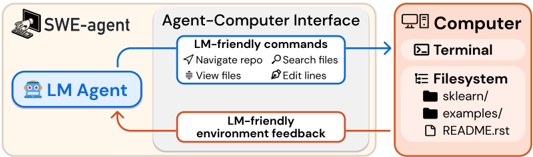
This image is a high-level architectural diagram illustrating the interaction between a Software Engineering Agent (**SWE-agent**) and a **Computer** system via an intermediate layer called the **Agent-Computer Interface (ACI)**. The diagram uses a closed-loop feedback system to show how a Language Model (LM) interacts with a file system and terminal.
---
## 2. Component Segmentation
### Region A: SWE-agent (Left Section)
* **Header Label:** `SWE-agent` (accompanied by an icon of a hand interacting with a computer monitor).
* **Primary Component:** `LM Agent`
* **Visuals:** Contained within a blue-bordered rounded rectangle. Includes a robot emoji icon.
* **Function:** Acts as the central processing unit that initiates actions and receives feedback.
### Region B: Agent-Computer Interface (Middle Section)
* **Header Label:** `Agent-Computer Interface`
* **Visuals:** A light gray background box containing two primary communication channels.
* **Outbound Channel (Top):** `LM-friendly commands`
* **Visuals:** Blue-bordered box.
* **Specific Commands Listed:**
* `Navigate repo` (Icon: Paper plane/navigation)
* `Search files` (Icon: Magnifying glass)
* `View files` (Icon: Stacked lines/document)
* `Edit lines` (Icon: Pen/writing)
* **Inbound Channel (Bottom):** `LM-friendly environment feedback`
* **Visuals:** Brown-bordered box.
### Region C: Computer (Right Section)
* **Header Label:** `Computer` (accompanied by a desktop computer icon).
* **Visuals:** A light orange/peach background box.
* **Sub-component 1:** `Terminal` (Icon: Command prompt `>_`)
* **Sub-component 2:** `Filesystem` (Icon: List/hierarchy)
* **Directory/File Structure Example:**
* `sklearn/` (Folder icon)
* `examples/` (Folder icon)
* `README.rst` (File icon)
---
## 3. Process Flow and Logic
The diagram depicts a bidirectional loop between the **LM Agent** and the **Computer**:
1. **Action Initiation (Blue Path):**
* The **LM Agent** generates an intent.
* This intent passes through the **Agent-Computer Interface** where it is translated into **LM-friendly commands** (Navigate, Search, View, Edit).
* The blue arrow points from the interface directly into the **Computer** system (Terminal/Filesystem).
2. **Environment Response (Brown Path):**
* The **Computer** executes the commands within the Terminal or Filesystem.
* The resulting state or output is processed back through the **Agent-Computer Interface**.
* The information is formatted as **LM-friendly environment feedback**.
* The brown arrow points back to the **LM Agent**, completing the cycle.
---
## 4. Textual Transcription Summary
| Category | Extracted Text |
| :--- | :--- |
| **Main Titles** | SWE-agent, Agent-Computer Interface, Computer |
| **Agent Components** | LM Agent |
| **Interface Commands** | LM-friendly commands: Navigate repo, Search files, View files, Edit lines |
| **Interface Feedback** | LM-friendly environment feedback |
| **System Components** | Terminal, Filesystem |
| **Filesystem Data** | sklearn/, examples/, README.rst |
**Language Declaration:** All text in this image is in **English**.