## Diagram: Agent-Computer Interface Architecture
### Overview
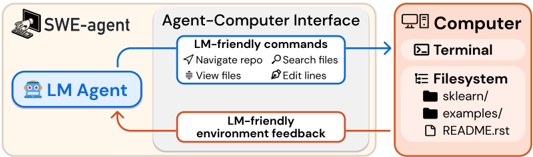
The diagram illustrates a technical workflow involving three core components:
1. **SWE-agent** (top-left)
2. **Agent-Computer Interface** (center)
3. **Computer** (right)
Arrows indicate directional interactions, with blue arrows representing "LM-friendly commands" and red arrows representing "LM-friendly environment feedback."
---
### Components/Axes
#### 1. **SWE-agent**
- Icon: Computer with hand cursor
- Position: Top-left quadrant
#### 2. **Agent-Computer Interface**
- Contains two sub-components:
- **LM-friendly commands** (blue arrow):
- Navigate repo
- Search files
- View files
- Edit lines
- **LM-friendly environment feedback** (red arrow):
- Feedback loop to LM Agent
#### 3. **Computer**
- Sub-components:
- **Terminal** (icon: terminal window)
- **Filesystem** (icon: folder structure):
- Directories: `sklearn/`, `examples/`
- File: `README.rst`
---
### Detailed Analysis
#### LM Agent
- Positioned within the Agent-Computer Interface
- Connected to SWE-agent via blue arrow (commands)
- Receives feedback via red arrow (environmental responses)
#### Computer Filesystem
- Explicitly lists:
- `sklearn/` (machine learning library directory)
- `examples/` (example code directory)
- `README.rst` (reStructuredText documentation file)
---
### Key Observations
1. **Directional Flow**:
- Commands flow from LM Agent → Agent-Computer Interface → Computer (blue arrows).
- Feedback flows from Computer → Agent-Computer Interface → LM Agent (red arrow).
2. **File Structure**:
- Presence of `sklearn/` and `examples/` suggests machine learning-related tasks.
- `README.rst` implies documentation for the project.
3. **Color Coding**:
- Blue arrows = Command execution.
- Red arrows = Feedback/response mechanism.
---
### Interpretation
This architecture demonstrates a closed-loop system where:
- The **LM Agent** (likely a language model) interacts with the **Computer** via the **SWE-agent** as an intermediary.
- The **Agent-Computer Interface** acts as a translator, converting LM Agent outputs into executable commands (e.g., "navigate repo") and relaying environmental feedback (e.g., terminal outputs or file changes).
- The explicit mention of `sklearn/` and `examples/` indicates the system is designed for machine learning workflows, with the LM Agent potentially automating tasks like code navigation, file editing, or documentation updates.
- The feedback loop suggests iterative refinement, where the LM Agent adjusts its commands based on environmental responses (e.g., error messages or file states).
**Notable Design Choices**:
- Use of reStructuredText (`README.rst`) implies compatibility with Python-based projects (common in data science).
- The separation of "commands" and "feedback" highlights a modular design for debugging and system transparency.