# Technical Document Extraction: Code Editing Workflow Diagram
## Diagram Overview
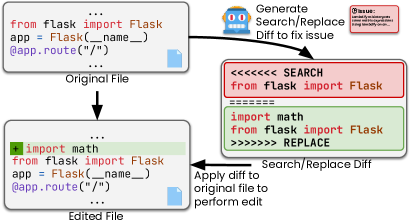
The image depicts a **code editing workflow** involving **search/replace operations** to fix an issue in a Python application. The process involves three primary components:
1. **Original File**
2. **Edited File**
3. **Search/Replace Diff Generation**
---
## Component Breakdown
### 1. Original File
- **Code Snippet**:
```python
from flask import Flask
app = Flask(__name__)
@app.route("/")
```
- **Visual Elements**:
- Blue file icon in the bottom-right corner.
- Label: `Original File` (below the code block).
### 2. Edited File
- **Code Snippet**:
```python
+ import math # Added line (highlighted in green)
from flask import Flask
app = Flask(__name__)
@app.route("/")
```
- **Visual Elements**:
- Green `+` symbol indicating an addition.
- Label: `Edited File` (below the code block).
### 3. Search/Replace Diff Generation
- **Robot Icon**:
- Blue robot with red eyes and yellow antenna.
- Label: `Generate Search/Replace Diff to fix issue`.
- **Search/Replace Diff Section**:
- **Search Block** (highlighted in red):
```text
<<<<<<< SEARCH
from flask import Flask
import math
from flask import Flask
```
- **Replace Block** (highlighted in green):
```text
>>>>>>> REPLACE
from flask import Flask
from flask import Flask
```
- **Action**:
- Label: `Apply diff to original file to perform edit`.
---
## Flowchart Arrows
1. **Original File → Edited File**:
- Indicates the transition from the original code to the modified version.
2. **Edited File → Search/Replace Diff**:
- Shows the generation of the diff to resolve the issue.
3. **Search/Replace Diff → Original File**:
- Represents applying the diff to the original file.
---
## Key Observations
- **Issue Context**:
- A pink box labeled `ISSUE:` is present but contains unreadable text.
- **Color Coding**:
- **Red**: Search operations (deletions/additions to remove).
- **Green**: Replace operations (additions to retain).
- **Code Consistency**:
- Both files retain `from flask import Flask` and `@app.route("/")`.
- The edited file adds `import math` (highlighted in green).
---
## Workflow Summary
1. Start with the **Original File** containing Flask imports.
2. Modify the file by adding `import math` (resulting in the **Edited File**).
3. Generate a **Search/Replace Diff** to identify changes.
4. Apply the diff to the original file to implement the edit.
---
## Diagram Structure
- **Top-to-Bottom Flow**:
`Original File` → `Edited File` → `Search/Replace Diff` → `Apply diff to original file`.
- **Visual Hierarchy**:
- Code blocks are centrally aligned.
- Labels and icons are positioned adjacent to their respective components.
---
## Missing Information
- The `ISSUE:` label’s text is illegible due to small font size.
- No explicit axis titles or legends are present (the diagram is flowchart-based, not a chart).
---
## Final Notes
This diagram illustrates a **code versioning workflow** using search/replace diffs to manage changes in a Python application. The use of color coding (red/green) aligns with standard diff tools (e.g., Git). The process emphasizes incremental editing and automated diff generation for reproducibility.