## Diagram: Task Editing Workflow with Camera Motion and Object Adjustment
### Overview
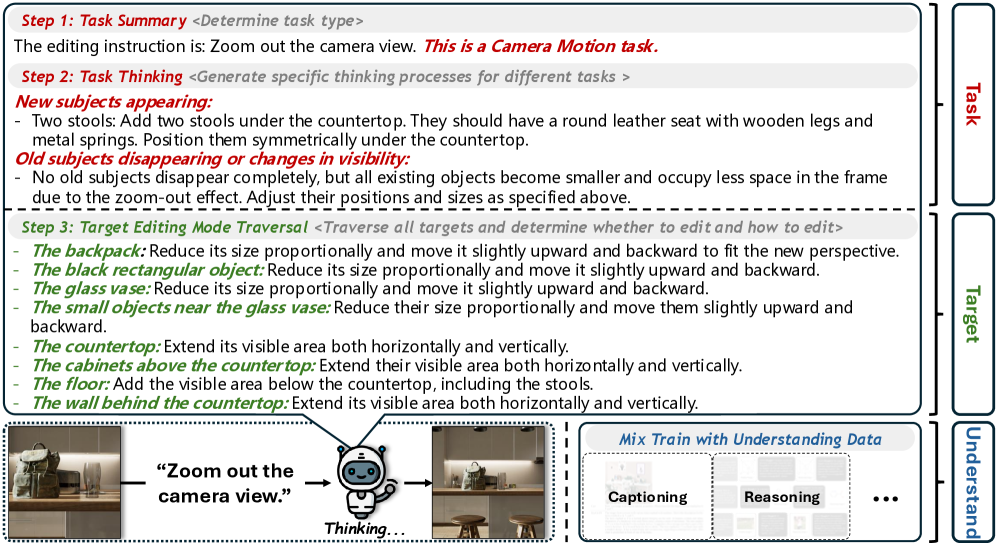
The diagram illustrates a multi-step process for editing images involving camera motion and object manipulation. It combines textual instructions with visual elements (e.g., a robot icon) to represent task decomposition, object adjustments, and data integration strategies.
---
### Components/Axes
1. **Task Summary** (Top Section):
- **Labels**: "Step 1: Task Summary", "Determine task type"
- **Text**: "The editing instruction is: Zoom out the camera view. This is a Camera Motion task."
- **Color**: Light gray background.
2. **Task Thinking** (Middle Section):
- **Labels**: "Step 2: Task Thinking", "Generate specific thinking processes for different tasks"
- **Subcomponents**:
- **New Subjects Appearing**: Red text, lists two stools with specific attributes.
- **Old Subjects Disappearing**: Green text, describes size reduction and repositioning.
- **Color**: White background with red/green text highlights.
3. **Target Editing Mode** (Bottom Section):
- **Labels**: "Step 3: Target Editing Mode Traversal"
- **Subcomponents**:
- **Object Adjustments**: Green text listing edits for "backpack," "black rectangular object," "glass vase," etc.
- **Spatial Modifications**: Instructions to reduce size, move upward/backward, or extend visible areas.
- **Color**: White background with green text.
4. **Mix Train with Understanding Data** (Right Panel):
- **Labels**: "Mix Train with Understanding Data"
- **Subcomponents**:
- **Captioning**: Light blue background.
- **Reasoning**: Dark blue background.
- **Color**: Vertical gradient from light to dark blue.
5. **Visual Elements**:
- **Robot Icon**: Positioned at the bottom center, labeled "Thinking..." with a speech bubble containing "Zoom out the camera view view."
- **Image Preview**: Shows a room with a countertop, cabinets, and floor.
---
### Detailed Analysis
- **Task Summary**: Explicitly identifies the task as "Camera Motion" with a focus on zooming out the camera view.
- **Task Thinking**: Introduces new objects (stools) and describes changes to existing objects (size reduction, repositioning).
- **Target Editing Mode**: Provides granular instructions for adjusting object sizes and positions, emphasizing proportional scaling and spatial alignment.
- **Mix Train Section**: Suggests combining captioning and reasoning data to enhance understanding.
---
### Key Observations
1. **Color Coding**:
- Red highlights new objects (stools).
- Green highlights disappearing objects and their adjustments.
- Blue gradients represent data integration strategies.
2. **Robot Icon**: Symbolizes AI-driven task analysis, positioned to "think" about the camera motion instruction.
3. **Spatial Relationships**:
- The robot is centered below the textual steps, linking abstract instructions to visual representation.
- The image preview aligns with the described countertop and floor adjustments.
---
### Interpretation
This diagram outlines a structured workflow for image editing, emphasizing:
1. **Task Decomposition**: Breaking down camera motion and object adjustments into discrete steps.
2. **Proportional Editing**: Ensuring objects maintain relative sizes and positions during edits.
3. **Data Fusion**: Combining captioning (descriptive data) and reasoning (logical adjustments) to improve AI understanding of spatial relationships.
The robot icon serves as a metaphor for AI cognition, bridging textual instructions with visual execution. The use of color coding and spatial grounding ensures clarity in distinguishing task phases and object interactions.