## Line Charts: Toolformer Performance Benchmarks
### Overview
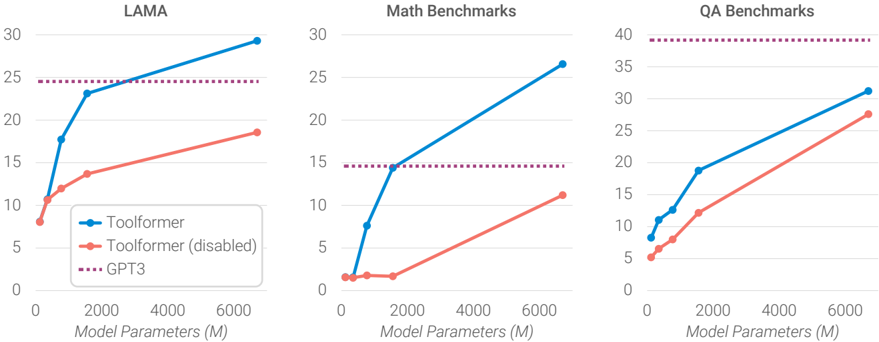
The image presents three line charts comparing the performance of Toolformer (enabled and disabled) against GPT3 across different benchmarks: LAMA, Math Benchmarks, and QA Benchmarks. The x-axis represents "Model Parameters (M)" ranging from 0 to 6000, and the y-axis represents the benchmark score.
### Components/Axes
* **Titles:**
* Left Chart: LAMA
* Middle Chart: Math Benchmarks
* Right Chart: QA Benchmarks
* **X-axis:** Model Parameters (M), with ticks at 0, 2000, 4000, and 6000.
* **Y-axis:**
* LAMA: 0 to 30, with ticks at intervals of 5.
* Math Benchmarks: 0 to 30, with ticks at intervals of 5.
* QA Benchmarks: 0 to 40, with ticks at intervals of 5.
* **Legend (bottom-left of the first chart):**
* Blue line: Toolformer
* Red line: Toolformer (disabled)
* Dotted Purple line: GPT3
### Detailed Analysis
#### LAMA Chart
* **Toolformer (Blue):** The line starts at approximately 8 and increases sharply to around 23 by 2000 Model Parameters (M). It then continues to increase, but at a slower rate, reaching approximately 29 by 6000 Model Parameters (M).
* **Toolformer (disabled) (Red):** The line starts at approximately 8 and increases gradually to approximately 19 by 6000 Model Parameters (M).
* **GPT3 (Purple Dotted):** The line is horizontal at approximately 24.
#### Math Benchmarks Chart
* **Toolformer (Blue):** The line starts near 0, remains low until 2000 Model Parameters (M) where it is approximately 14, and then increases sharply to approximately 27 by 6000 Model Parameters (M).
* **Toolformer (disabled) (Red):** The line starts near 1, remains low until 2000 Model Parameters (M) where it is approximately 1, and then increases gradually to approximately 11 by 6000 Model Parameters (M).
* **GPT3 (Purple Dotted):** The line is horizontal at approximately 14.5.
#### QA Benchmarks Chart
* **Toolformer (Blue):** The line starts at approximately 8 and increases linearly to approximately 32 by 6000 Model Parameters (M).
* **Toolformer (disabled) (Red):** The line starts at approximately 5 and increases linearly to approximately 28 by 6000 Model Parameters (M).
* **GPT3 (Purple Dotted):** The line is horizontal at approximately 39.
### Key Observations
* In all three benchmarks, Toolformer (enabled) outperforms Toolformer (disabled) across all model parameter sizes.
* GPT3's performance is constant across all model parameter sizes, as indicated by the horizontal dotted line.
* The performance gap between Toolformer (enabled) and Toolformer (disabled) varies across the benchmarks. It's most pronounced in Math Benchmarks and least pronounced in QA Benchmarks.
* Toolformer (enabled) surpasses GPT3 in LAMA and Math Benchmarks at higher model parameter sizes, but remains below GPT3 in QA Benchmarks.
### Interpretation
The data suggests that enabling Toolformer significantly improves performance across all benchmarks. The extent of improvement varies depending on the specific task. The comparison with GPT3 provides a baseline, indicating that Toolformer can achieve comparable or even superior performance in certain tasks (LAMA, Math) when sufficiently scaled. The consistent performance of GPT3 regardless of "Model Parameters (M)" suggests it is not being evaluated on different sizes of the model, but rather is a fixed baseline. The Math Benchmark shows the most dramatic difference between Toolformer enabled and disabled, suggesting that the Toolformer architecture is particularly effective for mathematical tasks.