## Diagram: Console and Python Library Interaction
### Overview
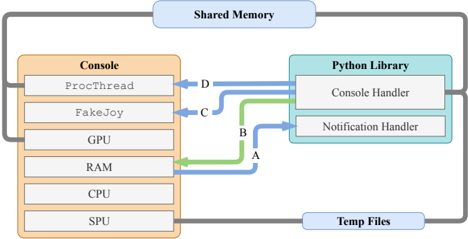
The image is a diagram illustrating the interaction between a "Console" and a "Python Library," mediated by "Shared Memory" and "Temp Files." The diagram shows data flow between components within the Console and Python Library, as well as communication pathways between them.
### Components/Axes
* **Title:** None explicitly provided, but the diagram depicts "Console and Python Library Interaction."
* **Console:** A rounded rectangle on the left, colored in light orange, containing the following components (from top to bottom):
* ProcThread
* FakeJoy
* GPU
* RAM
* CPU
* SPU
* **Python Library:** A rounded rectangle on the right, colored in light blue, containing the following components (from top to bottom):
* Console Handler
* Notification Handler
* **Shared Memory:** A rounded rectangle at the top, colored in light blue.
* **Temp Files:** A rounded rectangle at the bottom, colored in light blue.
* **Data Flow Arrows:**
* A: Green arrow from RAM in Console to Notification Handler in Python Library.
* B: Green arrow from RAM in Console to Console Handler in Python Library.
* C: Blue arrow from FakeJoy in Console to Console Handler in Python Library.
* D: Blue arrow from ProcThread in Console to Console Handler in Python Library.
* **Grey Lines:** Connect the Console and Python Library to Shared Memory and Temp Files.
### Detailed Analysis or Content Details
* **Console Components:**
* ProcThread: Located at the top of the Console block.
* FakeJoy: Located below ProcThread.
* GPU: Located below FakeJoy.
* RAM: Located below GPU.
* CPU: Located below RAM.
* SPU: Located at the bottom of the Console block.
* **Python Library Components:**
* Console Handler: Located at the top of the Python Library block.
* Notification Handler: Located below Console Handler.
* **Data Flow:**
* The green arrow labeled "A" originates from the RAM component of the Console and points to the Notification Handler component of the Python Library.
* The green arrow labeled "B" originates from the RAM component of the Console and points to the Console Handler component of the Python Library.
* The blue arrow labeled "C" originates from the FakeJoy component of the Console and points to the Console Handler component of the Python Library.
* The blue arrow labeled "D" originates from the ProcThread component of the Console and points to the Console Handler component of the Python Library.
* **Shared Memory and Temp Files:**
* The Console and Python Library are connected to "Shared Memory" via grey lines. The Console connects to Shared Memory from the top-left corner, and the Python Library connects to Shared Memory from the top-right corner.
* The Console and Python Library are connected to "Temp Files" via grey lines. The Console connects to Temp Files from the bottom-left corner, and the Python Library connects to Temp Files from the bottom-right corner.
### Key Observations
* The diagram illustrates data flow between specific components of the Console and the Python Library.
* RAM in the Console sends data to both Console Handler and Notification Handler in the Python Library.
* ProcThread and FakeJoy in the Console only send data to the Console Handler in the Python Library.
* Shared Memory and Temp Files are used for general communication between the Console and Python Library.
### Interpretation
The diagram depicts the architecture and data flow between a Console application and a Python Library. It highlights how different components within the Console (ProcThread, FakeJoy, RAM) interact with specific handlers within the Python Library (Console Handler, Notification Handler). The use of Shared Memory and Temp Files suggests a mechanism for broader communication and data exchange between the two systems. The diagram suggests that the RAM component in the Console is a central point for data dissemination to the Python Library, while ProcThread and FakeJoy have more specific interactions with the Console Handler.