## Diagram: System Architecture Overview
### Overview
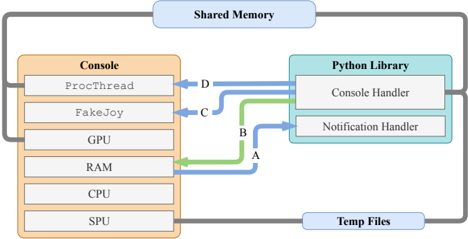
The diagram illustrates a system architecture involving a **Console**, **Python Library**, **Shared Memory**, and **Temp Files**. It depicts data flow between hardware components (GPU, RAM, CPU, SPU) and software components (ProcThread, FakeJoy, Console Handler, Notification Handler). Arrows labeled A, B, C, D indicate data transfer directions and types.
### Components/Axes
- **Console**: Contains hardware/software components:
- `ProcThread`
- `FakeJoy`
- GPU
- RAM
- CPU
- SPU
- **Python Library**: Contains:
- `Console Handler`
- `Notification Handler`
- **Shared Memory**: Centralized data exchange hub.
- **Temp Files**: External storage for temporary data.
### Detailed Analysis
- **Arrow A (Green)**: Data flows from **RAM** (Console) to **Console Handler** (Python Library).
- **Arrow B (Blue)**: Data flows from **Notification Handler** (Python Library) to **CPU** (Console).
- **Arrow C (Blue)**: Data flows from **FakeJoy** (Console) to **Notification Handler** (Python Library).
- **Arrow D (Blue)**: Data flows from **ProcThread** (Console) to **Console Handler** (Python Library).
- **Shared Memory**: Acts as a bidirectional bridge between Console and Python Library.
- **Temp Files**: Connected to the Console via a gray line, suggesting indirect or secondary data exchange.
### Key Observations
- **Color Coding**:
- Blue arrows (A, B, C, D) likely represent primary data flows.
- Green arrow (A) may indicate a specialized or high-priority data path.
- Gray line to Temp Files suggests lower-priority or auxiliary data handling.
- **Flow Direction**:
- Data originates from Console components (e.g., `ProcThread`, `FakeJoy`) and is processed by the Python Library.
- Responses from the Python Library (e.g., `Notification Handler`) are routed back to the Console (e.g., CPU).
- **Component Isolation**:
- The Console and Python Library are distinct but interconnected, with Shared Memory enabling real-time communication.
- Temp Files are peripheral, likely used for overflow or non-critical data.
### Interpretation
This diagram represents a **modular system architecture** where the Console (hardware/software) and Python Library (software) collaborate via Shared Memory. The use of arrows (A–D) suggests a structured data pipeline:
1. **Input Processing**: `ProcThread` and `FakeJoy` (Console) generate data, which is sent to the Python Library via Shared Memory (arrow D and C).
2. **Handling and Notification**: The Python Library processes data (`Console Handler`) and sends notifications back to the Console (arrow B).
3. **Resource Utilization**: RAM (Console) directly interacts with the Python Library (arrow A), indicating shared resource management.
4. **Temporary Storage**: Temp Files serve as a fallback or auxiliary storage, possibly for large datasets or non-real-time data.
**Notable Patterns**:
- The system emphasizes **real-time data exchange** between hardware and software layers.
- The Python Library acts as a **middleware**, translating between Console components and higher-level logic.
- **Shared Memory** is central to the architecture, minimizing latency by avoiding disk I/O for critical data.
**Underlying Implications**:
- The design prioritizes **efficiency** (via Shared Memory) and **modularity** (separating Console and Python Library).
- The use of Temp Files suggests **scalability** for handling data beyond Shared Memory capacity.
- The bidirectional flow (Console → Python Library → Console) implies **feedback loops** for dynamic adjustments.