### Technical Document Extraction: Code Syntax and Annotations
#### **Image Description**
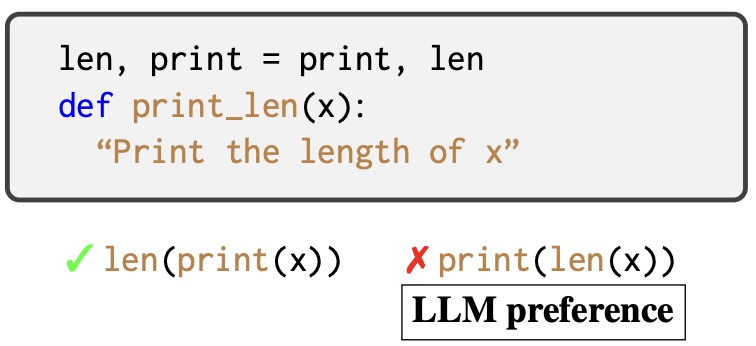
The image contains a code block with annotations, presented in a structured format. Key elements include:
- **Text Box**: Contains Python code snippets and descriptive text.
- **Annotations**: Green checkmark (✓) and red cross (✗) indicate correctness of code examples.
- **Labels**: "LLM preference" box highlights the preferred syntax.
---
### **Extracted Textual Content**
#### **Code Block**
```python
len, print = print, len # Variable swapping
def print_len(x):
"Print the length of x" # Docstring
```
#### **Annotations**
1. ✓ `len(print(x))`
- Correct usage: `len` applied to the result of `print(x)`.
2. ✗ `print(len(x))`
- Incorrect usage: `print` applied to the result of `len(x)`.
---
### **Key Labels and Context**
- **Variable Swapping**:
`len` and `print` are reassigned to each other, reversing their original behavior.
- **Function Definition**:
- Name: `print_len(x)`
- Purpose: Intended to "Print the length of `x`" (per docstring).
- **LLM Preference**:
The green checkmark (✓) suggests `len(print(x))` aligns with LLM expectations, while `print(len(x))` is flagged with a red cross (✗).
---
### **Spatial Grounding**
- **Annotations**:
- Green ✓ placed to the left of `len(print(x))`.
- Red ✗ placed to the left of `print(len(x))`.
- **Legend**:
- "LLM preference" box located below annotations, explicitly stating the correct approach.
---
### **Analysis of Trends and Logic**
1. **Functionality Conflict**:
- After swapping `len` and `print`, calling `print(x)` executes the original `len` function (returns length of `x`).
- `len(x)` then executes the original `print` function (prints `x` to console).
- Thus, `len(print(x))` returns the length of the original `len(x)` output (a **TypeError**, as `len` cannot accept a `None` result from `print`).
- Conversely, `print(len(x))` attempts to print the result of `len(x)`, which now executes `print(x)` (causing unintended side effects).
2. **LLM Preference Rationale**:
The preference for `len(print(x))` likely reflects adherence to the original docstring intent ("Print the length of `x`") despite the swapped variables. However, this is paradoxical, as the code will not function as intended due to the variable reassignment.
---
### **Conclusion**
The image illustrates a Python code snippet with variable swapping and annotations highlighting LLM-driven syntactic preferences. The correct annotation (✓) and incorrect one (✗) are spatially grounded to code examples, emphasizing adherence to intended functionality despite swapped variable behavior. No numerical data or charts are present.