TECHNICAL ASSET FINGERPRINT
c3dc2d240dec041ed4e662ab
Click to view fullscreen
Press ESC or click to close
FOUND IN PAPERS
EXPERT: healer-alpha-free VERSION 1
RUNTIME: free/openrouter/healer-alpha
INTEL_VERIFIED
## Diagram: Robotic Arm Task Sequences
### Overview
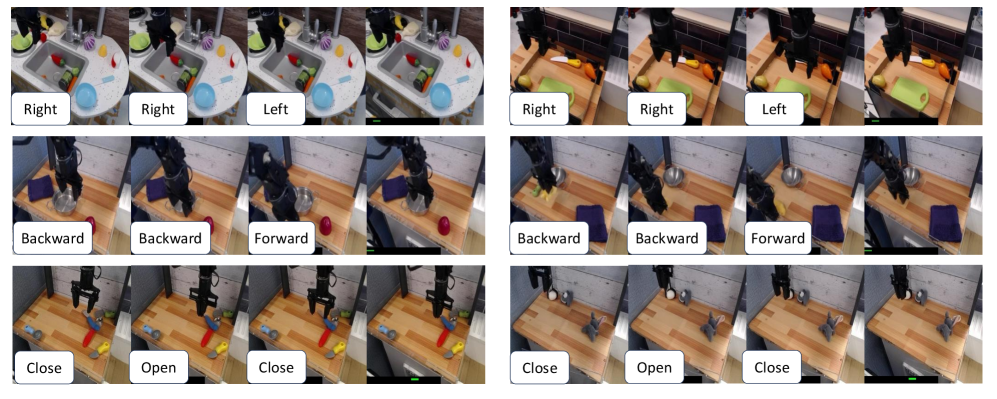
The image is a composite diagram consisting of six distinct panels arranged in a 3x2 grid. Each panel contains a sequence of four sequential frames illustrating a robotic arm performing a specific manipulation task in a simulated kitchen or workshop environment. The tasks involve interacting with various objects using directional commands (Right, Left, Forward, Backward) and action commands (Open, Close). The purpose appears to be demonstrating or training robotic control for everyday object manipulation.
### Components/Axes
* **Structure:** Six rectangular panels, each with a white background and a thin black border.
* **Content per Panel:** Four sequential image frames arranged horizontally.
* **Labels:** Each frame has a white rectangular label with black text positioned at the bottom-left corner of the frame. The text indicates the command or action being performed in that frame.
* **Objects:** The scenes include a variety of objects: a kitchen sink, a cutting board, vegetables (carrot, cucumber, bell pepper), a purple block, a silver sphere, a red cylinder, a drawer, and various small containers and tools.
* **Agent:** A black robotic arm with a gripper is the active agent in all sequences.
### Detailed Analysis
**Panel 1 (Top-Left): Sink Interaction**
* **Sequence:** The robotic arm is positioned over a white kitchen sink containing a blue plate, a green sponge, and other small items.
* **Frame 1:** Label: **"Right"**. The arm is positioned towards the left side of the sink.
* **Frame 2:** Label: **"Right"**. The arm has moved slightly to the right.
* **Frame 3:** Label: **"Left"**. The arm has moved back towards the left.
* **Frame 4:** No label visible. The arm is in a similar position to Frame 3.
* **Trend:** The sequence demonstrates lateral (side-to-side) movement control over the sink area.
**Panel 2 (Top-Right): Cutting Board Interaction**
* **Sequence:** The arm is over a wooden cutting board with a green cucumber, an orange carrot, and a yellow bell pepper.
* **Frame 1:** Label: **"Right"**. The arm is positioned over the left side of the board.
* **Frame 2:** Label: **"Right"**. The arm has moved to the right, now over the center of the board.
* **Frame 3:** Label: **"Left"**. The arm has moved back to the left.
* **Frame 4:** No label visible. The arm is positioned over the left side.
* **Trend:** Similar lateral movement demonstration, but in a different workspace context.
**Panel 3 (Middle-Left): Object Relocation (Purple Block)**
* **Sequence:** The arm interacts with a purple rectangular block on a wooden surface. A red sphere is also present.
* **Frame 1:** Label: **"Backward"**. The arm is positioned behind (further from the camera) the purple block.
* **Frame 2:** Label: **"Backward"**. The arm has moved further backward.
* **Frame 3:** Label: **"Forward"**. The arm has moved forward, now positioned over the purple block.
* **Frame 4:** No label visible. The arm appears to be grasping or has just released the purple block.
* **Trend:** Demonstrates depth-axis (forward/backward) movement for approaching and interacting with an object.
**Panel 4 (Middle-Right): Object Relocation (Silver Sphere)**
* **Sequence:** The arm interacts with a silver metallic sphere on a wooden surface. A purple block is also present.
* **Frame 1:** Label: **"Backward"**. The arm is positioned behind the silver sphere.
* **Frame 2:** Label: **"Backward"**. The arm has moved further backward.
* **Frame 3:** Label: **"Forward"**. The arm has moved forward, now positioned over the silver sphere.
* **Frame 4:** No label visible. The arm is positioned over the sphere.
* **Trend:** Another demonstration of depth-axis control with a different object (sphere vs. block).
**Panel 5 (Bottom-Left): Drawer Interaction (Red Cylinder)**
* **Sequence:** The arm interacts with a red cylinder placed near a drawer handle on a wooden countertop.
* **Frame 1:** Label: **"Close"**. The drawer appears closed. The arm is near the red cylinder.
* **Frame 2:** Label: **"Open"**. The drawer is now partially open. The arm is positioned over the red cylinder.
* **Frame 3:** Label: **"Close"**. The drawer is closed again. The arm is near the cylinder.
* **Frame 4:** No label visible. The scene is similar to Frame 3.
* **Trend:** Demonstrates a discrete action ("Open"/"Close") applied to an articulated object (the drawer), with the red cylinder as a potential manipulation target or obstacle.
**Panel 6 (Bottom-Right): Drawer Interaction (Empty)**
* **Sequence:** The arm interacts with the same drawer, but the red cylinder is absent.
* **Frame 1:** Label: **"Close"**. The drawer is closed.
* **Frame 2:** Label: **"Open"**. The drawer is open.
* **Frame 3:** Label: **"Close"**. The drawer is closed.
* **Frame 4:** No label visible. The drawer is closed.
* **Trend:** Isolates the drawer "Open"/"Close" action without the secondary object present.
### Key Observations
1. **Consistent Structure:** All six panels follow an identical format: four frames with command labels for the first three frames.
2. **Command Types:** Two distinct command vocabularies are used: **Directional** (Right, Left, Forward, Backward) for continuous movement, and **Action** (Open, Close) for discrete state changes.
3. **Environmental Variety:** The tasks are set in slightly different but related environments (sink area, cutting board, open counter, drawer), suggesting training for generalization across contexts.
4. **Object Variety:** The arm interacts with objects of different shapes (block, sphere, cylinder, vegetables), materials, and functions.
5. **Label Placement:** All labels are consistently placed in the bottom-left corner of their respective frames, ensuring clear association.
### Interpretation
This diagram is a technical visualization of **robotic manipulation primitives**. It breaks down complex tasks (like "prepare food" or "tidy a counter") into fundamental, teachable sub-skills:
* **Spatial Navigation:** The "Right/Left" and "Forward/Backward" sequences train the robot's ability to position its end-effector precisely in 3D space relative to objects and work surfaces.
* **Object Interaction:** The "Open/Close" sequences train the robot to apply forces to change the state of articulated objects (like drawers), a crucial skill for environmental manipulation.
* **Context Generalization:** By showing similar actions in slightly different settings (e.g., lateral movement over a sink vs. a cutting board), the diagram implies a focus on developing robust policies that work across varied but semantically similar environments.
The absence of labels on the fourth frame in each sequence likely indicates the **result state** or the moment after the commanded action is completed. The overall purpose is likely for **robot learning**, either as training data for imitation learning or as a demonstration of a learned policy's capabilities. The clear, segmented presentation makes it suitable for technical documentation, research papers, or system specification guides in the field of robotics and AI.
DECODING INTELLIGENCE...