## Diagram: Process State Diagram
### Overview
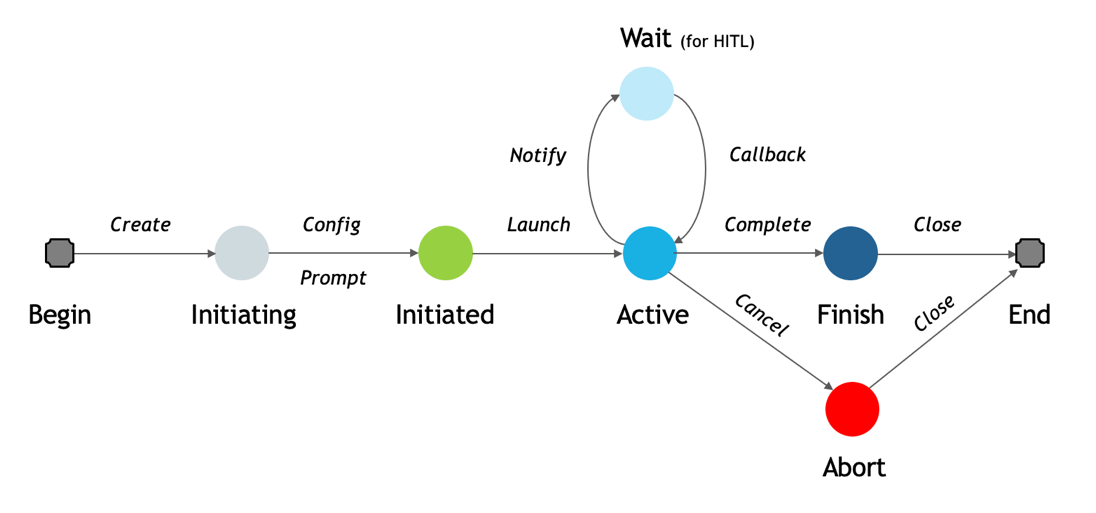
This image displays a state machine diagram illustrating a process flow from a "Begin" state to an "End" state, passing through several intermediate states. The diagram shows both a primary successful path, a waiting loop, and an alternative termination path. States are represented by circles or rounded squares, and transitions between states are indicated by arrows with descriptive labels.
### Components/Axes
The diagram consists of eight distinct states and ten labeled transitions. There are no explicit axes or legends, but the states are visually differentiated by color and shape.
**States (Nodes):**
1. **Begin**: A grey square with rounded corners, positioned at the far left of the diagram. This represents the starting point of the process.
2. **Initiating**: A light grey circular node, positioned to the right of "Begin".
3. **Initiated**: A green circular node, positioned to the right of "Initiating".
4. **Active**: A bright blue circular node, centrally located in the main flow, to the right of "Initiated".
5. **Wait (for HITL)**: A light blue circular node, positioned above the "Active" state. The parenthetical text "(for HITL)" indicates a specific condition for this wait state.
6. **Finish**: A dark blue circular node, positioned to the right of "Active".
7. **Abort**: A red circular node, positioned below the "Active" state. This represents an alternative, unsuccessful termination path.
8. **End**: A grey square with rounded corners, positioned at the far right of the diagram. This represents the final termination point of the process.
**Transitions (Arrows with Labels):**
* **Create**: An arrow pointing from "Begin" to "Initiating".
* **Config**: An arrow pointing from "Initiating" to "Initiated", labeled above the arrow.
* **Prompt**: An arrow pointing from "Initiating" to "Initiated", labeled below the arrow.
* **Launch**: An arrow pointing from "Initiated" to "Active".
* **Notify**: An arrow pointing from "Active" upwards to "Wait (for HITL)".
* **Callback**: An arrow pointing from "Wait (for HITL)" downwards back to "Active".
* **Complete**: An arrow pointing from "Active" to "Finish".
* **Cancel**: An arrow pointing diagonally downwards from "Active" to "Abort".
* **Close**: An arrow pointing from "Finish" to "End".
* **Close**: An arrow pointing diagonally upwards from "Abort" to "End".
### Detailed Analysis
The process begins at the "Begin" state.
1. From **Begin**, a "Create" action transitions the process to the **Initiating** state.
2. From **Initiating**, the process can transition to **Initiated** via two possible actions: "Config" or "Prompt".
3. Once **Initiated**, a "Launch" action moves the process to the **Active** state.
4. From the **Active** state, there are multiple possible paths:
* **Main Path**: A "Complete" action transitions the process to the **Finish** state.
* **Waiting Loop**: A "Notify" action can move the process to the **Wait (for HITL)** state. From the "Wait (for HITL)" state, a "Callback" action returns the process to the **Active** state, forming a self-loop. The "(for HITL)" annotation suggests a "Human-In-The-Loop" interaction is involved in this waiting period.
* **Abortion Path**: A "Cancel" action can transition the process to the **Abort** state.
5. From the **Finish** state, a "Close" action transitions the process to the **End** state.
6. From the **Abort** state, a "Close" action also transitions the process to the **End** state.
### Key Observations
* The diagram illustrates a sequential process with clear start and end points.
* The main flow is linear: Begin -> Initiating -> Initiated -> Active -> Finish -> End.
* The "Active" state is a critical hub, allowing for progression, a waiting period, or early termination.
* There is a specific loop for a "Wait (for HITL)" state, indicating a potential pause for external input or human intervention before returning to "Active".
* The "Abort" state represents an alternative, likely unsuccessful, termination path, distinct from the "Finish" state. Both "Finish" and "Abort" ultimately lead to the "End" state.
* The use of different colors for circular states (light grey, green, bright blue, light blue, dark blue, red) visually distinguishes different phases or types of states. The start and end states are consistently represented by grey rounded squares.
### Interpretation
This diagram represents a typical lifecycle or workflow for a task or system operation.
The initial states ("Begin", "Initiating", "Initiated") describe the setup and preparation phases. "Create" likely refers to the initial creation of the task, while "Config" and "Prompt" suggest configuration steps or user input required to move to an "Initiated" state.
The "Active" state signifies the core execution phase of the process. The presence of a "Wait (for HITL)" state indicates that the process might involve steps requiring human review, decision-making, or external input. The "Notify" and "Callback" transitions suggest an asynchronous interaction where the system notifies a human, waits, and then receives a callback to resume activity. This is crucial for processes that cannot be fully automated or require human oversight.
The process can conclude successfully via the "Complete" transition to "Finish", followed by "Close" to "End". Alternatively, if issues arise or the process is no longer needed, it can be "Cancel"ed from the "Active" state, leading to an "Abort" state, which also eventually "Close"s to "End". The "Abort" state, being red, visually signals a negative or exceptional termination.
Overall, the diagram effectively communicates the various stages, decision points, and potential outcomes of a process, highlighting both normal progression and exceptional handling, particularly emphasizing a human-in-the-loop interaction during the active phase.