## Diagram: AI Agent Training and Execution Process
### Overview
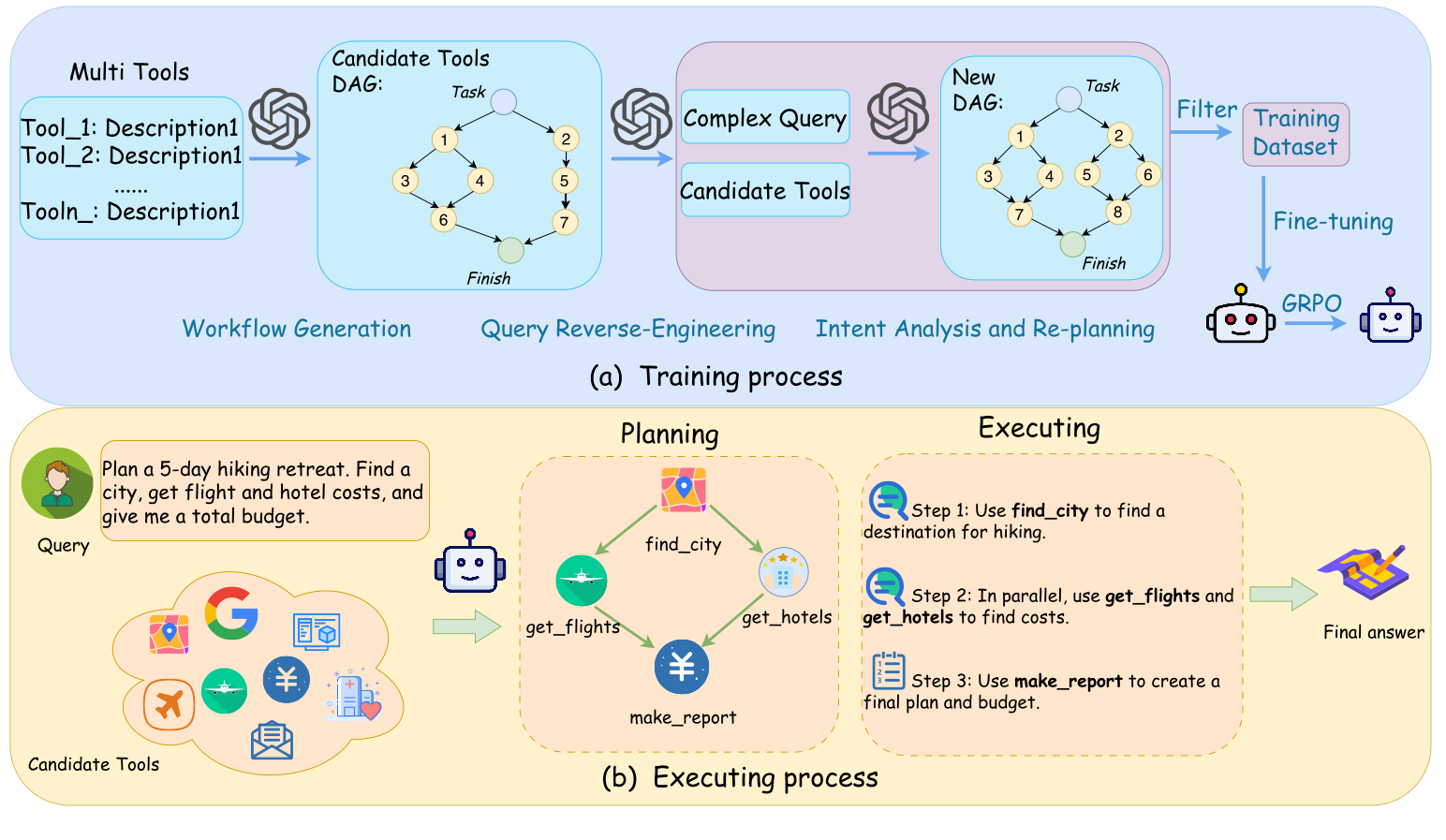
This image is a technical diagram illustrating a two-part process for an AI agent: (a) Training process and (b) Executing process. The diagram uses flowcharts, directed acyclic graphs (DAGs), and various icons to depict the stages of workflow generation, query processing, planning, and execution using a set of tools.
### Components/Axes
The image is divided horizontally into two main sections, each representing a distinct process:
**Section (a): Training process** (Upper half, predominantly light blue and light purple background)
This section is labeled "(a) Training process" at the bottom-center of its boundary. It describes the system's learning phase.
* **Workflow Generation Stage** (Leftmost, light blue background):
* **Multi Tools** box (top-left): A rectangular box containing a list of generic tools.
* Content:
* "Tool_1: Description1"
* "Tool_2: Description1"
* "......" (ellipsis indicating more tools)
* "Tooln_: Description1"
* **Candidate Tools DAG** (center-left): A directed acyclic graph (DAG) representing a potential workflow.
* Label: "Candidate Tools DAG: Task" (at the top)
* Nodes:
* Start Node: "Task" (light blue circle at the top)
* Intermediate Nodes: Numbered circles 1, 2, 3, 4, 5, 6, 7 (light yellow circles)
* End Node: "Finish" (light green circle at the bottom)
* Edges (arrows indicating flow): Task -> 1, Task -> 2; 1 -> 3, 1 -> 4; 2 -> 4, 2 -> 5; 3 -> 6; 4 -> 6, 4 -> 7; 5 -> 7; 6 -> Finish, 7 -> Finish.
* **Query Reverse-Engineering Stage** (Middle, light purple background):
* **Complex Query & Candidate Tools** box (center): A rectangular box containing two sub-labels.
* Content: "Complex Query" (top sub-box), "Candidate Tools" (bottom sub-box)
* **Intent Analysis and Re-planning Stage** (Rightmost, light blue background):
* **New DAG** (center-right): Another directed acyclic graph (DAG), representing a refined workflow.
* Label: "New DAG: Task" (at the top)
* Nodes:
* Start Node: "Task" (light blue circle at the top)
* Intermediate Nodes: Numbered circles 1, 2, 3, 4, 5, 6, 7, 8 (light yellow circles)
* End Node: "Finish" (light green circle at the bottom)
* Edges (arrows indicating flow): Task -> 1, Task -> 2; 1 -> 3, 1 -> 4; 2 -> 5, 2 -> 6; 3 -> 7; 4 -> 7, 4 -> 8; 5 -> 8; 6 -> 8; 7 -> Finish, 8 -> Finish.
* **Training Dataset** box (top-right): A rectangular box.
* Content: "Training Dataset"
* **GRPO Agent Icons** (bottom-right): Two robot icons connected by an arrow.
* Left Robot: Frowning face with red eyes.
* Right Robot: Smiling face with blue eyes.
* Text above arrow: "GRPO"
**Section (b): Executing process** (Lower half, predominantly light yellow background)
This section is labeled "(b) Executing process" at the bottom-center of its boundary. It describes how the trained system performs a task.
* **Query & Candidate Tools Stage** (Leftmost, light yellow background):
* **Query Icon & Text** (top-left): A circular icon of a person (green shirt) with a speech bubble next to it.
* Label: "Query" (below the person icon)
* Speech Bubble Content: "Plan a 5-day hiking retreat. Find a city, get flight and hotel costs, and give me a total budget."
* **Candidate Tools Cloud** (bottom-left): A cloud-shaped area containing various tool icons.
* Label: "Candidate Tools" (below the cloud)
* Icons (from top-left to bottom-right):
* Google Maps pin icon (red, yellow, blue, green)
* Google 'G' logo (red, yellow, blue, green)
* Document icon (blue, white)
* Airplane icon (orange)
* Airplane icon (green)
* Money symbol (Yen/Yuan, blue)
* Hospital/hotel building icon with a red heart (blue, white)
* Envelope icon (blue, white)
* **Planning Stage** (Middle, light yellow background):
* Label: "Planning" (centered at the top of this stage)
* **Planning DAG** (center): A directed acyclic graph (DAG) representing the specific plan for the query.
* Nodes (icons with labels below):
* Top: Google Maps pin icon, labeled "find_city"
* Left: Green airplane icon, labeled "get_flights"
* Right: Yellow hotel/stars icon, labeled "get_hotels"
* Bottom: Blue money symbol, labeled "make_report"
* Edges (arrows indicating flow): find_city -> get_flights; find_city -> get_hotels; get_flights -> make_report; get_hotels -> make_report.
* **Executing Stage** (Rightmost, light yellow background):
* Label: "Executing" (centered at the top of this stage)
* **Execution Steps** (center-right): A rectangular box listing three numbered steps.
* Step 1: "Step 1: Use **find_city** to find a destination for hiking." (Icon: magnifying glass over a map pin)
* Step 2: "Step 2: In parallel, use **get_flights** and **get_hotels** to find costs." (Icon: two magnifying glasses over a map pin)
* Step 3: "Step 3: Use **make_report** to create a final plan and budget." (Icon: document with numbered lines)
* **Final Answer Icon** (bottom-right): An icon depicting a document with a pen.
* Label: "Final answer" (below the icon)
**Connecting Elements and Icons:**
* **Gear/Brain Icon**: Represents a processing or generation step, seen between "Multi Tools" and "Candidate Tools DAG", and between "Complex Query" and "New DAG".
* **Robot Icons**: Represent the AI agent. A frowning robot is fine-tuned into a smiling robot during training. A smiling robot processes the query in the execution phase.
* **Arrows**: Indicate the direction of flow or data transformation between components.
### Detailed Analysis
**Section (a) Training process:**
The training process begins with a collection of "Multi Tools," each having a generic "Description1." These tools are fed into a "Workflow Generation" module (represented by the gear/brain icon) to produce a "Candidate Tools DAG." This DAG outlines a potential sequence of tool usage, starting from a "Task" and ending at "Finish," with intermediate nodes numbered 1 through 7.
Following this, a "Complex Query" and the "Candidate Tools" are processed through "Query Reverse-Engineering" and "Intent Analysis and Re-planning" (another gear/brain icon). This step generates a "New DAG," which is a refined or adapted workflow. This "New DAG" is more complex, featuring 8 intermediate nodes, suggesting a more detailed or optimized plan.
The output of the "New DAG" is used to "Filter Training Dataset" and then for "Fine-tuning" an AI agent. The fine-tuning process, labeled "GRPO," transforms a "frowning" robot (presumably an untrained or poorly performing agent) into a "smiling" robot (a well-trained or high-performing agent). This implies an iterative learning process, possibly using reinforcement learning, where the agent learns to generate and execute effective workflows.
**Section (b) Executing process:**
The execution process starts with a user providing a natural language "Query," such as "Plan a 5-day hiking retreat. Find a city, get flight and hotel costs, and give me a total budget." The system also has access to a pool of "Candidate Tools," represented by various icons like maps, search, documents, flights, hotels, and financial tools.
In the "Planning" stage, the system, likely guided by the trained agent, constructs a specific DAG tailored to the query. This DAG shows a clear dependency structure:
1. `find_city` (using a map tool) is the initial step.
2. Once a city is found, `get_flights` (using a flight tool) and `get_hotels` (using a hotel tool) can proceed in parallel.
3. Finally, `make_report` (using a money/report tool) combines the information from flights and hotels to create a budget.
The "Executing" stage then describes the sequential and parallel steps derived from the "Planning" DAG:
1. "Step 1: Use **find_city** to find a destination for hiking."
2. "Step 2: In parallel, use **get_flights** and **get_hotels** to find costs."
3. "Step 3: Use **make_report** to create a final plan and budget."
This execution leads to a "Final answer," represented by a document and pen icon.
### Key Observations
* **DAG-centric Approach**: Both training and execution heavily rely on Directed Acyclic Graphs (DAGs) to model and manage complex workflows, indicating a structured and dependency-aware approach to task completion.
* **Iterative Refinement in Training**: The transition from "Candidate Tools DAG" to "New DAG" suggests a process of refining or optimizing workflows based on complex queries and intent analysis.
* **Agent Improvement**: The "GRPO" fine-tuning step, transforming a frowning robot to a smiling one, clearly indicates that the training process aims to improve the agent's capability or performance.
* **Tool-Use Specialization**: In the execution phase, generic "Candidate Tools" are mapped to specific, named functions like `find_city`, `get_flights`, `get_hotels`, and `make_report`, demonstrating the system's ability to select and apply relevant tools.
* **Parallelism in Execution**: The "Planning" DAG and "Executing" steps explicitly show that `get_flights` and `get_hotels` can run "in parallel," highlighting the system's ability to optimize task execution time.
### Interpretation
This diagram illustrates a sophisticated AI system designed to understand complex user queries and execute them by orchestrating a series of specialized tools. The core idea is to enable an AI agent to break down a high-level goal into a structured workflow (a DAG) of tool calls.
The **training process** is crucial for teaching the agent how to construct these effective workflows. It starts with a broad set of tools and learns to generate and refine DAGs that represent valid and efficient ways to achieve tasks. The "Query Reverse-Engineering" and "Intent Analysis" steps suggest that the system learns to infer the underlying intent of a complex query and adapt its planning strategy accordingly. The "GRPO" fine-tuning indicates that this learning is likely driven by optimizing some performance metric, possibly through reinforcement learning, where the agent is rewarded for generating successful plans.
The **executing process** demonstrates the practical application of this learned capability. Given a user's query, the agent doesn't just execute a single command but intelligently plans a multi-step, potentially parallel, sequence of tool invocations. For the hiking retreat example, the agent understands that finding a city is a prerequisite for finding flights and hotels, and both are needed before a final budget can be compiled. This shows a hierarchical understanding of tasks and their dependencies.
In essence, the system acts as an intelligent orchestrator, translating human intent into actionable, tool-based workflows. This approach is highly relevant for developing general-purpose AI agents that can interact with a wide array of digital tools and services to solve real-world problems, moving beyond single-task capabilities to complex, multi-faceted problem-solving. The "Description1" for all tools in the training phase might imply that the system learns to generalize from tool descriptions rather than requiring specific examples for each tool, making it adaptable to new tools.