# Technical Document Extraction: AI Agent Training and Execution Workflow
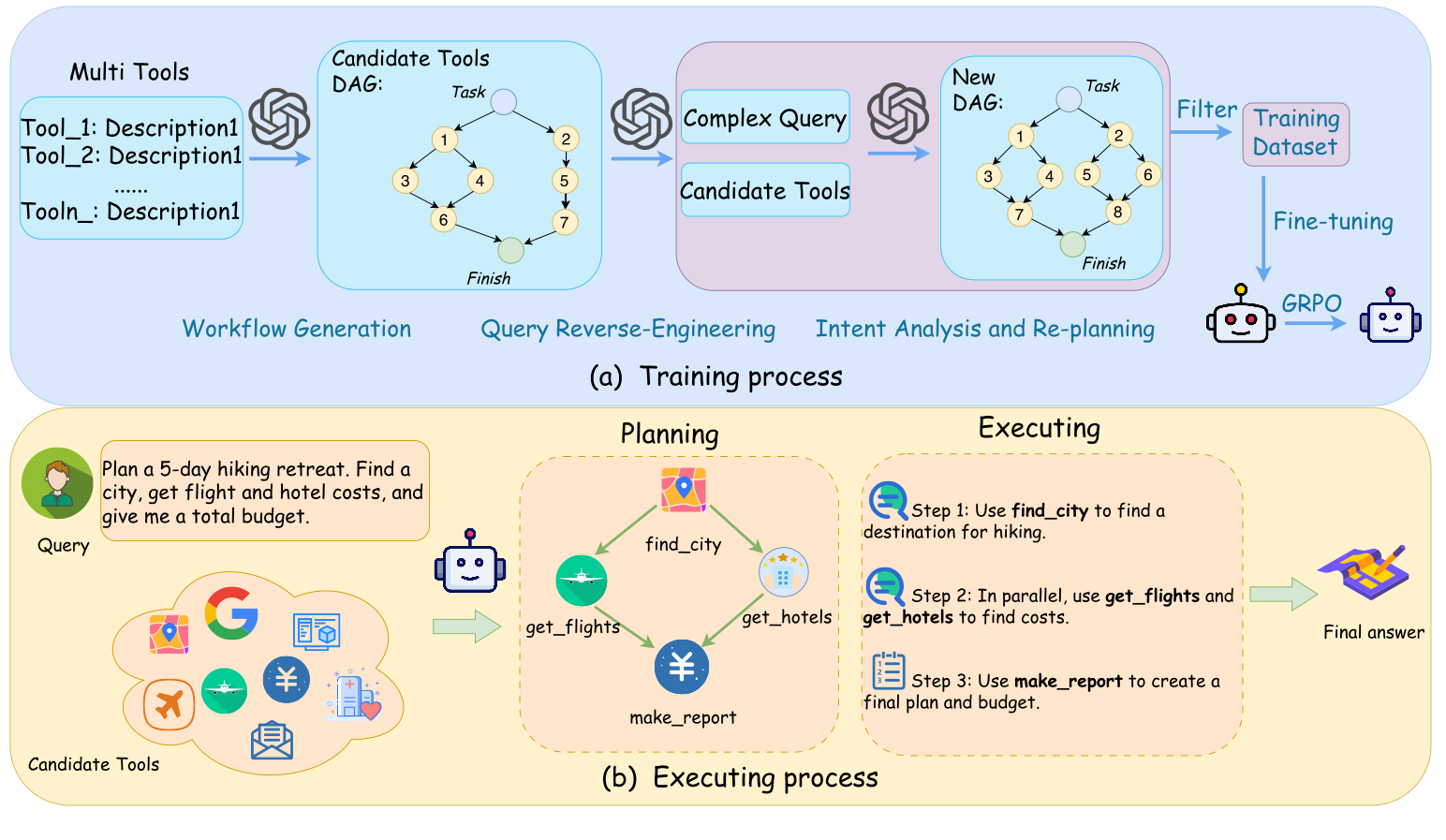
This document provides a comprehensive technical breakdown of the provided image, which illustrates a two-part process for training and executing an AI agent capable of complex task planning and tool usage.
---
## 1. Overview
The image is divided into two primary horizontal sections:
* **(a) Training process:** A blue-shaded region detailing the data generation and model optimization pipeline.
* **(b) Executing process:** A yellow-shaded region illustrating the real-time application of the trained model to a user query.
---
## 2. Section (a): Training Process
This section describes the "Workflow Generation," "Query Reverse-Engineering," and "Intent Analysis and Re-planning" phases.
### Component 1: Multi Tools Input
A list of available tools is provided as the initial input:
* **Tool_1:** Description1
* **Tool_2:** Description1
* **......**
* **Tool_n:** Description1
### Component 2: Workflow Generation
An OpenAI/GPT-style logo indicates an LLM processes the tools to create a **Candidate Tools DAG (Directed Acyclic Graph)**:
* **Structure:**
* Starts at a node labeled **Task**.
* Flows into a parallel structure:
* Path A: Node 1 $\rightarrow$ Node 3 $\rightarrow$ Node 6.
* Path B: Node 1 $\rightarrow$ Node 4 $\rightarrow$ Node 6.
* Path C: Node 2 $\rightarrow$ Node 5 $\rightarrow$ Node 7.
* All paths converge at a node labeled **Finish**.
### Component 3: Query Reverse-Engineering & Intent Analysis
The DAG and tools are passed through another LLM process to generate a **Complex Query**. This is then fed into a third LLM stage for **Intent Analysis and Re-planning**, resulting in a **New DAG**:
* **New DAG Structure:**
* Starts at **Task**.
* Branch 1: Node 1 $\rightarrow$ Node 3 $\rightarrow$ Node 7.
* Branch 2: Node 1 $\rightarrow$ Node 4 $\rightarrow$ Node 7.
* Branch 3: Node 2 $\rightarrow$ Node 5 $\rightarrow$ Node 8.
* Branch 4: Node 2 $\rightarrow$ Node 6 $\rightarrow$ Node 8.
* All paths converge at **Finish**.
### Component 4: Model Optimization
* **Filter:** The generated data is filtered into a **Training Dataset**.
* **Fine-tuning:** The dataset is used to fine-tune a base model (represented by a robot icon).
* **GRPO:** A final optimization step labeled "GRPO" (likely Group Relative Policy Optimization) transitions the model to its final state.
---
## 3. Section (b): Executing Process
This section demonstrates the inference flow from user query to final answer.
### Component 1: User Query and Candidate Tools
* **Query:** "Plan a 5-day hiking retreat. Find a city, get flight and hotel costs, and give me a total budget."
* **Candidate Tools:** A cloud containing various icons representing Google, maps, flights, currency/finance, and messaging.
### Component 2: Planning (DAG Generation)
The agent generates a specific execution graph:
1. **find_city** (Map icon)
2. **get_flights** (Airplane icon) and **get_hotels** (Building icon) are triggered in parallel after `find_city`.
3. **make_report** (Currency/Yen icon) is the final node receiving input from both flights and hotels.
### Component 3: Executing (Step-by-Step)
The plan is translated into sequential/parallel execution steps:
* **Step 1:** Use `find_city` to find a destination for hiking.
* **Step 2:** In parallel, use `get_flights` and `get_hotels` to find costs.
* **Step 3:** Use `make_report` to create a final plan and budget.
### Component 4: Output
* **Final answer:** Represented by a map and pencil icon, signifying the completed itinerary and budget report.
---
## 4. Summary of Flow
1. **Training:** Synthetic workflows (DAGs) are generated from tool descriptions, reverse-engineered into queries, and used to fine-tune a model via GRPO.
2. **Execution:** The fine-tuned model receives a natural language query, selects tools, generates a planning DAG, and executes the steps to provide a final answer.