## Diagram: AI Agent Training and Execution Workflow
### Overview
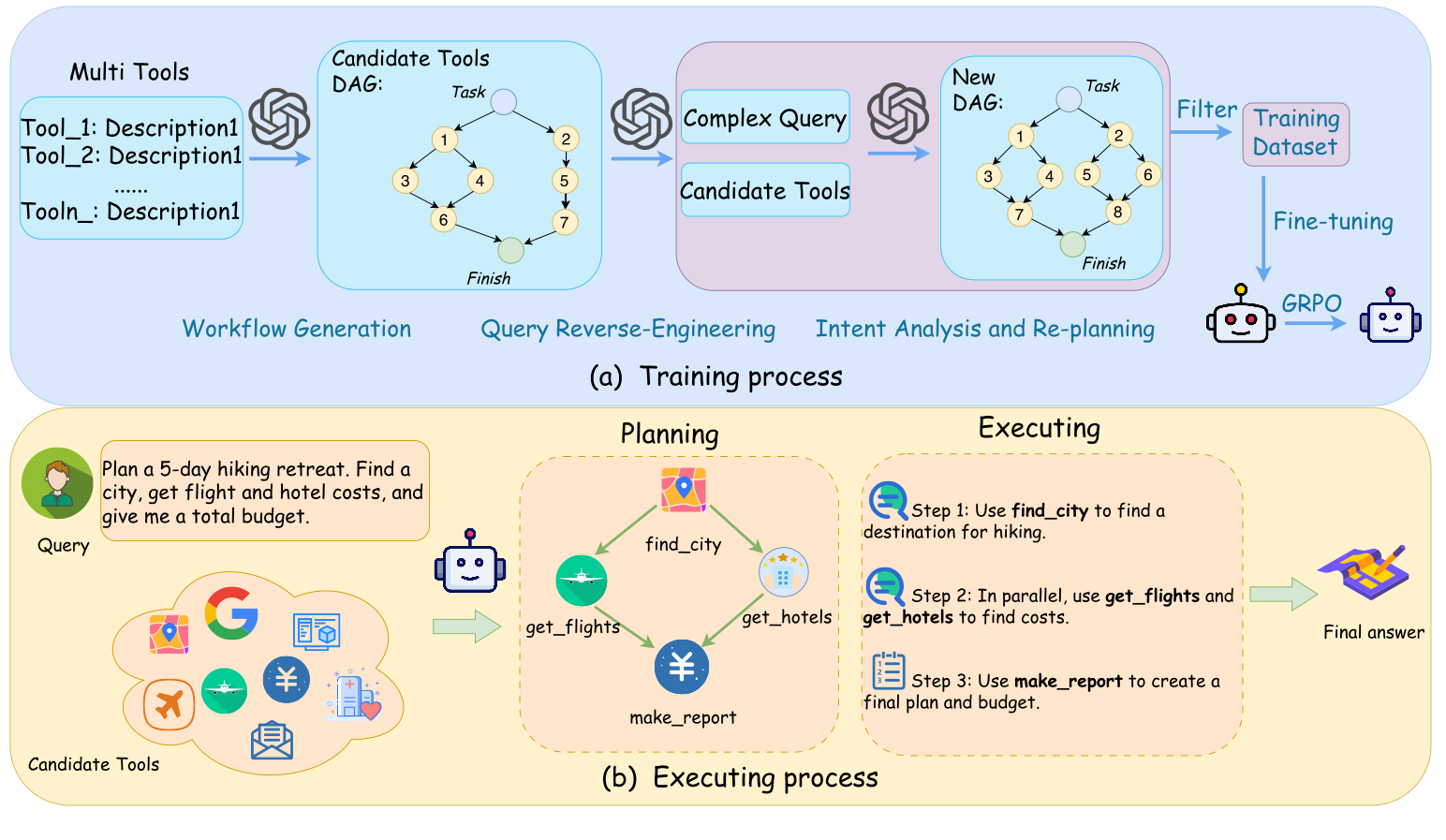
The image is a two-part technical diagram illustrating a framework for training and deploying an AI agent that uses multiple tools to solve complex queries. The top section (a) depicts the **Training process**, showing how tool descriptions and queries are used to generate training data for fine-tuning an agent. The bottom section (b) illustrates the **Executing process**, demonstrating how the trained agent plans and executes a specific user query by composing tool calls into a Directed Acyclic Graph (DAG).
### Components/Axes
The diagram is divided into two main colored regions:
1. **Top Region (Light Blue):** Labeled "(a) Training process".
2. **Bottom Region (Light Yellow):** Labeled "(b) Executing process".
**Key Textual Elements and Labels:**
* **Training Process (a):**
* **Leftmost Box:** "Multi Tools" containing a list: `Tool_1: Description1`, `Tool_2: Description1`, `......`, `Tooln_: Description1`.
* **First DAG Box:** "Candidate Tools DAG:" with a graph containing nodes labeled `Task`, `1`, `2`, `3`, `4`, `5`, `6`, `7`, and `Finish`.
* **Middle Boxes:** "Complex Query" and "Candidate Tools".
* **Second DAG Box:** "New DAG:" with a graph containing nodes labeled `Task`, `1`, `2`, `3`, `4`, `5`, `6`, `7`, `8`, and `Finish`.
* **Process Flow Labels (below the boxes):** "Workflow Generation", "Query Reverse-Engineering", "Intent Analysis and Re-planning".
* **Right Side:** An arrow labeled "Filter" points to a box labeled "Training Dataset". An arrow labeled "Fine-tuning" points from the dataset to a robot icon. The robot is labeled "GRPO".
* **Executing Process (b):**
* **Left Side - User Query:** A user icon next to a text box containing: "Plan a 5-day hiking retreat. Find a city, get flight and hotel costs, and give me a total budget." This is labeled "Query".
* **Left Side - Tools:** A cloud-shaped container labeled "Candidate Tools" filled with various application icons (e.g., Google logo, map pin, airplane, hotel, yen symbol, envelope).
* **Center - Planning:** A section titled "Planning" containing a DAG with tool icons and labels: `find_city` (map pin), `get_flights` (airplane), `get_hotels` (hotel), and `make_report` (yen symbol). Arrows show the flow: `find_city` -> `get_flights` & `get_hotels` (in parallel) -> `make_report`.
* **Right - Execution Steps:** A section titled "Executing" with three steps:
* "Step 1: Use **find_city** to find a destination for hiking."
* "Step 2: In parallel, use **get_flights** and **get_hotels** to find costs."
* "Step 3: Use **make_report** to create a final plan and budget."
* **Final Output:** An arrow points to an icon of a document with a pencil, labeled "Final answer".
### Detailed Analysis
**Training Process Flow (a):**
1. **Input:** A set of tool descriptions ("Multi Tools") and a "Complex Query".
2. **Process:** The system performs "Workflow Generation" to create an initial "Candidate Tools DAG". It then engages in "Query Reverse-Engineering" and "Intent Analysis and Re-planning" to produce a "New DAG".
3. **Output Generation:** The new DAG is filtered to create a "Training Dataset".
4. **Model Training:** The dataset is used for "Fine-tuning" to produce a trained agent model, represented by a robot icon labeled "GRPO".
**Executing Process Flow (b**** AI,##, AI, для,**, AI, всужизации, AI, для,,, AI я, AI0.,,,**я, я,, tools.об,,00 000 наи,.. и002000**化的ations, **.00я. .00,0.4.0000.,.... autom.0 . **,,,**### ** Key Observations
* **DAG-Centric Design:**** Both training and execution rely on representing workflows as Directed Acyclic Graphs (DAGs), where nodes represent tasks or tool calls and edges represent dependencies.
* **Two-Stage Process:** The framework clearly separates the offline **training** of the agent (learning to create good DAGs) from the online **execution** (using a trained agent to solve a new query).
* **Parallel Execution:** The executing process diagram explicitly highlights the ability to run independent tool calls (`get_flights` and `get_hotels`) in parallel, which is a key efficiency feature.
* **GRPO Agent:** The trained agent is referred to as "GRPO," which is likely an acronym for the specific model or algorithm used (e.g., "Graph-based Reasoning and Planning Operator").
### Interpretation
This diagram outlines a sophisticated method for building AI agents that can solve multi-step problems by intelligently composing available tools. The core innovation appears to be using **reverse-engineering and re-planning** during training to generate high-quality training data (DAGs) from complex queries. This teaches the agent not just to use tools, but to structure their use optimally.
The executing process demonstrates the practical benefit: a vague, high-level user request ("Plan a hiking retreat") is decomposed into a concrete, executable plan with clear steps and parallelizable sub-tasks. The agent acts as a **reasoning engine**, translating intent into action. The "GRPO" agent is the product of this training, capable of taking a new query and candidate tools, and autonomously generating and following an efficient execution plan to produce a final answer. This approach bridges the gap between large language models' reasoning capabilities and the practical need to interact with external APIs and services.