# Technical Diagram Analysis: Question Answering System Workflow
## Diagram Overview
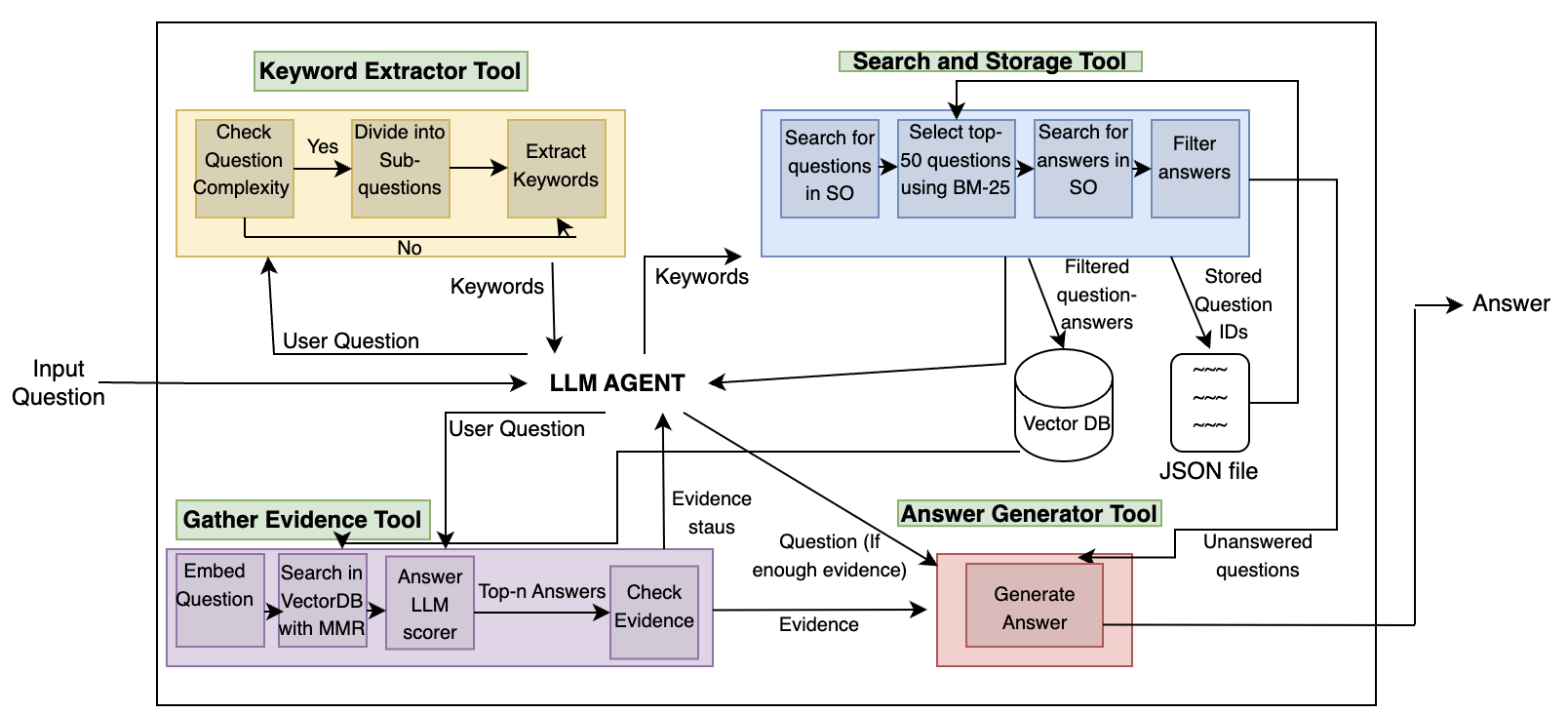
This flowchart illustrates a multi-stage technical system for processing user questions and generating answers. The system integrates keyword extraction, evidence gathering, and answer generation through interconnected tools and processes.
---
## Component Breakdown
### 1. Keyword Extractor Tool (Yellow Box)
**Function**: Processes input questions to identify relevant keywords
- **Decision Flow**:
- `Check Question Complexity` → Yes/No
- **Yes**:
- `Divide into Sub-questions` → `Extract Keywords`
- **No**: Direct `Keywords` output
- **Inputs**: User Question
- **Outputs**: Keywords
### 2. Search and Storage Tool (Blue Box)
**Function**: Manages question-answer database operations
- **Process Flow**:
1. `Search for questions in SO`
2. `Select top-50 questions using BM-25`
3. `Search for answers in SO`
4. `Filter answers`
- **Storage**:
- `Stored Question IDs` → JSON file
- **Outputs**:
- Filtered question-answers
- Unanswered questions
### 3. Gather Evidence Tool (Purple Box)
**Function**: Validates answer relevance through evidence scoring
- **Process Flow**:
1. `Embed Question`
2. `Search in VectorDB with MMR`
3. `Answer LLM scorer` → `Top-n Answers`
4. `Check Evidence` (Evidence status: sufficient/insufficient)
- **Inputs**: User Question
- **Outputs**: Evidence status
### 4. LLM Agent (Central Node)
**Function**: Coordinates system operations
- **Connections**:
- Receives: User Question, Keywords, Evidence status
- Outputs: Evidence status to Answer Generator Tool
### 5. Answer Generator Tool (Red Box)
**Function**: Generates final answers based on evidence
- **Process Flow**:
- `Generate Answer` (conditional on evidence status)
- **Inputs**: Evidence status from LLM Agent
- **Outputs**: Answer
---
## System Workflow
1. **Input**: User Question
2. **Keyword Extraction**:
- Complex questions split into sub-questions
- Keywords extracted for all paths
3. **Evidence Gathering**:
- Questions embedded and searched in VectorDB
- Evidence status determined via LLM scoring
4. **Answer Generation**:
- Answers generated only if sufficient evidence exists
5. **Storage**:
- Processed questions/answers stored in JSON
- Unanswered questions flagged
---
## Color Coding Legend
- **Yellow**: Keyword Extractor Tool
- **Blue**: Search and Storage Tool
- **Purple**: Gather Evidence Tool
- **Red**: Answer Generator Tool
---
## Key Technical Features
1. **Modular Architecture**: Separate tools handle distinct processing stages
2. **Evidence-Based Generation**: Answers only produced when evidence threshold met
3. **Vector Database Integration**: Uses MMR (Maximal Marginal Relevance) for semantic search
4. **BM-25 Algorithm**: Implements for question ranking in search phase
5. **JSON Storage**: Structured storage of processed question-answer pairs
---
## Diagram Structure
- **Input Flow**: Left-to-right progression from user question to answer
- **Conditional Branching**: Complexity check creates parallel processing paths
- **Feedback Loop**: Evidence status influences answer generation
- **Storage Integration**: Final output connects to persistent JSON storage
---
## Technical Notes
- **VectorDB**: Likely a semantic search database for question-answer pairs
- **BM-25**: Information retrieval algorithm for ranking search results
- **MMR**: Scoring function for improving search result relevance
- **LLM Scorer**: Likely uses large language model for evidence evaluation
---
## System Constraints
- **Top-n Answers**: Limits evidence consideration to top results
- **Filtering Stage**: Ensures answer quality before storage
- **Unanswered Questions**: Flagged for potential future processing
---
## Diagram Spatial Analysis
- **Central Node**: LLM Agent coordinates all system operations
- **Input/Output**: Single input (User Question), single output (Answer)
- **Process Segregation**: Each tool occupies distinct color-coded region
- **Conditional Flow**: Arrows split/merge based on question complexity and evidence status
---
## Missing Elements
- No explicit data points or numerical values present
- No time-based metrics or performance indicators shown
- No user interface components depicted
---
## Conclusion
This diagram represents a sophisticated question-answering pipeline combining traditional information retrieval (BM-25), semantic search (VectorDB with MMR), and large language model capabilities. The system emphasizes evidence-based answer generation and structured storage of processed Q&A pairs.