## Algorithm Diagram: Multi-Split Sorting
### Overview
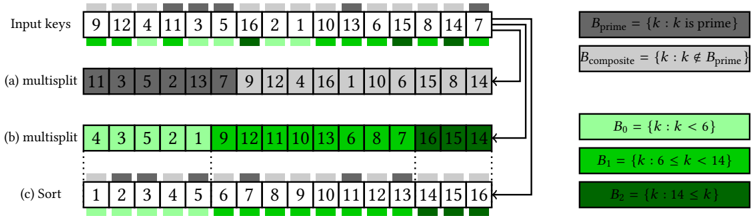
The image illustrates a multi-split sorting algorithm. It shows the process of sorting a set of input keys through multiple splitting and sorting stages. The diagram includes the initial input keys, two multi-split stages, and the final sorted output. The keys are categorized based on whether they are prime or composite, and also based on their numerical value falling into different ranges.
### Components/Axes
* **Input keys:** The initial unsorted sequence of numbers.
* **(a) multisplit:** The first splitting stage.
* **(b) multisplit:** The second splitting stage.
* **(c) Sort:** The final sorted sequence.
* **Legend (Right side):**
* `Bprime = {k: k is prime}` (Gray)
* `Bcomposite = {k: k ≠ Bprime}` (Light Gray)
* `B0 = {k: k < 6}` (Light Green)
* `B1 = {k: 6 ≤ k < 14}` (Green)
* `B2 = {k: 14 ≤ k}` (Dark Green)
### Detailed Analysis
**1. Input Keys:**
The input keys are: 9, 12, 4, 11, 3, 5, 16, 2, 1, 10, 13, 6, 15, 8, 14, 7.
Each key is represented in a box. The color below each box indicates the range the number falls into:
* 9 (Green: B1)
* 12 (Green: B1)
* 4 (Light Green: B0)
* 11 (Green: B1)
* 3 (Light Green: B0)
* 5 (Light Green: B0)
* 16 (Dark Green: B2)
* 2 (Light Green: B0)
* 1 (Light Green: B0)
* 10 (Green: B1)
* 13 (Green: B1)
* 6 (Green: B1)
* 15 (Dark Green: B2)
* 8 (Green: B1)
* 14 (Dark Green: B2)
* 7 (Green: B1)
**2. (a) multisplit:**
The keys after the first split are: 11, 3, 5, 2, 13, 7, 9, 12, 4, 16, 1, 10, 6, 15, 8, 14.
The colors above each box indicate whether the number is prime or composite:
* 11 (Gray: Bprime)
* 3 (Gray: Bprime)
* 5 (Gray: Bprime)
* 2 (Gray: Bprime)
* 13 (Gray: Bprime)
* 7 (Gray: Bprime)
* 9 (Light Gray: Bcomposite)
* 12 (Light Gray: Bcomposite)
* 4 (Light Gray: Bcomposite)
* 16 (Light Gray: Bcomposite)
* 1 (Light Gray: Bcomposite)
* 10 (Light Gray: Bcomposite)
* 6 (Light Gray: Bcomposite)
* 15 (Light Gray: Bcomposite)
* 8 (Light Gray: Bcomposite)
* 14 (Light Gray: Bcomposite)
**3. (b) multisplit:**
The keys after the second split are: 4, 3, 5, 2, 1, 9, 12, 11, 10, 13, 6, 8, 7, 16, 15, 14.
Each key is represented in a box. The color below each box indicates the range the number falls into:
* 4 (Light Green: B0)
* 3 (Light Green: B0)
* 5 (Light Green: B0)
* 2 (Light Green: B0)
* 1 (Light Green: B0)
* 9 (Green: B1)
* 12 (Green: B1)
* 11 (Green: B1)
* 10 (Green: B1)
* 13 (Green: B1)
* 6 (Green: B1)
* 8 (Green: B1)
* 7 (Green: B1)
* 16 (Dark Green: B2)
* 15 (Dark Green: B2)
* 14 (Dark Green: B2)
**4. (c) Sort:**
The final sorted keys are: 1, 2, 3, 4, 5, 6, 7, 8, 9, 10, 11, 12, 13, 14, 15, 16.
The colors above each box indicate whether the number is prime or composite:
* 1 (Light Gray: Bcomposite)
* 2 (Gray: Bprime)
* 3 (Gray: Bprime)
* 4 (Light Gray: Bcomposite)
* 5 (Gray: Bprime)
* 6 (Light Gray: Bcomposite)
* 7 (Gray: Bprime)
* 8 (Light Gray: Bcomposite)
* 9 (Light Gray: Bcomposite)
* 10 (Light Gray: Bcomposite)
* 11 (Gray: Bprime)
* 12 (Light Gray: Bcomposite)
* 13 (Gray: Bprime)
* 14 (Light Gray: Bcomposite)
* 15 (Light Gray: Bcomposite)
* 16 (Light Gray: Bcomposite)
### Key Observations
* The first multi-split stage categorizes numbers based on whether they are prime or composite.
* The second multi-split stage categorizes numbers based on their value ranges (less than 6, between 6 and 14, and greater than or equal to 14).
* The final stage results in a fully sorted sequence of numbers from 1 to 16.
### Interpretation
The diagram illustrates a sorting algorithm that leverages multiple splitting stages based on different criteria (prime/composite and value ranges) to achieve a sorted output. This approach can be useful for parallelizing the sorting process, as each split can be performed independently. The algorithm demonstrates a combination of categorization and sorting techniques to efficiently arrange the input keys.