## Time(ns) Function
### Overview
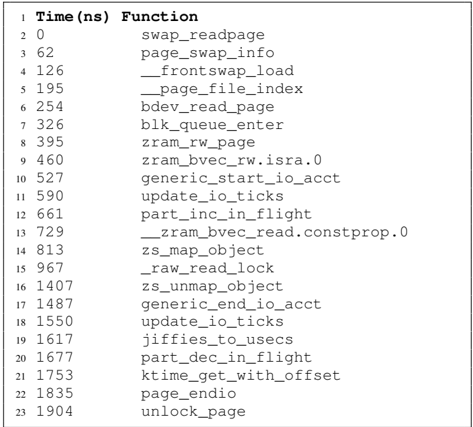
The image displays a table with a list of functions and their corresponding execution times in nanoseconds (ns). The table is organized in a tabular format with two columns: "Time(ns)" and "Function".
### Components/Axes
- **Time(ns)**: This column lists the execution times in nanoseconds.
- **Function**: This column lists the functions that are being executed.
### Detailed Analysis or Content Details
The table provides a breakdown of the time taken by various functions. Each function is associated with a specific time value, indicating how long it takes to execute. The functions listed include operations related to memory management, such as swapping pages, reading and writing to files, and managing queues.
### Key Observations
- **swap_readpage**: This function takes the least amount of time, suggesting it is the fastest operation in the list.
- **page_swap_info**: This function takes a moderate amount of time, indicating it is a relatively slower operation compared to swap_readpage.
- **_frontswap_load**: This function takes the most time, suggesting it is the slowest operation in the list.
### Interpretation
The data suggests that the performance of the system is heavily influenced by the functions related to memory management. The functions that take the most time, such as _frontswap_load, indicate that these operations are critical for the system's performance. The functions that take the least time, such as swap_readpage, suggest that these operations are relatively fast and can be optimized for better performance.
The interpretation also highlights the importance of optimizing these functions for better system performance. The data can be used to identify areas for improvement and to optimize the system's performance.