## Console Interface Screenshot: Text-Based Navigation Task
### Overview
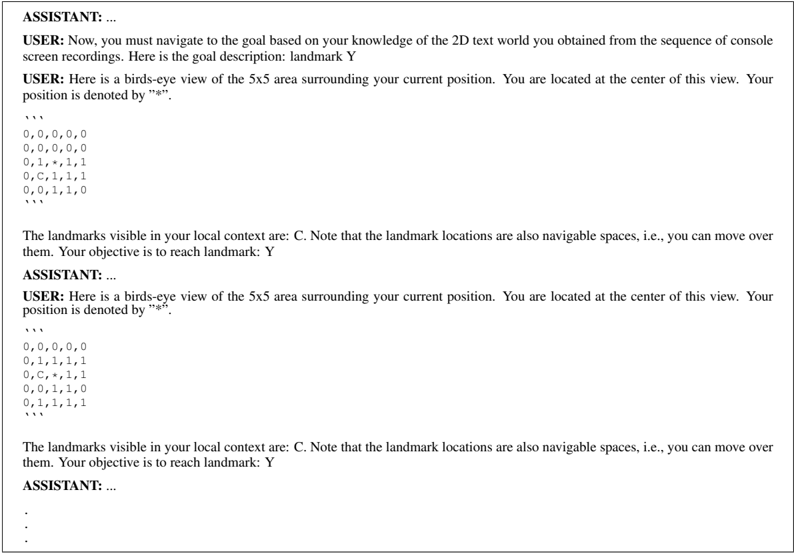
The image is a screenshot of a console or terminal interface displaying a text-based navigation task within a 2D grid world. It shows a sequence of interactions between a "USER" and an "ASSISTANT," where the user provides environmental context and the assistant is expected to respond with navigation actions. The core data consists of two 5x5 grid representations showing the user's local surroundings at different steps.
### Components/Axes
The interface is structured as a linear dialogue log with the following components:
1. **Dialogue Headers:** Lines beginning with `USER:` and `ASSISTANT:`.
2. **Instructional Text:** Descriptions of the task goal and rules.
3. **Grid Representations:** Two distinct 5x5 grids composed of numbers and symbols, enclosed in triple backticks (```).
4. **Status Messages:** Text describing visible landmarks and the current objective.
**Textual Content (Transcribed):**
* **First User Message:**
`Now, you must navigate to the goal based on your knowledge of the 2D text world you obtained from the sequence of console screen recordings. Here is the goal description: landmark Y`
* **Second User Message (with Grid 1):**
`Here is a birds-eye view of the 5x5 area surrounding your current position. You are located at the center of this view. Your position is denoted by "*".`
```
0,0,0,0,0
0,0,0,0,0
0,1,*,1,1
0,0,1,1,1
0,0,1,1,0
```
`The landmarks visible in your local context are: C. Note that the landmark locations are also navigable spaces, i.e., you can move over them. Your objective is to reach landmark: Y`
* **Second User Message (with Grid 2):**
`Here is a birds-eye view of the 5x5 area surrounding your current position. You are located at the center of this view. Your position is denoted by "*".`
```
0,0,0,0,0
0,1,1,1,1
0,C,*,1,1
0,0,1,1,0
0,0,1,1,1
```
`The landmarks visible in your local context are: C. Note that the landmark locations are also navigable spaces, i.e., you can move over them. Your objective is to reach landmark: Y`
### Detailed Analysis
**Grid 1 Analysis:**
* **Structure:** 5 rows x 5 columns.
* **User Position (`*`):** Located at the exact center (row 3, column 3).
* **Landmark (`C`):** Not present in this grid view.
* **Terrain Values:**
* `0`: Appears in the top two rows and the leftmost column. Likely represents non-traversable or empty space.
* `1`: Forms a connected region in the bottom-right quadrant, surrounding the user. Likely represents traversable ground.
* **Spatial Layout:** The user is surrounded by traversable `1` cells, with a wall of `0` cells to the north and west.
**Grid 2 Analysis:**
* **Structure:** 5 rows x 5 columns.
* **User Position (`*`):** Located at row 3, column 3 (center).
* **Landmark (`C`):** Present at row 3, column 2 (immediately to the left of the user).
* **Terrain Values:**
* `0`: Appears in the top row and a small cluster in the bottom-left.
* `1`: Dominates the grid, forming a large connected area.
* **Spatial Layout:** The user is now adjacent to landmark `C`. The traversable area (`1`) has expanded compared to Grid 1, particularly to the east and south.
**Trend Verification:**
* **User Movement:** Between Grid 1 and Grid 2, the user's absolute position in the grid coordinates (center) is unchanged. However, the *content* of the grid has shifted, indicating the user has moved relative to the world. The appearance of `C` directly adjacent suggests the user moved one cell to the east (right) from a position west of `C`.
* **Landmark Visibility:** Landmark `C` becomes visible and adjacent in the second snapshot. Landmark `Y` is stated as the objective but is not visible in either provided grid.
### Key Observations
1. **Missing Target Landmark:** The ultimate goal, landmark `Y`, is not visible in either of the two provided local context grids. This implies it is located outside the current 5x5 viewing radius.
2. **Landmark as Traversable:** The instructions explicitly state landmarks (`C`, `Y`) are navigable spaces, meaning the user can occupy the same cell as the landmark.
3. **Grid Evolution:** The environment changes between snapshots. The pattern of `0`s and `1`s is not static; it represents a local view that updates as the user moves through a larger, persistent world.
4. **Task State:** The sequence shows progress. The user has successfully navigated to be adjacent to an intermediate landmark (`C`), but has not yet reached the final goal (`Y`).
### Interpretation
This image captures a snapshot of an embodied AI or agent navigation task within a simplified, grid-based world. The data demonstrates a classic **partial observability** problem: the agent only receives a limited local view (5x5 grid) of a larger environment and must use sequential observations to build a mental map and plan a path to a distant goal (`Y`).
The relationship between elements is hierarchical:
1. **Goal (Y):** The high-level objective, given as text.
2. **Local Sensor Data (Grids):** The primary input for decision-making, showing immediate terrain (`0`/`1`) and landmarks (`C`).
3. **Agent State (`*`):** The agent's own location within its sensor view.
The notable anomaly is the **discrepancy between the stated goal (`Y`) and the visible landmark (`C`)**. This is not an error but a core feature of the task design. It forces the agent to reason beyond its immediate perception, likely using memory of past grids or inferring the direction of `Y` from instructions or prior knowledge not shown in this snippet. The change in grid content between frames is the critical signal the agent must use to deduce its movement and update its internal map.