# Technical Document Extraction: Accessibility Settings Interface
## 1. Header Information
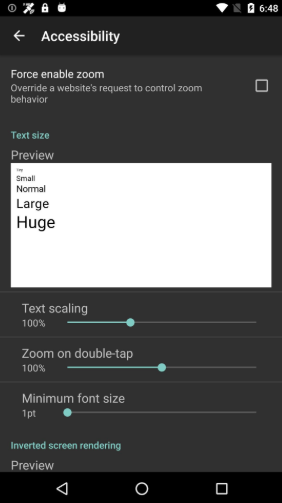
* **Status Bar (Top):** Displays system icons including a satellite/GPS icon, a lock icon, an Android mascot icon, Wi-Fi signal, cellular signal, and battery level. The time is displayed as **6:48**.
* **Navigation Bar (Top):** Contains a back arrow icon followed by the title **"Accessibility"**.
## 2. Component Breakdown
### Section: Zoom Controls
* **Label:** Force enable zoom
* **Description:** Override a website's request to control zoom behavior.
* **Input Type:** Checkbox (currently **Unchecked**).
### Section: Text Size
* **Section Header:** Text size (displayed in teal).
* **Sub-label:** Preview
* **Preview Box Content:** A white rectangular box demonstrating various font scales:
* Tiny
* Small
* Normal
* Large
* Huge
### Section: Scaling Sliders
This section contains three horizontal sliders with teal adjustment handles.
| Setting Label | Current Value | Slider Position |
| :--- | :--- | :--- |
| **Text scaling** | 100% | Centered (approx. 40% of the track) |
| **Zoom on double-tap** | 100% | Slightly right of center (approx. 55% of the track) |
| **Minimum font size** | 1pt | Far left (approx. 15% of the track) |
### Section: Screen Rendering
* **Section Header:** Inverted screen rendering (displayed in teal).
* **Sub-label:** Preview
* *(Note: The bottom of the screen is cut off, showing only the start of this section.)*
## 3. System Navigation (Bottom)
* Standard Android soft keys: **Back** (Triangle), **Home** (Circle), and **Recent Apps** (Square).
## 4. Visual Style Summary
* **Background:** Dark gray/Black (Dark Mode).
* **Primary Text Color:** White.
* **Secondary/Header Text Color:** Teal.
* **Interactive Elements:** Teal sliders and white checkboxes.