# Technical Document Extraction: Search Methodology Comparison
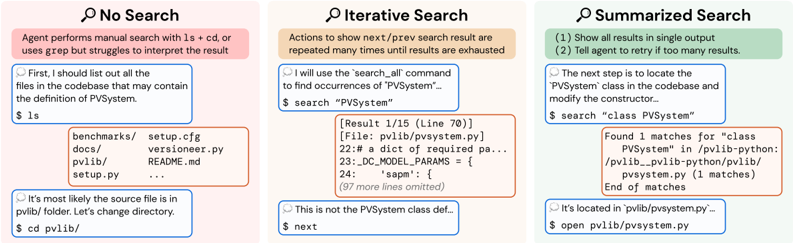
This image is a comparative diagram illustrating three different search strategies employed by an AI agent when navigating a codebase. The diagram is divided into three vertical panels, each representing a specific methodology: **No Search**, **Iterative Search**, and **Summarized Search**.
---
## 1. Panel: No Search (Left)
**Background Color:** Light Red/Pink
**Description:** This panel illustrates a manual, inefficient approach where the agent relies on basic file system navigation commands rather than specialized search tools.
### Header Information
* **Title:** 🔍 No Search
* **Summary Box:** Agent performs manual search with `ls` + `cd`, or uses `grep` but struggles to interpret the result.
### Process Flow (Dialogue & Terminal)
1. **Agent Thought/Action (Blue Box):**
* *Text:* "First, I should list out all the files in the codebase that may contain the definition of PVSystem."
* *Command:* `$ ls`
2. **System Output (Orange Box):**
* *Content:*
```text
benchmarks/ setup.cfg
docs/ versioneer.py
pvlib/ README.md
setup.py ...
```
3. **Agent Thought/Action (Blue Box):**
* *Text:* "It's most likely the source file is in pvlib/ folder. Let's change directory."
* *Command:* `$ cd pvlib/`
---
## 2. Panel: Iterative Search (Center)
**Background Color:** Light Orange/Tan
**Description:** This panel illustrates a repetitive process where the agent uses a search command but must manually cycle through numerous individual results.
### Header Information
* **Title:** 🔍 Iterative Search
* **Summary Box:** Actions to show next/prev search result are repeated many times until results are exhausted.
### Process Flow (Dialogue & Terminal)
1. **Agent Thought/Action (Blue Box):**
* *Text:* "I will use the `search_all` command to find occurrences of "PVSystem"..."
* *Command:* `$ search "PVSystem"`
2. **System Output (Orange Box):**
* *Content:*
```text
[Result 1/15 (Line 70)]
[File: pvlib/pvsystem.py]
22:# a dict of required pa...
23:_DC_MODEL_PARAMS = {
24: 'sapm': {
(97 more lines omitted)
```
3. **Agent Thought/Action (Blue Box):**
* *Text:* "This is not the PVSystem class def..."
* *Command:* `$ next`
---
## 3. Panel: Summarized Search (Right)
**Background Color:** Light Green
**Description:** This panel illustrates an optimized approach where the search tool provides a high-level summary, allowing the agent to identify the correct file immediately.
### Header Information
* **Title:** 🔍 Summarized Search
* **Summary Box:**
1. Show all results in single output
2. Tell agent to retry if too many results.
### Process Flow (Dialogue & Terminal)
1. **Agent Thought/Action (Blue Box):**
* *Text:* "The next step is to locate the `PVSystem` class in the codebase and modify the constructor..."
* *Command:* `$ search "class PVSystem"`
2. **System Output (Orange Box):**
* *Content:*
```text
Found 1 matches for "class PVSystem" in /pvlib-python:
/pvlib--pvlib-python/pvlib/
pvsystem.py (1 matches)
End of matches
```
3. **Agent Thought/Action (Blue Box):**
* *Text:* "It's located in `pvlib/pvsystem.py`..."
* *Command:* `$ open pvlib/pvsystem.py`
---
## Summary of Components
* **Blue Outlined Boxes:** Represent the AI Agent's internal reasoning and the specific command it executes.
* **Orange Outlined Boxes:** Represent the terminal/system output returned to the agent.
* **Trend/Logic Observation:**
* **No Search** is slow and requires multiple steps of manual navigation.
* **Iterative Search** provides specific data but creates a bottleneck by forcing the agent to process results one by one (1/15).
* **Summarized Search** is the most efficient, providing a targeted overview that allows the agent to jump directly to the relevant file.