## Neural Network Pipeline Diagrams
### Overview
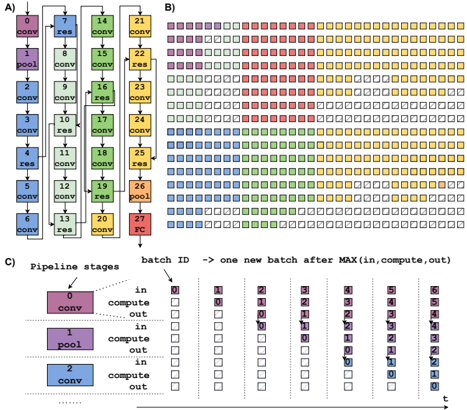
The image presents three diagrams illustrating different aspects of a neural network pipeline. Diagram A shows the architecture of a convolutional neural network (CNN). Diagram B visualizes the processing of batches through the network. Diagram C details the pipeline stages and batch processing flow.
### Components/Axes
**Diagram A: CNN Architecture**
* **Nodes:** Represent layers in the CNN. Each node is labeled with a number (0-27) and a layer type (conv, pool, res, FC).
* **Layer Types:**
* `conv`: Convolutional layer
* `pool`: Pooling layer
* `res`: Residual block
* `FC`: Fully connected layer
* **Connections:** Arrows indicate the flow of data between layers. Some arrows bypass layers, indicating residual connections.
* **Color Coding:** Each layer type is associated with a color:
* `conv`: Blue, Green, Yellow
* `pool`: Purple
* `res`: Light Green, Light Pink
* `FC`: Red
**Diagram B: Batch Processing Visualization**
* **Grid:** Represents the processing of batches through the network over time.
* **Squares:** Each square represents a batch at a specific stage of processing.
* **Color Coding:** The colors of the squares correspond to the layer types in Diagram A.
* **Empty Squares:** Represent idle or unprocessed batches.
**Diagram C: Pipeline Stages and Batch Flow**
* **Pipeline Stages:** Shows three stages: `conv`, `pool`, and `conv`.
* **Batch ID:** Indicates the ID of each batch.
* **Processing Steps:** Each stage has "in," "compute," and "out" steps.
* **Time (t):** Represents the progression of time from left to right.
* **Arrows:** Indicate the movement of batches through the pipeline.
### Detailed Analysis
**Diagram A: CNN Architecture**
* The network starts with a convolutional layer (0) followed by a pooling layer (1) and then a series of convolutional and residual blocks.
* Residual connections are present, allowing data to bypass certain layers. For example, the output of layer 3 is added to the output of layer 7.
* The network ends with a fully connected layer (27).
* The sequence of layers is approximately: conv-pool-conv-conv-res-conv-res-conv-conv-res-conv-conv-res-conv-conv-res-conv-conv-res-conv-conv-res-conv-conv-res-pool-FC
**Diagram B: Batch Processing Visualization**
* The diagram shows how batches are processed through the network in parallel.
* The colors indicate the stage of processing for each batch.
* The diagram illustrates the concept of pipelining, where multiple batches are processed simultaneously at different stages.
* The first few batches are purple, then red, then yellow.
* The diagram shows a total of 10 rows and approximately 25 columns.
**Diagram C: Pipeline Stages and Batch Flow**
* The diagram illustrates the flow of batches through a three-stage pipeline.
* Each stage consists of "in," "compute," and "out" steps.
* The diagram shows how batches are processed in parallel, with each stage working on a different batch at the same time.
* The batches are processed in order, with batch ID increasing from left to right.
* The diagram shows how a new batch is started after the maximum of the "in," "compute," and "out" times for the previous batch.
### Key Observations
* **Diagram A:** The CNN architecture includes convolutional, pooling, residual, and fully connected layers.
* **Diagram B:** The batch processing visualization demonstrates the pipelined execution of batches through the network.
* **Diagram C:** The pipeline stages diagram illustrates the flow of batches through a three-stage pipeline.
### Interpretation
The diagrams provide a comprehensive overview of a CNN pipeline, from the architecture of the network to the flow of batches through the pipeline. Diagram A shows the structure of the CNN, including the different types of layers and their connections. Diagram B visualizes the parallel processing of batches through the network, demonstrating the concept of pipelining. Diagram C provides a detailed view of the pipeline stages and the flow of batches through each stage. Together, these diagrams provide a clear understanding of how a CNN pipeline works and how it can be optimized for performance.