## Screenshot: Robotics Task Environment
### Overview
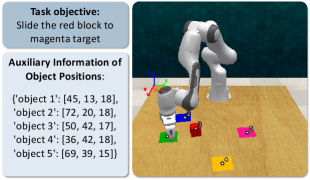
The image is a screenshot from a robotics simulation or task planning interface. It displays a 3D scene of a robotic arm workspace alongside a text panel containing task instructions and object position data. The primary task is a pick-and-place or sliding manipulation involving colored blocks.
### Components/Axes
The image is divided into two main regions:
1. **Left Panel (Text Box):** A light gray box with a dark border containing two sections of text.
2. **Right Scene (3D View):** A rendered 3D environment showing a robotic arm on a wooden-textured table with several colored blocks.
**Text Panel Content (Transcribed):**
* **Task objective:** Slide the red block to magenta target
* **Auxiliary Information of Object Positions:**
* `['object 1': [45, 18, 18],`
* `'object 2': [72, 20, 18],`
* `'object 3': [50, 42, 17],`
* `'object 4': [36, 42, 18],`
* `'object 5': [69, 39, 15]]`
**3D Scene Components:**
* **Robotic Arm:** A white, multi-jointed robotic manipulator (resembling a Franka Emika Panda arm) mounted on the left side of the table.
* **Coordinate Axes:** A 3D coordinate system gizmo is visible near the robot's base, with red (X), green (Y), and blue (Z) axes.
* **Objects on Table:**
* A **red cube** (likely the target object to be moved).
* A **blue cube**.
* A **green cube**.
* A **yellow cube**.
* A **magenta cube** with a black target symbol (◎) on its top face (the destination target).
* **Table Surface:** A light brown, wood-grain textured plane.
### Detailed Analysis
**Object Position Data (from text panel):**
As listed in the Text Panel Content, the auxiliary information provides 3D coordinates [X, Y, Z] for five objects. The units are unspecified but likely represent centimeters or a simulation unit relative to a world origin.
**Visual Scene Analysis (Spatial Grounding):**
* **Robot Base:** Positioned on the left side of the table.
* **Red Block:** Located near the center of the table, slightly to the right of the robot's base. This is the object to be moved.
* **Magenta Target Block:** Positioned on the right side of the table, farther from the robot than the red block. It is marked with a target symbol.
* **Other Blocks (Blue, Green, Yellow):** Scattered between the robot and the target, acting as potential obstacles. The blue block is closest to the robot, the green is near the red block, and the yellow is in the foreground.
* **Coordinate System:** The origin appears to be at or near the robot's base. The positive X-axis (red) points to the right, the positive Y-axis (green) points away from the viewer (into the scene), and the positive Z-axis (blue) points upward.
**Trend/Logic Verification:**
The task is not a time-series chart but a static setup. The "trend" is the spatial relationship defined by the task: the robot must plan a path to move the red block (Object 1) to the magenta target (likely Object 5, given its position and the target symbol) while avoiding collisions with the other blocks (Objects 2, 3, 4).
### Key Observations
1. **Task Clarity:** The objective is explicitly stated: "Slide the red block to magenta target." This implies a planar pushing or sliding motion, not a pick-and-place.
2. **Data-Scene Correspondence:** The text provides precise numerical coordinates, while the image provides the visual context. The magenta block (Object 5) has the lowest Z-coordinate (15), which may indicate it is flatter or placed differently than the others (Z=17-18).
3. **Environment Complexity:** The presence of three additional blocks (blue, green, yellow) creates a cluttered environment, making the path planning non-trivial.
4. **Visual Target Marker:** The magenta block is uniquely identified by a black target symbol, reinforcing its role as the destination.
### Interpretation
This image represents a classic robotics manipulation problem setup, likely for research or testing in areas like motion planning, obstacle avoidance, and object manipulation.
* **What the data suggests:** The numerical coordinates are the ground truth state of the environment, essential for an algorithm to compute a collision-free path. The visual scene is the corresponding rendered output for human verification.
* **How elements relate:** The text panel defines the "what" (task and object states), and the 3D scene shows the "where" (physical arrangement). The robot is the agent that must act upon this information to achieve the goal.
* **Notable Anomalies/Considerations:**
* The task specifies "slide," which constrains the manipulation strategy compared to lifting.
* The coordinate for the magenta target (Object 5: [69, 39, 15]) has a notably lower Z-value. This could mean the target is a flat marker on the table rather than a cube of the same height as the others, which is consistent with the visual of a symbol on a surface.
* The setup is designed to test a planner's ability to navigate a constrained space. The red block must be moved from approximately (45,18) to (69,39) on the XY plane, a path that likely requires maneuvering around the green and yellow blocks.
**Language Declaration:** All text within the image is in English.