## Image Analysis: Robotic Task Simulation
### Overview
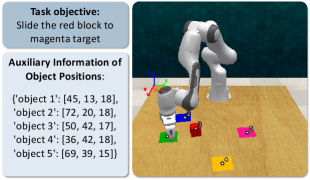
The image depicts a simulated robotic task environment. It includes a robotic arm interacting with colored blocks on a surface. The image provides the task objective and auxiliary information about the object positions.
### Components/Axes
* **Task Objective (Top-Left)**: A text box stating the objective: "Slide the red block to magenta target."
* **Auxiliary Information (Left)**: A text box providing object positions in a dictionary format.
* **Simulation Environment (Right)**: A 3D simulation showing a robotic arm, colored blocks (red, blue, green, yellow, magenta), and a wooden surface. A coordinate system (red, green, blue axes) is visible.
### Detailed Analysis
* **Task Objective**: The robot's goal is to manipulate the red block and move it to the magenta target.
* **Object Positions**: The auxiliary information lists the positions of five objects. The positions are represented as 3D coordinates (x, y, z).
* Object 1 (Green): [45, 13, 18]
* Object 2 (Blue): [72, 20, 18]
* Object 3 (Red): [50, 42, 17]
* Object 4 (Magenta): [36, 42, 18]
* Object 5 (Yellow): [69, 39, 15]
* **Simulation Environment**:
* The robotic arm is positioned above the blocks.
* The blocks are placed on a wooden surface.
* The coordinate system indicates the orientation of the environment.
### Key Observations
* The task is clearly defined: moving the red block to the magenta target.
* The object positions are provided as numerical data, which could be used for planning or analysis.
* The simulation environment provides a visual representation of the task.
### Interpretation
The image presents a simulated robotic task, providing both a visual representation and numerical data about the environment. The task objective is straightforward, and the object positions are given, allowing for the development and testing of robot control algorithms. The simulation could be used for training robots to perform manipulation tasks in a controlled environment.