# Technical Document Extraction: StarCraft II Gameplay Interface
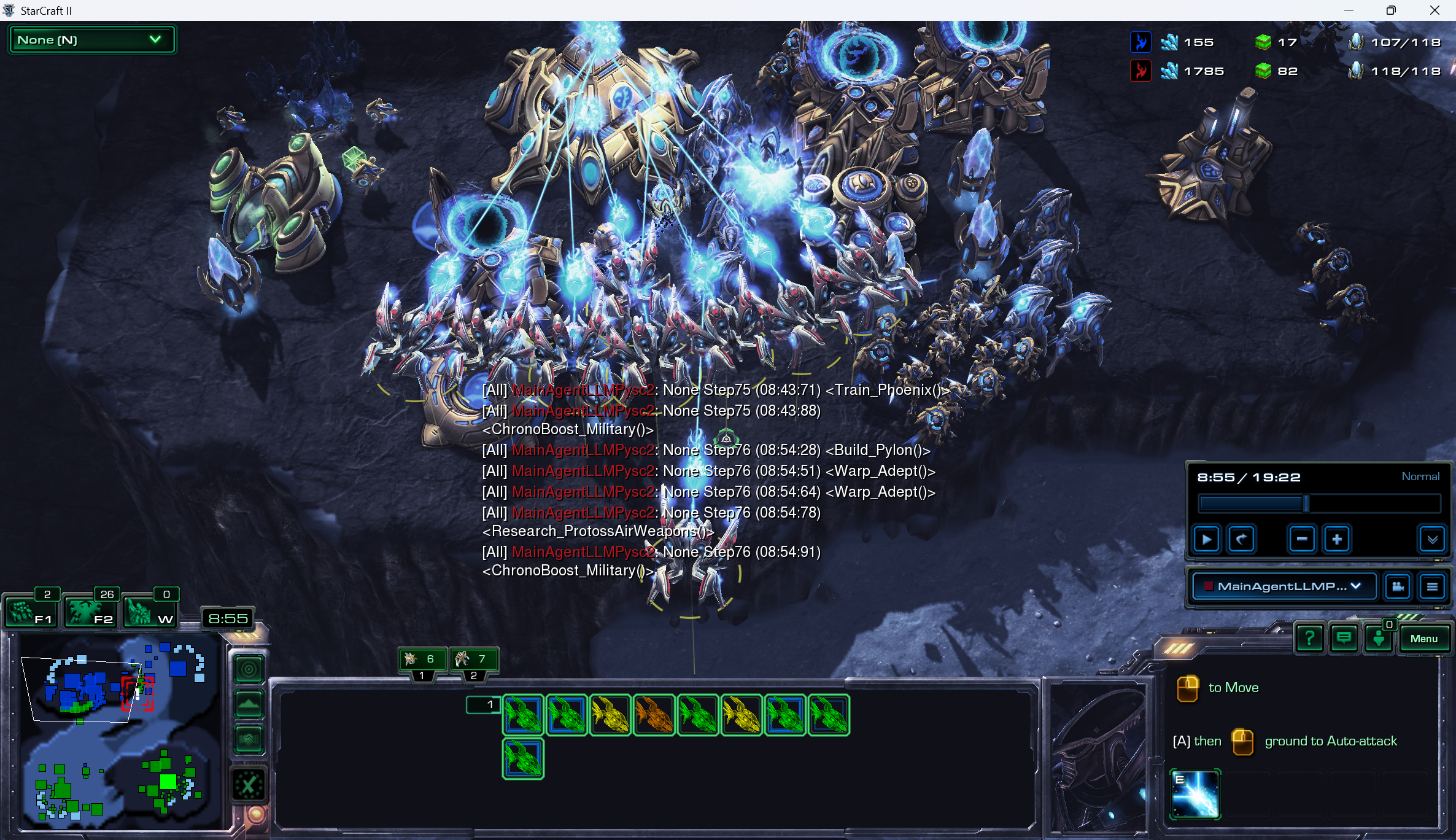
This document provides a comprehensive extraction of textual and data-driven information from the provided image, which depicts a real-time strategy game (StarCraft II) featuring an automated agent.
## 1. Header / Global Status Bar (Top Right)
This section tracks the resources and supply for two players (Blue and Red).
| Player Color | Minerals (Icon) | Vespene Gas (Icon) | Supply (Icon) |
| :--- | :--- | :--- | :--- |
| **Blue** | 155 | 17 | 107 / 118 |
| **Red** | 1785 | 82 | 118 / 118 |
## 2. Replay / Control Interface (Middle Right)
* **Time Elapsed:** 8:55 / 19:22
* **Game Speed:** Normal
* **Active Perspective:** MainAgentLLMP... (Dropdown menu selected)
* **Controls:** Standard replay controls (Play/Pause, Skip Back, Speed Decrease/Increase, Camera Lock, Menu).
## 3. In-Game Chat / Log (Center Overlay)
The center of the screen contains a series of logs from an automated agent named `MainAgentLLMPysc2`. The logs follow a specific syntax: `[All] [AgentName]: [ActionType] [Step] ([Timestamp]) <[Command]>`.
| Step | Timestamp | Command / Action |
| :--- | :--- | :--- |
| Step 75 | 08:43:71 | `<Train_Phoenix()>` |
| Step 75 | 08:43:88 | `<ChronoBoost_Military()>` |
| Step 76 | 08:54:28 | `<Build_Pylon()>` |
| Step 76 | 08:54:51 | `<Warp_Adept()>` |
| Step 76 | 08:54:64 | `<Warp_Adept()>` |
| Step 76 | 08:54:78 | `<Research_ProtossAirWeapons()>` |
| Step 76 | 08:54:91 | `<ChronoBoost_Military()>` |
## 4. Minimap and Control Groups (Bottom Left)
* **Minimap:** Shows a base in the top left (Blue) and a base in the bottom right (Green). The current camera view is focused on the Blue base.
* **Control Groups:**
* **F1:** 2 (Idle Workers)
* **F2:** 26 (Army Units)
* **W:** 0 (Warp Gates)
* **Clock:** 8:55
## 5. Unit Selection and Command Card (Bottom Center/Right)
### Selection Tray
The tray shows 10 units currently selected (likely Phoenixes and Adepts based on the icons and chat log).
* **Row 1:** 8 units. Colors indicate health/shield status (Green = Full, Yellow/Orange = Damaged).
* **Row 2:** 2 units. Both are Green (Full health).
### Command Card (Bottom Right)
* **Instructional Text:**
* "[Right Click Icon] to Move"
* "[A] then [Left Click Icon] ground to Auto-attack"
* **Active Ability Icon:** "E" (Likely Graviton Beam for Phoenixes).
## 6. Visual Scene Analysis (Main View)
* **Environment:** Dark, rocky terrain (Protoss-themed map).
* **Structures:** Multiple Protoss structures are visible, including a Nexus (center-top), Pylons, and Stargates.
* **Units:** A large cluster of Protoss units is gathered in the center.
* **Phoenixes:** Numerous aerial units emitting blue energy beams (Chrono Boost effect) toward the Stargates.
* **Adepts:** Ground units positioned below the Phoenixes.
* **Visual Effects:** Bright blue "Chrono Boost" animations are active on the production structures, correlating with the chat logs `<ChronoBoost_Military()>`.
## 7. Technical Summary
The image captures an AI agent (`MainAgentLLMPysc2`) managing a Protoss army and economy. The agent is currently at "Step 76" of its execution, focusing on air unit production (Phoenixes), air weapon research, and warping in ground reinforcements (Adepts). The agent is utilizing "Chrono Boost" to accelerate these processes. The Red player has a significant mineral lead (1785 vs 155), while the Blue player (the agent) is actively spending resources on production.