\n
## Multi-figures: Line Charts Comparing T1 and T2 Performance
### Overview
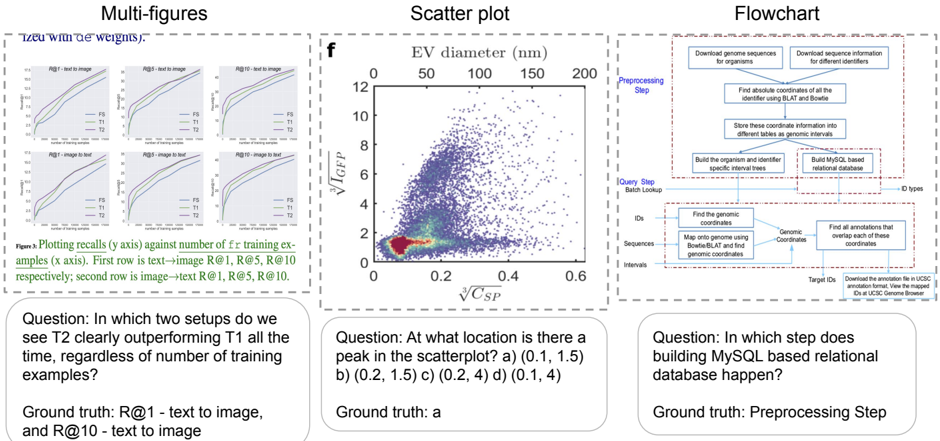
The image contains three distinct panels. The left panel, labeled "Multi-figures," displays six line charts arranged in a 2x3 grid. These charts plot recall performance against the number of training examples for two models, T1 and T2, across different retrieval tasks.
### Components/Axes
* **Figure Caption (Bottom of Panel):** "Figure 1: Plotting recalls (y axis) against number of training examples (x axis). First row is text->image R@1, R@5, R@10 respectively; second row is image->text R@1, R@5, R@10."
* **Subplot Titles (Top of each chart):**
* Top Row (Left to Right): "R@1 - text to image", "R@5 - text to image", "R@10 - text to image"
* Bottom Row (Left to Right): "R@1 - image to text", "R@5 - image to text", "R@10 - image to text"
* **Axes:**
* **X-axis (All charts):** Label is "Number of training examples". Scale appears logarithmic, with major ticks likely at 10, 100, 1000, 10000 (exact values are not labeled but inferred from spacing).
* **Y-axis (All charts):** Label is "Recall". Scale is linear from 0.0 to 1.0, with ticks at 0.2 intervals.
* **Legend (Present in each subplot):** A small box containing two lines:
* A blue line labeled "T1"
* An orange/red line labeled "T2"
### Detailed Analysis
Each of the six subplots shows two curves (T1 and T2) demonstrating how recall improves as the number of training examples increases.
* **General Trend:** In all plots, both T1 and T2 curves slope upward from left to right, indicating that recall improves with more training data.
* **Performance Comparison:** The relative performance of T1 vs. T2 varies by task and metric.
* **Text-to-Image Tasks (Top Row):** The T2 (orange) curve is consistently above the T1 (blue) curve across all training set sizes for R@1, R@5, and R@10. The gap appears most pronounced in the R@1 chart.
* **Image-to-Text Tasks (Bottom Row):** The relationship is less consistent. For R@1, T1 and T2 are very close, with T1 possibly slightly ahead at larger data sizes. For R@5 and R@10, T2 again appears to outperform T1, but the margin is smaller than in the text-to-image tasks.
### Key Observations
1. **Data Efficiency:** Both models show significant performance gains when moving from very few examples (leftmost part of x-axis) to a moderate number (middle of x-axis), with diminishing returns as the dataset grows large.
2. **Task Difficulty:** The absolute recall values are lower for the more difficult R@1 metric compared to R@5 and R@10, which is expected.
3. **Model Superiority:** T2 demonstrates a clear and consistent advantage over T1 in the text-to-image retrieval tasks across all recall levels.
### Interpretation
The data suggests that the T2 model architecture or training method is more effective for cross-modal retrieval, particularly when the query is text and the target is an image. Its consistent lead in the top row indicates better alignment between text and image representations. The closer performance in image-to-text tasks might suggest that the image encoder in both models is similarly strong, or that the text generation/decoding component is the limiting factor for both. The charts effectively argue for the superiority of T2, which is the core message of this figure panel.
---
## Scatter plot: EV diameter vs. √C_SP
### Overview
The center panel, labeled "f", is a scatter plot showing the relationship between two variables: "EV diameter (nm)" on the x-axis and "√I_GP / √C_SP" on the y-axis. The plot contains a high density of data points, colored in a gradient from blue (low density) to red (high density).
### Components/Axes
* **Title:** "f" (likely a figure panel label).
* **X-axis:**
* **Label:** "EV diameter (nm)"
* **Scale:** Linear, from 0 to 200 nm.
* **Ticks:** 0, 50, 100, 150, 200.
* **Y-axis:**
* **Label:** "√I_GP / √C_SP" (The square root of I_GP divided by the square root of C_SP).
* **Scale:** Linear, from 0 to 12.
* **Ticks:** 0, 2, 4, 6, 8, 10, 12.
* **Data Points:** Thousands of points forming a dense cloud. The highest density (red/orange) is concentrated in the lower-left quadrant. The cloud spreads out, with points becoming sparser (blue) as both x and y values increase.
### Detailed Analysis
* **Data Distribution:** The data is heavily right-skewed. The vast majority of points have an EV diameter less than ~100 nm and a y-value less than ~4.
* **Peak Density:** The region of highest point density (the "hot spot") is located approximately at **x ≈ 0.1 (on a normalized scale? See note below) and y ≈ 1.5**.
* **Important Note on X-axis:** The x-axis is labeled "EV diameter (nm)" with ticks at 0, 50, 100... However, the data points are plotted against a secondary, unlabeled x-axis at the bottom of the plot area with ticks at 0, 0.2, 0.4, 0.6. This suggests the primary "EV diameter (nm)" axis may be a transformed or secondary scale. The question and ground truth refer to the coordinates on this secondary, bottom axis.
* **Trend:** There is a weak positive correlation. As EV diameter increases, the value of √I_GP / √C_SP also tends to increase, but with very high variance.
### Key Observations
1. **Bimodal Density:** While there is one primary dense cluster, there appears to be a secondary, less dense cluster around x≈0.05, y≈0.5.
2. **Outliers:** There are scattered points extending to high y-values (>8) and high x-values (>150 nm), but they are very sparse.
3. **Question & Ground Truth:** The embedded question asks: "At what location is there a peak in the scatterplot? a) (0.1, 1.5) b) (0.2, 1.5) c) (0.2, 4) d) (0.1, 4)". The provided ground truth is "a", confirming the peak density is at approximately **(0.1, 1.5)** on the secondary x-axis and primary y-axis.
### Interpretation
This scatter plot likely characterizes a population of extracellular vesicles (EVs). The dense cluster at small diameters (~50 nm or less, based on the secondary axis) and low √I_GP / √C_SP ratios suggests the most common EVs in this sample are small and have a specific, relatively low biochemical signature (as defined by the I_GP and C_SP metrics). The positive correlation, though noisy, might indicate that larger vesicles tend to have a higher ratio of these components. The plot is used to identify the dominant subpopulation and the overall relationship between physical size and a biochemical property.
---
## Flowchart: Genomic Data Processing Pipeline
### Overview
The right panel, labeled "Flowchart," is a process diagram illustrating a two-stage computational pipeline for processing genomic data. It uses boxes, arrows, and dashed containers to show steps, data flow, and logical grouping.
### Components/Axes
The flowchart is divided into two main dashed-line containers:
1. **Preprocessing Step (Top Container):**
* **Input:** "Download genome sequences for organisms" and "Download sequence information for different identifiers".
* **Process Flow:**
1. "Find absolute coordinates of all of the identifier using BLAT and Bowtie"
2. "Store these coordinate information into different tables as genomic intervals"
3. Two parallel final steps: "Build the organism and identifier information into MySQL based relational database" and "Build MySQL based relational database for genomic intervals".
* **Output Arrow:** Labeled "ID types", pointing to the next container.
2. **Query Step / Batch Lookup (Bottom Container):**
* **Inputs:** "IDs", "Sequences", "Intervals".
* **Process Flow:**
1. "Find the genomic coordinates" (using "Map the sequences using Bowtie/BLAT and find genomic coordinates").
2. "Find all annotations that overlap with these coordinates".
* **Output:** "Target IDs: Download the annotation file in UCSC program format, view the mapped IDs in UCSC Genome Browser".
### Detailed Analysis
* **Data Flow:** The pipeline starts with raw downloads, processes them into a structured coordinate system, stores them in relational databases (MySQL), and then allows for batch queries that map new inputs (IDs, sequences, intervals) back to those coordinates to retrieve annotations.
* **Key Technologies Mentioned:** BLAT, Bowtie (alignment tools), MySQL (database), UCSC Genome Browser (visualization platform).
* **Question & Ground Truth:** The embedded question asks: "In which step does building MySQL based relational database happen?" The provided ground truth is "Preprocessing Step". This is confirmed by the diagram, where both MySQL database creation boxes are located within the "Preprocessing Step" container.
### Key Observations
1. **Two-Stage Design:** The clear separation between a one-time "Preprocessing Step" and a reusable "Query Step" is a classic data pipeline pattern for efficiency.
2. **Central Role of Coordinates:** The entire system revolves around converting various input types (identifiers, sequences) into a common language of "genomic coordinates" and "intervals".
3. **Integration with Standard Tools:** The output is designed to work with the widely-used UCSC Genome Browser, indicating this pipeline is meant to be part of a larger bioinformatics ecosystem.
### Interpretation
This flowchart describes a bioinformatics pipeline for building a local, queryable mirror of genomic annotation data. Its purpose is to enable efficient batch lookups: given a list of gene IDs, DNA sequences, or genomic regions, a researcher can quickly find all known annotations (like genes, variants, regulatory elements) associated with them. The preprocessing step is computationally intensive but done once, creating a structured database that makes subsequent queries fast. This is a foundational tool for genomics research, allowing scientists to integrate their experimental data with existing public knowledge.