# Technical Document Extraction: AWQ Quantization and TinyChat Inference System
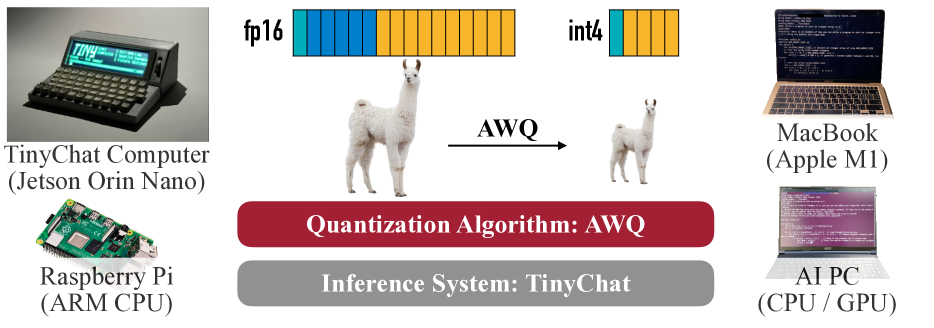
This image is a technical infographic illustrating the process of model quantization using the **AWQ (Activation-aware Weight Quantization)** algorithm and its deployment across various hardware platforms using the **TinyChat** inference system.
## 1. Component Isolation
The image is organized into three primary horizontal segments:
* **Top Segment:** Visual representation of the quantization process (Data types and Model size).
* **Middle Segment (Core Labels):** Identification of the algorithm and inference system.
* **Side Segments (Hardware):** Examples of compatible edge and consumer hardware.
---
## 2. Quantization Process Diagram (Top Segment)
This section visualizes the transition from a high-precision model to a low-precision compressed model.
### Data Type Representation
* **fp16 (Floating Point 16):** Represented by a long horizontal bar consisting of 16 segments.
* **Color Coding:** The first 5 segments are blue; the remaining 11 segments are orange.
* **int4 (4-bit Integer):** Represented by a significantly shorter horizontal bar consisting of 4 segments.
* **Color Coding:** The first segment is blue; the remaining 3 segments are orange.
* **Visual Trend:** The reduction from 16 segments to 4 segments represents a 4x reduction in memory footprint per weight.
### Model Scaling (Llama Imagery)
* **Input:** A large image of a Llama (representing a Large Language Model, likely Llama-2 or similar).
* **Transformation:** An arrow pointing from left to right labeled "**AWQ**".
* **Output:** A significantly smaller image of the same Llama.
* **Inference:** The AWQ algorithm compresses the model size while maintaining the core structure/identity of the model.
---
## 3. Core System Identification (Middle Segment)
Two rounded rectangular blocks define the software stack:
| Block Color | Text Content | Description |
| :--- | :--- | :--- |
| **Dark Red** | **Quantization Algorithm: AWQ** | Identifies the specific method used to compress the model. |
| **Grey** | **Inference System: TinyChat** | Identifies the engine used to run the quantized models on hardware. |
---
## 4. Hardware Compatibility (Side Segments)
The image lists four distinct hardware categories where this system is applicable, positioned on the left and right flanks.
### Left Side: Edge/Embedded Devices
1. **TinyChat Computer (Jetson Orin Nano):**
* **Visual:** A specialized compact hardware device with a built-in screen displaying a terminal interface and a physical keyboard.
* **Text on Screen:** Includes "TINY", "CHAT", "COMPILER", and "Spatial Runtime".
2. **Raspberry Pi (ARM CPU):**
* **Visual:** A standard Raspberry Pi single-board computer.
### Right Side: Consumer/Workstation Devices
1. **MacBook (Apple M1):**
* **Visual:** A laptop showing a code editor with C++ or similar code.
2. **AI PC (CPU / GPU):**
* **Visual:** A standard silver laptop showing a terminal window with code execution.
---
## 5. Summary of Technical Information
* **Algorithm:** AWQ (Activation-aware Weight Quantization).
* **Compression Ratio:** 4:1 (Visualized by the transition from 16-bit fp16 to 4-bit int4).
* **Software Ecosystem:** TinyChat serves as the inference runtime.
* **Target Hardware:** Spans from low-power ARM devices (Raspberry Pi) and embedded AI modules (Jetson Orin Nano) to consumer laptops (Apple Silicon M1 and standard x86 AI PCs).