## Charts/Graphs: Frametime Performance Across Different Rendering Techniques and Hardware
### Overview
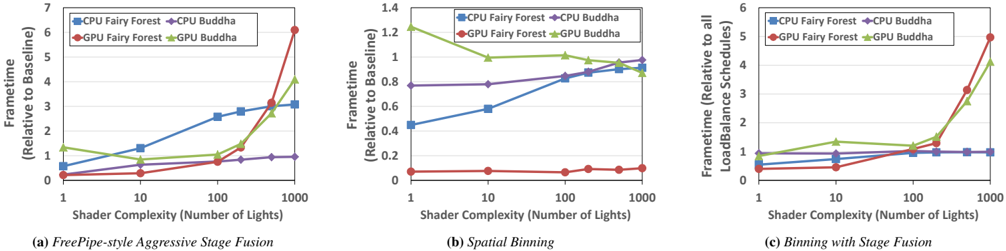
This image presents three line charts, labeled (a), (b), and (c), each illustrating the "Frametime" performance relative to a baseline or other schedules, as "Shader Complexity (Number of Lights)" increases. The charts compare the performance of "CPU Fairy Forest", "CPU Buddha", "GPU Fairy Forest", and "GPU Buddha" across three different rendering techniques: "FreePipe-style Aggressive Stage Fusion", "Spatial Binning", and "Binning with Stage Fusion". The x-axis for all charts is logarithmic, representing shader complexity, while the y-axis is linear, representing frametime.
### Components/Axes
The image consists of three distinct sub-charts arranged horizontally. Each sub-chart shares a common x-axis label and legend, but has a unique y-axis label and scale.
**Common X-axis:**
- **Title:** "Shader Complexity (Number of Lights)"
- **Scale:** Logarithmic, ranging from 1 to 1000.
- **Markers:** 1, 10, 100, 1000.
**Common Legend (positioned in the top-right corner of each sub-chart):**
- **CPU Fairy Forest:** Blue square marker, blue line.
- **CPU Buddha:** Purple diamond marker, purple line.
- **GPU Fairy Forest:** Red circle marker, red line.
- **GPU Buddha:** Green triangle marker, green line.
**Chart (a) Specific Y-axis:**
- **Title:** "Frametime (Relative to Baseline)"
- **Scale:** Linear, ranging from 0 to 7.
- **Markers:** 0, 1, 2, 3, 4, 5, 6, 7.
**Chart (b) Specific Y-axis:**
- **Title:** "Frametime (Relative to Baseline)"
- **Scale:** Linear, ranging from 0 to 1.4.
- **Markers:** 0, 0.2, 0.4, 0.6, 0.8, 1.0, 1.2, 1.4.
**Chart (c) Specific Y-axis:**
- **Title:** "Frametime (Relative to all LoadBalance Schedules)"
- **Scale:** Linear, ranging from 0 to 6.
- **Markers:** 0, 1, 2, 3, 4, 5, 6.
### Detailed Analysis
#### (a) FreePipe-style Aggressive Stage Fusion
This chart, located in the bottom-left, shows frametime relative to baseline using "FreePipe-style Aggressive Stage Fusion".
- **CPU Fairy Forest (Blue Square):** The frametime starts at approximately 0.5 at 1 light, increases to about 1.3 at 10 lights, then to 2.6 at 100 lights, and finally reaches approximately 3.0 at 1000 lights. The trend is a steady increase, with a slight acceleration between 10 and 100 lights, then a slower increase.
- **CPU Buddha (Purple Diamond):** The frametime starts at approximately 0.3 at 1 light, increases to about 0.5 at 10 lights, then to 0.8 at 100 lights, and stabilizes around 0.9 at 1000 lights. The trend shows a moderate increase followed by a flattening.
- **GPU Fairy Forest (Red Circle):** The frametime starts very low, at approximately 0.2 at 1 light, remains low at about 0.3 at 10 lights, then increases to 0.8 at 100 lights, and sharply rises to approximately 5.5 at 1000 lights. The trend is relatively flat at low complexity, followed by a dramatic exponential increase at high complexity.
- **GPU Buddha (Green Triangle):** The frametime starts at approximately 1.3 at 1 light, decreases to about 0.9 at 10 lights, then increases to 1.5 at 100 lights, and sharply rises to approximately 3.8 at 1000 lights. The trend shows an initial decrease, followed by a sharp increase at higher complexities.
#### (b) Spatial Binning
This chart, located in the bottom-center, shows frametime relative to baseline using "Spatial Binning".
- **CPU Fairy Forest (Blue Square):** The frametime starts at approximately 0.45 at 1 light, increases to about 0.58 at 10 lights, then to 0.85 at 100 lights, and reaches approximately 0.95 at 1000 lights. The trend is a consistent, moderate increase.
- **CPU Buddha (Purple Diamond):** The frametime starts at approximately 0.78 at 1 light, remains around 0.78 at 10 lights, then increases slightly to 0.85 at 100 lights, and reaches approximately 0.95 at 1000 lights. The trend is largely flat at lower complexities, with a slight increase at higher complexities.
- **GPU Fairy Forest (Red Circle):** The frametime starts very low, at approximately 0.08 at 1 light, remains around 0.08 at 10 lights and 100 lights, and slightly increases to approximately 0.1 at 1000 lights. The trend is remarkably flat and consistently very low across all complexities.
- **GPU Buddha (Green Triangle):** The frametime starts at approximately 1.25 at 1 light, decreases to about 1.0 at 10 lights, remains around 1.0 at 100 lights, and slightly decreases to approximately 0.95 at 1000 lights. The trend shows an initial decrease, then flattens out.
#### (c) Binning with Stage Fusion
This chart, located in the bottom-right, shows frametime relative to all LoadBalance Schedules using "Binning with Stage Fusion".
- **CPU Fairy Forest (Blue Square):** The frametime starts at approximately 0.5 at 1 light, increases to about 0.6 at 10 lights, then to 0.7 at 100 lights, and remains around 0.7 at 1000 lights. The trend shows a slight increase followed by a flattening.
- **CPU Buddha (Purple Diamond):** The frametime starts at approximately 0.6 at 1 light, increases to about 0.7 at 10 lights, then to 0.8 at 100 lights, and remains around 0.8 at 1000 lights. The trend shows a slight increase followed by a flattening.
- **GPU Fairy Forest (Red Circle):** The frametime starts at approximately 0.4 at 1 light, increases to about 0.5 at 10 lights, then to 0.8 at 100 lights, and sharply rises to approximately 5.0 at 1000 lights. The trend is relatively flat at low complexity, followed by a dramatic exponential increase at high complexity.
- **GPU Buddha (Green Triangle):** The frametime starts at approximately 0.9 at 1 light, increases to about 1.2 at 10 lights, then to 1.5 at 100 lights, and sharply rises to approximately 4.0 at 1000 lights. The trend shows a steady increase at lower complexities, followed by a sharp exponential increase at high complexity.
### Key Observations
- **GPU Fairy Forest Performance:** In both "FreePipe-style Aggressive Stage Fusion" (a) and "Binning with Stage Fusion" (c), GPU Fairy Forest exhibits a dramatic increase in frametime at high shader complexities (1000 lights), becoming the worst performer. However, in "Spatial Binning" (b), GPU Fairy Forest consistently maintains the lowest frametime across all complexities.
- **CPU Performance Stability:** CPU-based methods (CPU Fairy Forest and CPU Buddha) generally show more stable and predictable frametime increases compared to GPU methods, especially at higher complexities, in charts (a) and (c). Their frametime curves tend to flatten or increase linearly rather than exponentially.
- **Spatial Binning Effectiveness:** "Spatial Binning" (b) appears to be highly effective for GPU Fairy Forest, keeping its frametime very low. It also shows that CPU Buddha and CPU Fairy Forest have frametimes below 1.0 (relative to baseline) for all complexities, suggesting good performance. GPU Buddha in (b) also performs well, staying below 1.25.
- **Impact of Stage Fusion:** The addition of "Stage Fusion" (a) and (c) seems to negatively impact GPU performance at high complexities, leading to significant frametime spikes for both GPU Fairy Forest and GPU Buddha.
- **CPU Buddha Consistency:** CPU Buddha generally maintains a relatively low and stable frametime across all three techniques and complexities, often performing better than CPU Fairy Forest, especially at higher complexities in (a) and (c).
### Interpretation
The data suggests that the choice of rendering technique significantly impacts performance, particularly for GPU-based rendering as shader complexity increases.
1. **Spatial Binning (b) is highly optimized for GPU Fairy Forest:** The "Spatial Binning" technique demonstrates exceptional efficiency for "GPU Fairy Forest", maintaining a frametime close to zero relative to the baseline, even with 1000 lights. This indicates that spatial binning effectively manages the workload for this specific GPU configuration and scene type, preventing the performance degradation seen in other techniques. CPU methods also perform well under spatial binning, staying below the baseline.
2. **Stage Fusion introduces scalability challenges for GPUs:** Both "FreePipe-style Aggressive Stage Fusion" (a) and "Binning with Stage Fusion" (c) show that when stage fusion is involved, GPU performance (especially "GPU Fairy Forest" and "GPU Buddha") degrades significantly and non-linearly at higher shader complexities. This suggests that the overhead or architectural limitations related to stage fusion become a bottleneck for GPUs when processing a large number of lights. The exponential rise in frametime indicates a potential resource exhaustion or a non-optimal scaling of the fusion process on GPUs.
3. **CPUs handle stage fusion complexity more gracefully:** In contrast to GPUs, CPU-based rendering ("CPU Fairy Forest" and "CPU Buddha") with stage fusion (a and c) shows a more controlled increase in frametime. While frametime does increase, it tends to flatten out or increase linearly, suggesting that CPUs might be better equipped to handle the specific type of workload introduced by stage fusion, or that their performance degradation model is different and less severe than GPUs in these scenarios. "CPU Buddha" consistently shows better or comparable performance to "CPU Fairy Forest" across all scenarios, indicating its potential efficiency.
4. **Baseline and Relative Performance:** The y-axis labels are crucial. In (a) and (b), "Relative to Baseline" implies a comparison to a standard or initial performance. In (c), "Relative to all LoadBalance Schedules" suggests a comparison against a set of load-balancing techniques, implying that the values represent how well "Binning with Stage Fusion" performs compared to other load-balancing approaches. Values below 1.0 are generally desirable, indicating better performance than the baseline/other schedules.
In summary, for scenarios with high shader complexity, "Spatial Binning" appears to be the superior technique, especially for GPU rendering. However, when "Stage Fusion" is employed, CPU-based rendering, particularly "CPU Buddha", demonstrates more robust and scalable performance compared to GPU-based methods, which suffer significant performance drops. This highlights a trade-off between different rendering techniques and hardware platforms depending on the specific demands of the scene (shader complexity) and the chosen optimization strategies.