## Screenshot: Y-Maze Environment
### Overview
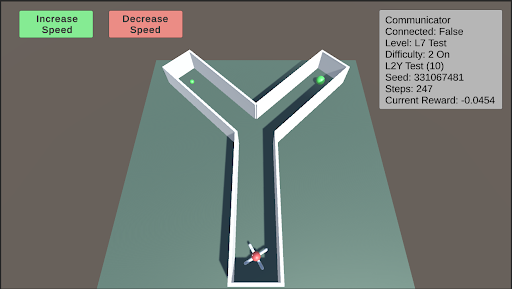
The image is a screenshot of a simulated Y-shaped maze environment. An agent, represented by a small vehicle with a propeller, is positioned at the bottom of the maze. Two green spheres are located at the ends of the two branches of the "Y". The screenshot also includes UI elements for controlling the simulation (Increase/Decrease Speed) and displaying simulation parameters (Communicator status, Level, Difficulty, Seed, Steps, Current Reward).
### Components/Axes
* **Environment:** A Y-shaped maze with white walls and a light green floor.
* **Agent:** A small vehicle with a propeller, located at the bottom of the maze.
* **Goals:** Two green spheres, one at the end of each branch of the "Y".
* **UI Elements:**
* "Increase Speed" button (green) - top-left
* "Decrease Speed" button (red) - top-center
* Communicator information box (top-right):
* Communicator
* Connected: False
* Level: L7 Test
* Difficulty: 2 On
* L2Y Test (10)
* Seed: 331067481
* Steps: 247
* Current Reward: -0.0454
### Detailed Analysis or ### Content Details
* **Maze:** The maze consists of a straight path leading to a fork, creating the "Y" shape. The walls are white, and the floor is light green.
* **Agent:** The agent appears to be a small vehicle with a propeller, suggesting it can move within the environment. It is positioned at the start of the maze.
* **Goals:** The green spheres likely represent the goals the agent needs to reach.
* **Simulation Parameters:**
* **Connected:** False - Indicates the simulation is not connected to an external communicator.
* **Level:** L7 Test - Indicates the current level of the simulation.
* **Difficulty:** 2 On - Indicates the difficulty level is set to 2 and is enabled ("On").
* **L2Y Test (10):** Indicates the type of test being run, likely related to the Y-maze. The number 10 is in parenthesis.
* **Seed:** 331067481 - A random seed used for the simulation.
* **Steps:** 247 - The number of steps taken in the simulation.
* **Current Reward:** -0.0454 - The current reward value for the agent.
### Key Observations
* The agent is at the starting point of the maze.
* The simulation is not connected to an external communicator.
* The current reward is negative, suggesting the agent has not yet reached a goal or is being penalized for actions.
### Interpretation
The screenshot depicts a reinforcement learning environment where an agent is trained to navigate a Y-shaped maze. The agent's objective is likely to reach one of the green spheres (goals) at the end of the maze branches. The "Current Reward" value indicates the agent's performance, which is currently negative. The simulation parameters provide information about the current state of the training process, including the level, difficulty, and number of steps taken. The "Increase Speed" and "Decrease Speed" buttons suggest the user can control the simulation speed. The seed value ensures reproducibility of the experiment.