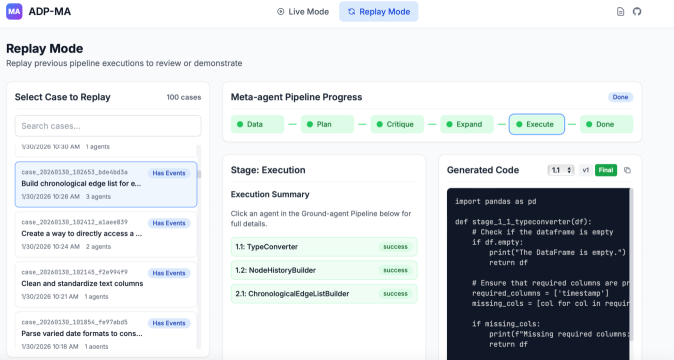
# Technical Document Extraction: UI Interface Analysis
## Header Section
- **Top Left**:
- Logo: "MA" (blue icon)
- Text: "ADP-MA"
- **Top Center**:
- Button: "Live Mode" (default state)
- Button: "Replay Mode" (active state, blue background)
- **Top Right**:
- Icons:
- Document (PDF) icon
- Refresh icon
## Main Content Sections
### Left Panel: "Select Case to Replay"
- **Title**: "Replay Mode"
- **Subtitle**: "Replay previous pipeline executions to review or demonstrate"
- **Search Bar**: "Search cases..."
- **Case List**:
1. **Case 1**:
- Timestamp: `1/30/2026 10:30 AM`
- Agents: `1 agent`
- Description: `Build chronological edge list for e...`
- Status: `Has Events` (blue highlight)
2. **Case 2**:
- Timestamp: `1/30/2026 10:26 AM`
- Agents: `3 agents`
- Description: `Create a way to directly access a...`
- Status: `Has Events`
3. **Case 3**:
- Timestamp: `1/30/2026 10:24 AM`
- Agents: `2 agents`
- Description: `Clean and standardize text columns`
- Status: `Has Events`
4. **Case 4**:
- Timestamp: `1/30/2026 10:21 AM`
- Agents: `1 agent`
- Description: `Parse varied date formats to cons...`
- Status: `Has Events`
### Middle Panel: "Meta-agent Pipeline Progress"
- **Title**: "Meta-agent Pipeline Progress"
- **Stages**:
1. **Data** (green circle)
2. **Plan** (green circle)
3. **Critique** (green circle)
4. **Expand** (green circle)
5. **Execute** (blue-outlined circle, active stage)
6. **Done** (green circle)
- **Action Button**: "Done" (top right)
### Right Panel: "Stage: Execution"
- **Title**: "Stage: Execution"
- **Subtitle**: "Execution Summary"
- **Instruction**: "Click an agent in the Ground-agent Pipeline below for full details."
- **Agent List**:
1. **1.1: TypeConverter** (green background, "success" label)
2. **1.2: NodeHistoryBuilder** (green background, "success" label)
3. **2.1: ChronologicalEdgeListBuilder** (green background, "success" label)
### Code Section: "Generated Code"
- **Code Snippet**: