## Diagram: Python Module Dependency and Formalization Status
### Overview
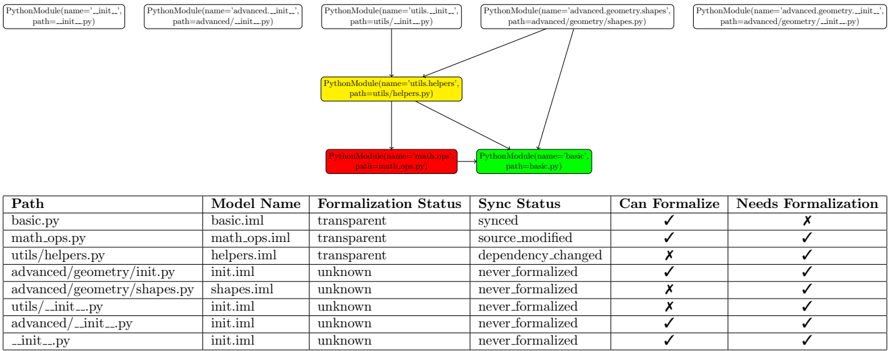
The image presents a diagram illustrating the dependencies between Python modules and a table summarizing their formalization status and synchronization status. The diagram shows the relationships between different Python modules, while the table provides details on their model names, formalization status, sync status, and whether they can be formalized or need formalization.
### Components/Axes
**Diagram Components:**
* **Nodes:** Represented by rounded rectangles, each labeled as "PythonModule(name='module_name', path='module_path')". The nodes are colored differently: green, red, and yellow.
* **Edges:** Represented by arrows, indicating dependencies between modules.
* **Node Colors:**
* Green: basic.py
* Red: math_ops.py
* Yellow: utils.helpers.py
* White: All other modules
**Table Columns:**
* **Path:** The file path of the Python module.
* **Model Name:** The name of the model associated with the module.
* **Formalization Status:** Indicates whether the module has been formalized (transparent or unknown).
* **Sync Status:** Indicates the synchronization status of the module (synced, source\_modified, dependency\_changed, or never\_formalized).
* **Can Formalize:** Indicates whether the module can be formalized (represented by a checkmark or an "X").
* **Needs Formalization:** Indicates whether the module needs formalization (represented by a checkmark or an "X").
### Detailed Analysis
**Diagram Node Details:**
* **Top Row (White Nodes):**
* PythonModule(name='\_\_init\_\_.py', path='\_\_init\_\_.py')
* PythonModule(name='advanced.\_\_init\_\_.py', path='advanced/\_\_init\_\_.py')
* PythonModule(name='utils.\_\_init\_\_.py', path='utils/\_\_init\_\_.py')
* PythonModule(name='advanced.geometry.shapes.py', path='advanced/geometry/shapes.py')
* PythonModule(name='advanced.geometry.\_\_init\_\_.py', path='advanced/geometry/\_\_init\_\_.py')
* **Middle Row (Yellow Node):**
* PythonModule(name='utils.helpers.py', path='utils/helpers.py')
* **Bottom Row (Red and Green Nodes):**
* PythonModule(name='math.ops.py', path='math\_ops.py') (Red)
* PythonModule(name='basic.py', path='basic.py') (Green)
**Table Data:**
| Path | Model Name | Formalization Status | Sync Status | Can Formalize | Needs Formalization |
| :------------------------------- | :----------- | :------------------- | :----------------- | :------------ | :------------------ |
| basic.py | basic.iml | transparent | synced | ✓ | X |
| math.ops.py | math\_ops.iml | transparent | source\_modified | ✓ | ✓ |
| utils/helpers.py | helpers.iml | transparent | dependency\_changed | X | ✓ |
| advanced/geometry/\_\_init\_\_.py | init.iml | unknown | never\_formalized | ✓ | ✓ |
| advanced/geometry/shapes.py | shapes.iml | unknown | never\_formalized | X | ✓ |
| utils/\_\_init\_\_.py | init.iml | unknown | never\_formalized | X | ✓ |
| advanced/\_\_init\_\_.py | init.iml | unknown | never\_formalized | ✓ | ✓ |
| \_\_init\_\_.py | init.iml | unknown | never\_formalized | ✓ | ✓ |
**Diagram Edge Details:**
* 'utils.helpers.py' depends on 'math.ops.py'
* 'utils.helpers.py' depends on 'basic.py'
* 'advanced.geometry.shapes.py' depends on 'utils.helpers.py'
### Key Observations
* The diagram visualizes the dependencies between Python modules.
* The table provides a summary of the formalization and synchronization status of each module.
* Modules with "transparent" formalization status have different sync statuses.
* Modules under "advanced/geometry" and init files have "unknown" formalization status and "never\_formalized" sync status.
* The "Can Formalize" and "Needs Formalization" columns provide a quick overview of the formalization requirements for each module.
### Interpretation
The diagram and table together provide a comprehensive view of the state of the Python modules in terms of their dependencies, formalization, and synchronization. The "transparent" formalization status suggests that these modules have been formalized to some extent, while "unknown" indicates that they haven't been formalized yet. The sync status provides information on whether the modules are up-to-date with the latest changes. The "Can Formalize" and "Needs Formalization" columns highlight the modules that require attention in terms of formalization efforts. The dependency graph shows how changes in one module might affect others, which is crucial for maintaining the system's integrity. The data suggests a need to prioritize the formalization of modules with "unknown" formalization status, especially those under "advanced/geometry" and init files, and to address the synchronization issues in modules with "source\_modified" or "dependency\_changed" sync status.