## Workflow Diagram: Orchestrator Task Assignment
### Overview
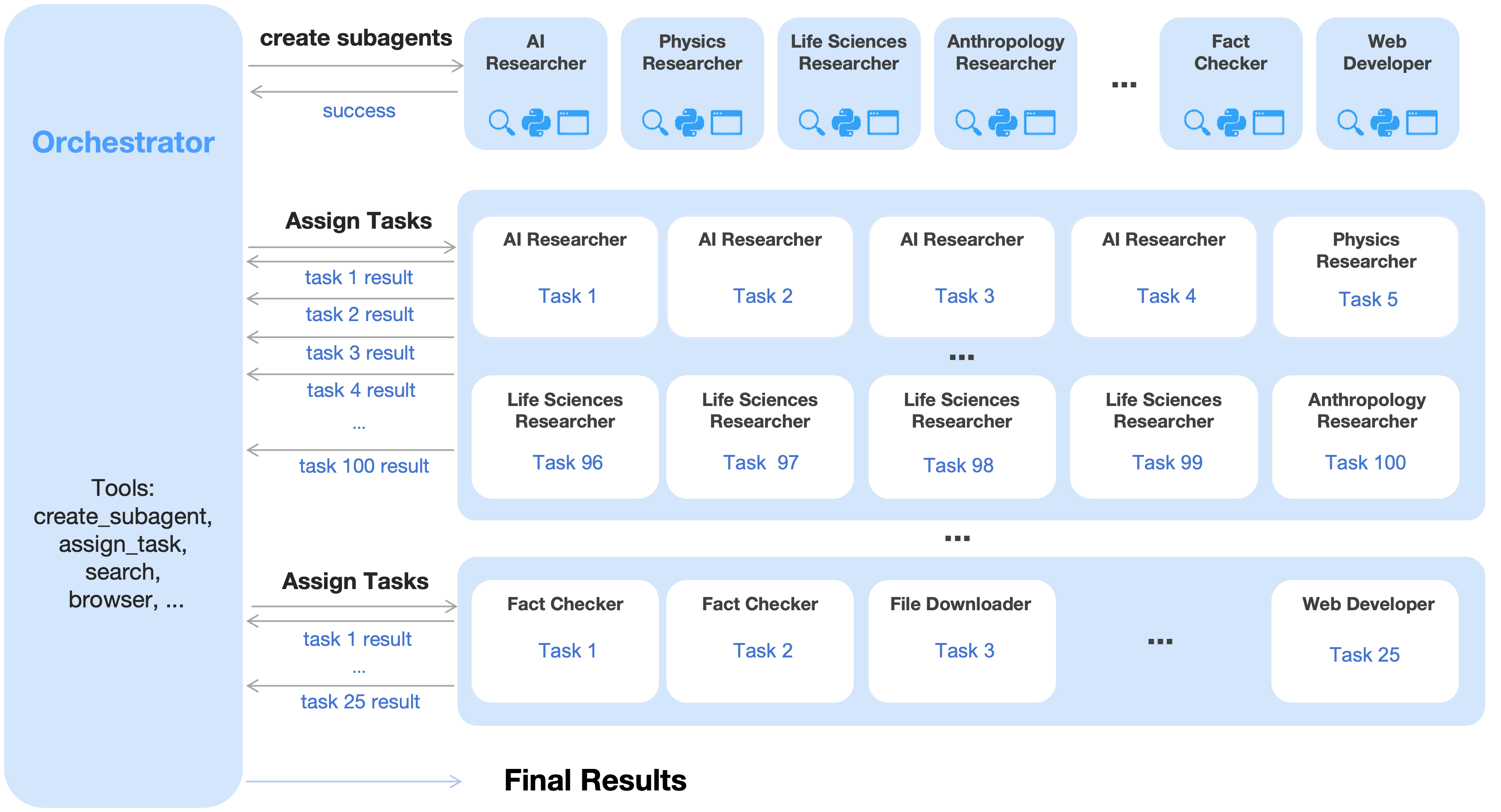
The image is a workflow diagram illustrating how an "Orchestrator" assigns tasks to various specialized agents (researchers, fact checkers, web developers). The diagram shows the creation of sub-agents, the assignment of tasks to these agents, and the flow of results back to the orchestrator, culminating in final results.
### Components/Axes
* **Orchestrator:** A central entity responsible for creating sub-agents and assigning tasks. Located on the left side of the diagram.
* Tools listed: create_subagent, assign_task, search, browser, ...
* **Sub-agents:** Specialized agents such as AI Researcher, Physics Researcher, Life Sciences Researcher, Anthropology Researcher, Fact Checker, and Web Developer. These are represented as rounded rectangles at the top of the diagram. Each sub-agent has icons below it, including a magnifying glass, a Python logo, and a document icon.
* **Tasks:** Individual assignments given to the sub-agents. Represented as rounded rectangles containing the task name (e.g., Task 1, Task 2).
* **Flow Arrows:** Arrows indicate the direction of task assignment and result retrieval.
* **Final Results:** The end point of the workflow, located at the bottom of the diagram.
### Detailed Analysis or ### Content Details
1. **Orchestrator to Sub-agents (Create Subagents):**
* The Orchestrator initiates the process by creating sub-agents.
* Sub-agents listed: AI Researcher, Physics Researcher, Life Sciences Researcher, Anthropology Researcher, Fact Checker, Web Developer.
* The Orchestrator receives a "success" confirmation after creating the sub-agents.
2. **Orchestrator to Sub-agents (Assign Tasks - First Row):**
* The Orchestrator assigns tasks to AI Researchers (Task 1, Task 2, Task 3, Task 4) and a Physics Researcher (Task 5).
* The Orchestrator receives results for tasks 1 through 4.
3. **Orchestrator to Sub-agents (Assign Tasks - Second Row):**
* The Orchestrator assigns tasks to Life Sciences Researchers (Task 96, Task 97, Task 98, Task 99) and an Anthropology Researcher (Task 100).
* The Orchestrator receives the result for task 100.
4. **Orchestrator to Sub-agents (Assign Tasks - Third Row):**
* The Orchestrator assigns tasks to Fact Checkers (Task 1, Task 2), a File Downloader (Task 3), and a Web Developer (Task 25).
* The Orchestrator receives results for tasks 1 and 25.
5. **Final Results:**
* All task results converge towards "Final Results" at the bottom of the diagram.
### Key Observations
* The Orchestrator manages a diverse set of specialized agents.
* Tasks are assigned sequentially, with results flowing back to the Orchestrator.
* The diagram uses ellipsis (...) to indicate that there are more agents and tasks than explicitly shown.
* The tools available to the Orchestrator include create_subagent, assign_task, search, and browser.
### Interpretation
The diagram illustrates a centralized task management system where an Orchestrator distributes work to specialized agents and collects their results. This architecture allows for efficient task delegation and coordination across different domains of expertise. The use of specialized agents suggests a modular and scalable approach to problem-solving, where each agent focuses on a specific type of task. The Orchestrator acts as a central hub, coordinating the entire workflow and ensuring that tasks are completed and results are collected. The system is designed to handle a large number of tasks, as indicated by the task numbers (up to 100).