# Technical Document Extraction: ADP-MA Replay Mode Interface
## Header Section
- **Logo**: `MA` (blue square with white "MA" text)
- **Title**: `ADP-MA`
- **Mode Indicators**:
- `Live Mode` (gray icon with play button)
- `Replay Mode` (blue icon with play button, currently active)
## Main Content
### Left Panel: Case Selection
**Title**: `Replay Mode`
**Subtitle**: `Replay previous pipeline executions to review or demonstrate`
**Search Bar**: `Search cases...`
**Case List** (100 cases total):
1. **Case ID**: `case_20260138_195832_4090287b`
- **Timestamp**: `1/30/2026 07:38 PM`
- **Description**: `Create a way to directly access th...`
- **Events**: `Has Events`
- **Agents**: `7 agents`
2. **Case ID**: `case_20260138_188602_c081f83e`
- **Timestamp**: `1/30/2026 06:06 PM`
- **Description**: `Create a way to directly access a...`
- **Events**: `Has Events`
- **Agents**: `8 agents`
3. **Case ID**: `case_20260138_188431_5b25697d`
- **Timestamp**: `1/30/2026 06:04 PM`
- **Description**: `Create a way to directly access a...`
- **Events**: `Has Events`
4. **Case ID**: `case_20260138_188301_191c1164`
- **Timestamp**: `1/30/2026 06:03 PM`
- **Description**: `Create a way to directly access a...`
- **Events**: `Has Events`
---
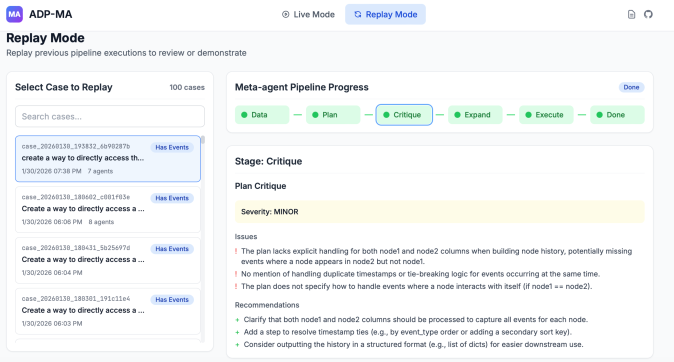
### Right Panel: Meta-agent Pipeline Progress
**Title**: `Meta-agent Pipeline Progress`
**Progress Stages** (color-coded):
1. `Data` (green circle)
2. `Plan` (green circle)
3. `Critique` (green circle with **blue border**, currently active)
4. `Expand` (green circle)
5. `Execute` (green circle)
6. `Done` (green circle)
**Stage Details**:
- **Stage**: `Critique`
- **Plan Critique**:
- **Severity**: `MINOR` (highlighted in yellow)
- **Issues**:
1. `The plan lacks explicit handling for both node1 and node2 columns when building node history, potentially missing events where a node appears in node2 but not node1.`
2. `No mention of handling duplicate timestamps or tie-breaking logic for events occurring at the same time.`
3. `The plan does not specify how to handle events where a node interacts with itself (if node1 == node2).`
- **Recommendations**:
1. `Clarify that both node1 and node2 columns should be processed to capture all events for each node.`
2. `Add a step to resolve timestamp ties (e.g., by event.type order or adding a secondary sort key).`
3. `Consider outputting the history in a structured format (e.g., list of dicts) for easier downstream use.`
---
## Notes
- **Language**: All text is in English.
- **Color Coding**:
- Progress stages use green circles with distinct labels.
- The "Critique" stage is highlighted with a blue border.
- **Spatial Grounding**:
- Header: Top-left (logo/title) and top-center (mode indicators).
- Left Panel: Case list with timestamps and descriptions.
- Right Panel: Pipeline progress stages and critique details.
- **No Charts/Graphs**: The image contains no numerical data or visual trends.