## Diagram: FLOD-3DGS Process Flow
### Overview
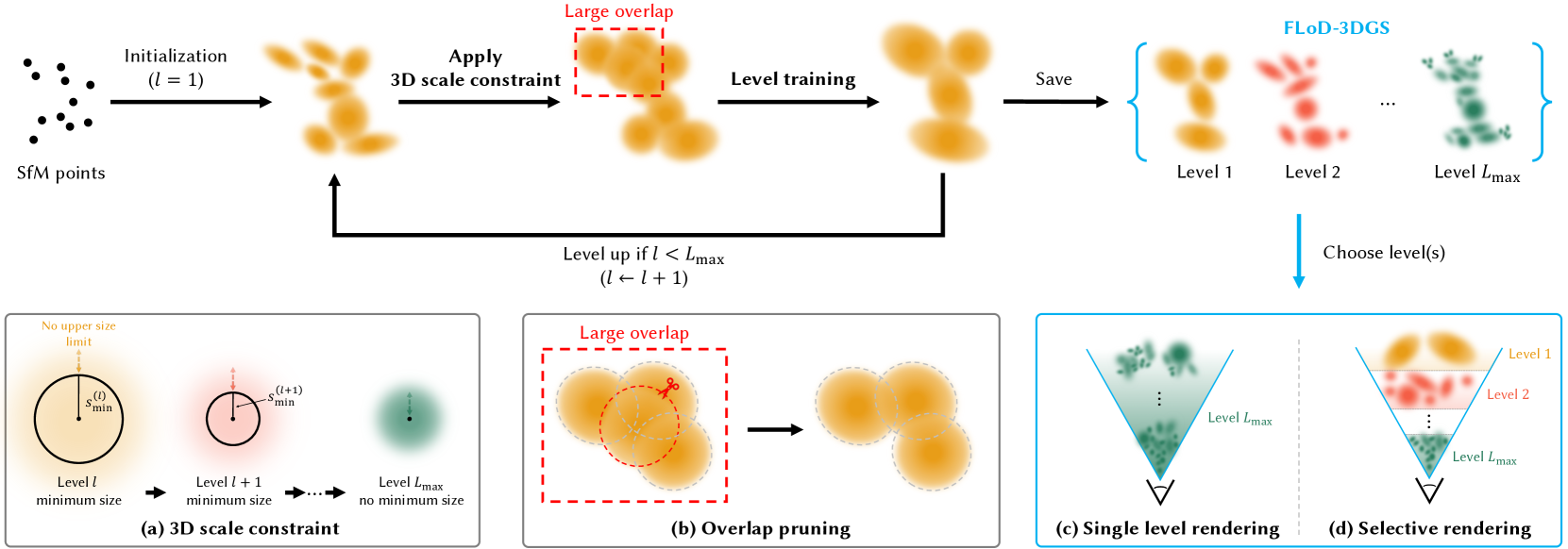
The image illustrates the process flow of FLOD-3DGS (Fast Level of Detail 3D Gaussian Splatting). It shows the steps involved in generating different levels of detail from SfM (Structure from Motion) points, including initialization, applying 3D scale constraints, level training, overlap pruning, and rendering options.
### Components/Axes
* **Title:** FLOD-3DGS (top-right)
* **Process Steps (Top Row):**
* SfM points -> Initialization (l=1) -> Apply 3D scale constraint -> Level training -> Save -> Level 1, Level 2, ..., Level Lmax -> Choose level(s)
* **Looping Mechanism:** A feedback loop connects the "Save" step back to the "Apply 3D scale constraint" step, with the condition "Level up if l < Lmax (l <- l + 1)".
* **(a) 3D scale constraint:** Shows the minimum size constraint at different levels (Level l, Level l+1, Level Lmax).
* Level l minimum size: Circle with radius s_min^(l), labeled "No upper size limit" with an arrow pointing upwards.
* Level l+1 minimum size: Circle with radius s_min^(l+1).
* Level Lmax no minimum size.
* **(b) Overlap pruning:** Illustrates the process of pruning overlapping Gaussians.
* **(c) Single level rendering:** Shows rendering using a single level of detail (Level Lmax).
* **(d) Selective rendering:** Shows rendering using multiple levels of detail (Level 1, Level 2, ..., Level Lmax).
### Detailed Analysis or ### Content Details
**Process Flow (Top Row):**
1. **SfM points:** Starts with a set of SfM points (black dots).
2. **Initialization (l=1):** Initializes the process with level l=1, resulting in a cluster of orange blurred shapes.
3. **Apply 3D scale constraint:** Applies a 3D scale constraint, resulting in a similar cluster of orange blurred shapes, with a "Large overlap" region highlighted by a red dashed box.
4. **Level training:** Trains the level, resulting in a slightly more refined cluster of orange blurred shapes.
5. **Save:** Saves the current level.
6. **Level 1, Level 2, ..., Level Lmax:** Represents the different levels of detail generated. Level 1 is orange, Level 2 is red, and Level Lmax is green.
7. **Choose level(s):** Selects the desired level(s) for rendering.
**Looping Mechanism:**
* The process loops back from "Save" to "Apply 3D scale constraint" if the current level `l` is less than the maximum level `Lmax`. The level is incremented by 1 (l <- l + 1).
**(a) 3D scale constraint:**
* Illustrates how the minimum size constraint changes with the level.
* Level l has a minimum size s_min^(l) and no upper size limit.
* Level l+1 has a minimum size s_min^(l+1).
* Level Lmax has no minimum size.
**(b) Overlap pruning:**
* Shows how overlapping Gaussians are pruned to reduce redundancy.
* A "Large overlap" region is highlighted by a red dashed box.
* Scissors icon indicates the pruning operation.
**(c) Single level rendering:**
* Renders the scene using a single level of detail (Level Lmax, green).
* The scene is represented as a cone, with the level of detail decreasing from top to bottom.
**(d) Selective rendering:**
* Renders the scene using multiple levels of detail (Level 1, Level 2, ..., Level Lmax).
* The scene is represented as a cone, with different levels of detail stacked on top of each other. Level 1 is orange, Level 2 is red, and Level Lmax is green.
### Key Observations
* The process generates multiple levels of detail, allowing for efficient rendering at different scales.
* The 3D scale constraint and overlap pruning steps help to reduce redundancy and improve the quality of the generated Gaussians.
* The single level rendering and selective rendering options provide flexibility in how the scene is rendered.
### Interpretation
The diagram illustrates the FLOD-3DGS process, which is a method for generating multi-resolution 3D Gaussian splatting representations. The process starts with SfM points and iteratively refines them by applying 3D scale constraints and pruning overlapping Gaussians. This results in a set of levels of detail, which can be used for efficient rendering. The selective rendering option allows for combining different levels of detail to achieve the desired balance between quality and performance. The diagram highlights the key steps and components of the process, providing a clear understanding of how FLOD-3DGS works.