## Diagram: Python Module Dependency Graph
### Overview
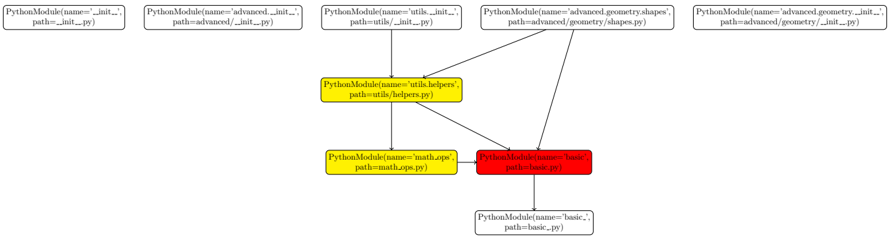
The image is a directed graph representing dependencies between Python modules. Each node represents a Python module, and the edges represent import relationships. The nodes are labeled with the module's name and file path. Node colors indicate module type or importance.
### Components/Axes
* **Nodes:** Represent Python modules. Each node is a rounded rectangle containing the module's name and path.
* Format: `PythonModule(name='module_name', path='module/path.py')`
* **Edges:** Represent dependencies (import relationships) between modules. Arrows indicate the direction of the dependency.
* **Node Colors:**
* White: Base modules or entry points.
* Yellow: Utility or helper modules.
* Red: Core or fundamental modules.
### Detailed Analysis
Here's a breakdown of each module and its dependencies:
1. **Top Row (Left to Right):**
* `PythonModule(name='__init__', path='__init__.py')` - White node, no incoming or outgoing edges.
* `PythonModule(name='advanced.__init__', path='advanced/__init__.py')` - White node, has one outgoing edge.
* `PythonModule(name='utils.__init__', path='utils/__init__.py')` - White node, has one outgoing edge.
* `PythonModule(name='advanced.geometry.shapes', path='advanced/geometry/shapes.py')` - White node, has one outgoing edge.
* `PythonModule(name='advanced.geometry.__init__', path='advanced/geometry/__init__.py')` - White node, no incoming or outgoing edges.
2. **Middle Row:**
* `PythonModule(name='utils.helpers', path='utils/helpers.py')` - Yellow node, has two outgoing edges and one incoming edge from `utils.__init__.py`.
* `PythonModule(name='math.ops', path='math.ops.py')` - Yellow node, has one outgoing edge and one incoming edge from `utils.helpers`.
* `PythonModule(name='basic', path='basic.py')` - Red node, has one outgoing edge and three incoming edges from `utils.helpers`, `math.ops`, and `advanced/geometry/shapes.py`.
3. **Bottom Row:**
* `PythonModule(name='basic', path='basic.py')` - White node, has one incoming edge from `basic.py`.
**Dependencies (Edges):**
* `advanced.__init__.py` -> `basic.py`
* `utils.__init__.py` -> `utils.helpers`
* `utils.helpers` -> `basic.py`
* `utils.helpers` -> `math.ops.py`
* `math.ops.py` -> `basic.py`
* `advanced.geometry.shapes` -> `basic.py`
* `basic.py` -> `basic.py`
### Key Observations
* The `basic.py` module (red node) is a central module, depending on several other modules.
* Utility modules (`utils.helpers`, `math.ops`) are colored yellow.
* The `__init__.py` modules and `advanced.geometry.shapes` appear to be entry points or initializers, as they have no incoming dependencies.
* The `basic.py` module at the bottom depends on the `basic.py` module in the middle row, suggesting a potential recursive or core dependency.
### Interpretation
The diagram illustrates the architecture and dependencies within a Python project. The red node (`basic.py`) likely represents a core module that provides fundamental functionalities, as it is depended upon by several other modules. The yellow nodes (`utils.helpers`, `math.ops`) are utility modules that provide helper functions or mathematical operations. The white nodes represent entry points, initializers, or modules with no dependencies. The graph highlights the flow of dependencies and the importance of the `basic.py` module in the overall project structure. The dependency of `basic.py` on itself suggests a fundamental or recursive relationship within the core logic.