## Dependency Diagram: Python Module Structure
### Overview
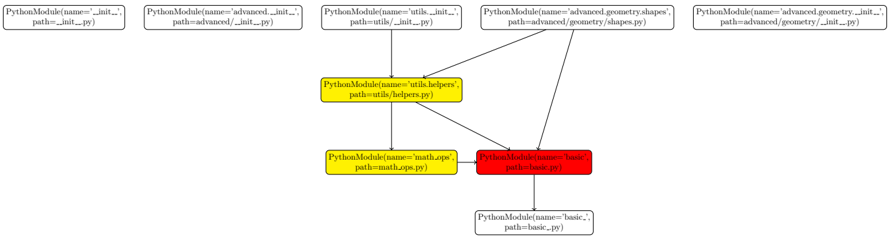
The diagram illustrates the hierarchical and interdependent structure of Python modules within a project. It visualizes module names, file paths, and dependencies through labeled nodes and directional arrows. Key modules include `basic`, `utils.helpers`, `math_ops`, and `advanced.geometry.shapes`, with dependencies flowing from higher-level modules to foundational ones.
### Components/Axes
- **Nodes**: Represent Python modules with labels containing:
- `name`: Module identifier (e.g., `PythonModule(name='basic')`).
- `path`: File system path (e.g., `path=basic.py`).
- **Arrows**: Indicate dependencies, pointing from dependent modules to their dependencies.
- **Colors**:
- **Yellow**: Highlighted modules (`utils.helpers`, `math_ops`).
- **Red**: Critical module (`basic`).
- **Legend**: Not explicitly visible in the diagram, but colors likely denote module criticality or role.
### Detailed Analysis
1. **Module Dependencies**:
- `utils.helpers` (path: `utils/helpers.py`) depends on `basic` (path: `basic.py`).
- `math_ops` (path: `math_ops.py`) depends on `basic`.
- `advanced.geometry.shapes` (path: `advanced/geometry/shapes.py`) depends on `utils.helpers`.
- `advanced.geometry.init` (path: `advanced/geometry/__init__.py`) and `advanced.init` (path: `advanced/__init__.py`) are top-level modules with no shown dependencies.
2. **Spatial Layout**:
- **Bottom**: `basic.py` (red) is centrally positioned, acting as a foundational dependency.
- **Middle**: `utils/helpers.py` (yellow) bridges `basic` and `math_ops`.
- **Top**: `advanced/geometry/shapes.py` (yellow) and `advanced/__init__.py` (white) are higher-level modules.
3. **Textual Labels**:
- All modules include `PythonModule(name='...', path='...')` syntax in their labels.
- Example: `PythonModule(name='utils.helpers', path=utils/helpers.py)`.
### Key Observations
- **Central Role of `basic`**: The red-highlighted `basic` module is a dependency for three other modules, suggesting it contains core functionality.
- **Modular Hierarchy**:
- `utils.helpers` and `math_ops` depend directly on `basic`.
- `advanced.geometry.shapes` depends indirectly on `basic` via `utils.helpers`.
- **Redundancy**: Two modules (`advanced.geometry.init` and `advanced.init`) share the same path structure but differ in naming, possibly indicating initialization logic.
### Interpretation
The diagram reflects a modular design pattern where:
- **`basic`** serves as the foundational layer, providing essential functions for other modules.
- **`utils.helpers`** acts as a utility layer, abstracting common operations used by both `basic` and `math_ops`.
- **`advanced`** modules build on these layers, demonstrating a top-down dependency flow. The use of colors (red for `basic`) emphasizes its criticality, while yellow highlights intermediate modules. The absence of a legend leaves the exact rationale for color choices ambiguous, but the spatial and dependency structure clearly prioritizes `basic` as the project’s core.